

xMatters AI
Use xMatters AI as the anchor for a real shortlist.
Instead of returning to a broad directory, jump straight into the strongest adjacent matchups for pricing, workflow fit, and differentiation.
Overview
Overview
xMatters AI is a comprehensive incident management platform designed for DevOps, site reliability engineers (SREs), and operations teams. It leverages artificial intelligence to automate on-call scheduling, alerting, and incident response workflows, helping organizations reduce downtime and improve service reliability. The platform integrates with existing monitoring and collaboration tools to provide a unified view of infrastructure health and incident resolution.
Key Features
- AI-Driven Incident Response: Automatically detects, prioritizes, and escalates incidents using machine learning models that learn from past incidents and user behavior.
- On-Call Scheduling: Simplifies on-call management with intelligent scheduling, shift handoffs, and escalation policies.
- Smart Alerting: Reduces alert fatigue by grouping related alerts, suppressing noise, and routing critical notifications to the right team members.
- Workflow Automation: Automates manual tasks such as running diagnostic scripts, creating Jira tickets, or sending Slack messages during incident resolution.
- Real-Time Collaboration: Provides built-in chat and collaboration tools for incident response teams, with integrations for popular platforms like Slack, Microsoft Teams, and Zoom.
- Analytics & Reporting: Offers dashboards and reports on incident trends, response times, and team performance to continuously improve operations.
- Multi-Cloud Monitoring: Integrates with AWS, Azure, GCP, and other cloud platforms to monitor infrastructure across hybrid environments.
Use Cases
DevOps Incident Management
DevOps teams use xMatters AI to accelerate incident detection and response. The platform automatically pages the right on-call engineer, provides contextual data from monitoring tools, and tracks resolution steps. This reduces mean time to resolution (MTTR) and improves overall system uptime.
Enterprise Service Reliability
SRE teams leverage xMatters AI to manage complex, multi-service architectures. The AI capabilities help identify root causes, predict potential failures, and automate remediation. This allows SREs to focus on proactive improvements rather than reactive firefighting.
IT Operations Automation
IT operations teams use the platform to streamline routine tasks such as password resets, server restarts, and software deployments. Workflow automation reduces human error and frees up staff for higher-value work.
Customer Support Escalations
Customer support teams can integrate xMatters AI with their ticketing system to automatically escalate critical customer issues to on-call engineers. This ensures fast response for high-priority incidents that impact customer experience.
Pricing & Plans
xMatters AI offers tiered pricing based on the number of users, integrations, and advanced features. A free tier is not available, but a trial period may be offered. For detailed pricing, organizations must contact sales for a custom quote.
Integrations & Compatibility
- Monitoring: Datadog, New Relic, Prometheus, Grafana, PagerDuty
- Collaboration: Slack, Microsoft Teams, Zoom, Webex
- ITSM: ServiceNow, Jira, Remedy, Freshservice
- Cloud Providers: AWS, Azure, GCP, VMware
- APIs: RESTful API for custom integrations
Who Is It For?
xMatters AI is built for DevOps engineers, SREs, IT operations managers, and platform engineers working in organizations that prioritize uptime and fast incident response. It is best suited for medium to large enterprises with complex infrastructure and on-call teams.
Limitations
- Dependency on Internet: The platform requires a stable internet connection; offline functionality is limited.
- Learning Curve: While the interface is intuitive, some advanced workflow automation features may require a learning investment.
- Pricing: Full capabilities require a paid subscription; there is no free tier for small teams.
- Integration Complexity: Setting up integrations with legacy or custom tools may require development effort.
Final Verdict
xMatters AI is a robust incident management platform that brings AI-driven automation to DevOps and SRE workflows. Its strengths lie in smart alerting, on-call scheduling, and deep integration with popular monitoring and collaboration tools. The main drawbacks are its reliance on a paid subscription and internet connectivity. For organizations looking to reduce downtime and streamline incident response, xMatters AI is a solid choice.
Tool Facts
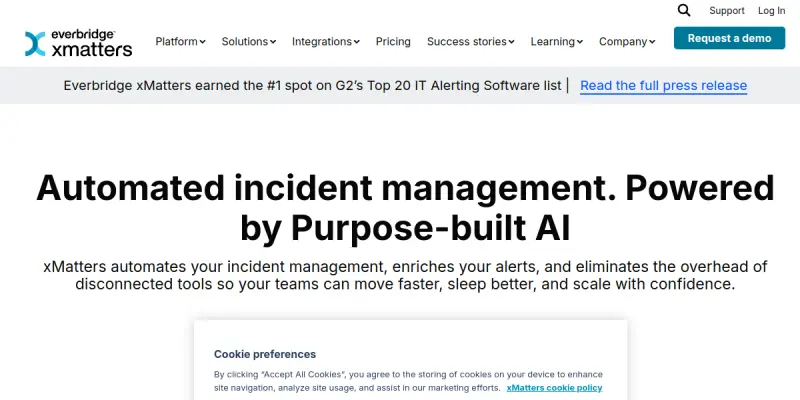
Screenshots & Interface
Pros
- ✓ AI-driven alerting reduces alert fatigue by grouping related incidents and suppressing noise.
- ✓ Intelligent on-call scheduling automates shift assignments and escalation policies.
- ✓ Deep integrations with monitoring tools like Datadog and Slack streamline workflows.
- ✓ Reduces mean time to resolution (MTTR) through automated incident response.
- ✓ Provides analytics dashboards to track team performance and incident trends.
Cons
- × Requires a stable internet connection; offline functionality is not available.
- × Full feature set is only accessible with a paid subscription, and no free tier is offered.
- × Setting up integrations with custom or legacy tools may require development effort.
- × Advanced workflow automation has a learning curve for new users.
How to Use xMatters AI in Your Workflow
Integrating xMatters AI into your professional toolkit enhances efficiency by automating manual steps. By configuring it to suit your specific project requirements, you can optimize output quality and reduce project cycle times. Standard workflows involve testing the tool on simple tasks before scaling its use to complex operations.
Frequently Asked Questions
What is xMatters AI used for?
xMatters AI is an incident management platform that helps DevOps, SREs, and ops teams automate workflows and ensure infrastructure availability. It uses AI to streamline on-call scheduling, alerting, and incident response. The platform is built for organizations that need to reduce downtime and deliver products at scale.
What is the pricing model for xMatters AI?
xMatters AI uses a Paid pricing model.
What are the main advantages of xMatters AI?
The key benefits of xMatters AI include: AI-driven alerting reduces alert fatigue by grouping related incidents and suppressing noise., Intelligent on-call scheduling automates shift assignments and escalation policies., Deep integrations with monitoring tools like Datadog and Slack streamline workflows., Reduces mean time to resolution (MTTR) through automated incident response., Provides analytics dashboards to track team performance and incident trends..
What are the main limitations of xMatters AI?
Some limitations or cons of xMatters AI are: Requires a stable internet connection; offline functionality is not available., Full feature set is only accessible with a paid subscription, and no free tier is offered., Setting up integrations with custom or legacy tools may require development effort., Advanced workflow automation has a learning curve for new users..
Alternative AI Tools

ArangoDB AI
ArangoDB AI is an AI-native graph database designed to manage context for intelligent applications, helping developers build better reasoning systems.

Perfecto AI
Perfecto.io automates mobile and web app testing using AI-driven quality assurance on a cloud device fleet. It integrates with CI/CD pipelines for continuous testing.

Cursor
Cursor Software AG provides a comprehensive CRM and BPM suite for customer relationship and business process management.
Rating Details
Based on 0 ratings
Quick Comparisons
Related Tools
More AI tools from the same workflow, industry, or category.
AICode
AICode is a spec-driven AI coding copilot for developers using Visual Studio Code. It enforces a disciplined workflow to prevent AI-generated technical debt and ensures maintainable code. Its key differentiator is forcing line-by-line human review before changes are applied.
Opik
Opik is an open-source platform for LLM observability and evaluation. It helps developers trace, test, and monitor AI applications and autonomous agents throughout development and production.
CodeReview AI
CodeReview AI is a tool that uses artificial intelligence to analyze code and suggest improvements. It helps developers identify bugs, security issues, and style inconsistencies automatically. The tool integrates with popular version control systems to fit into existing workflows.
Mendix AI
Mendix AI is an integrated assistant for the Mendix low-code platform that accelerates app development and debugging using generative AI.
Reviews
No reviews submitted yet. Be the first to share your experience.
Write a Review
Share Your Experience
Join the community to write reviews, submit ratings, and bookmark your favorite AI tools.