
AI Agent Harnesses Explained: The Missing Layer Between Models and Autonomous Work
The model provides the intelligence. The harness determines how that intelligence becomes useful, controlled, and repeatable.
An AI model can write code, summarize documents, analyze data, and reason through complex instructions. But give that same model access to a terminal, a browser, a database, or a business application, and a different engineering problem appears.
The model must know which tools are available, receive the right information, decide what to do next, handle tool responses, preserve progress, recover from errors, and recognize when the task is actually complete.
That surrounding system is commonly called an agent harness.
The term has become increasingly visible in agent engineering because teams are learning that model capability alone does not determine whether an agent can finish real work. The architecture around the model matters just as much.
This article explains what an agent harness is, how its components work together, how it differs from frameworks and execution environments, and what developers should consider when building one.
1. What is an AI agent harness?
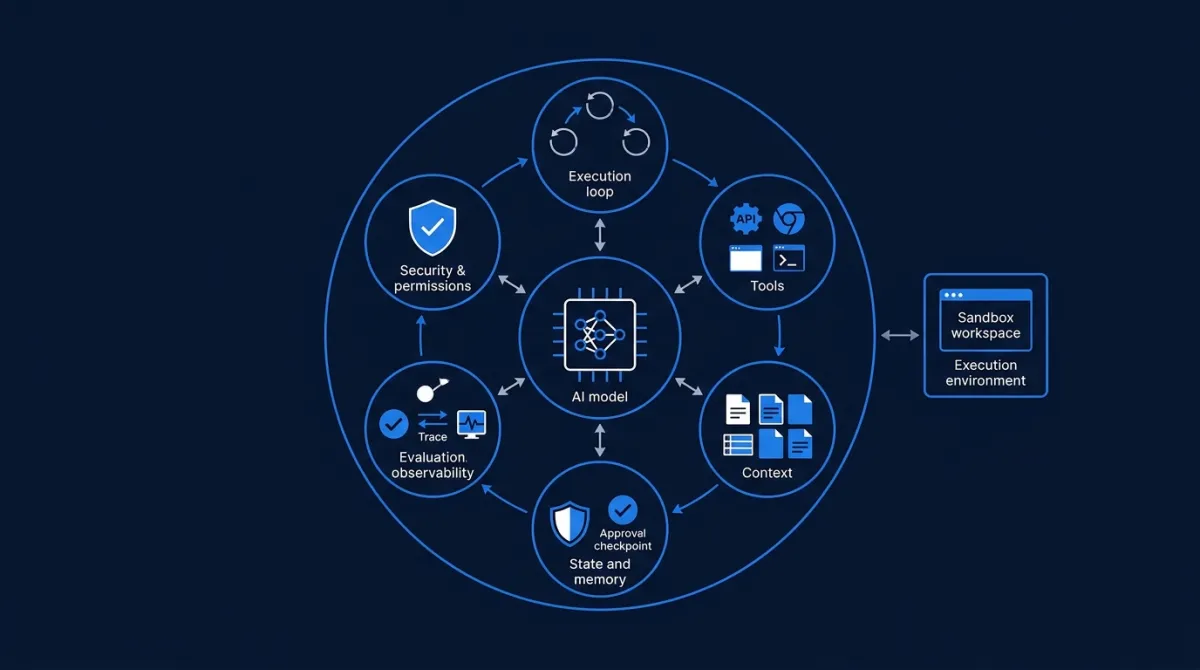
An agent harness is the runtime software that coordinates an AI agent's work. It connects a language model to tools and context, manages the execution loop, tracks session state, applies permissions, and determines how the agent continues or stops.
A useful mental model is:
AI agent = model + harness + execution environment
These are related but distinct responsibilities:
- Model: interprets instructions, reasons about the task, and decides what action to request.
- Harness: prepares context, exposes tools, coordinates model and tool calls, manages state, and enforces runtime policies.
- Execution environment: provides the place where actions happen, such as a local machine, remote server, browser, container, or sandbox.
The boundaries vary between products. Some platforms package the harness and execution environment together; others separate them.
Microsoft's Agent Framework documentation describes a harness as runtime scaffolding that drives model and tool calls, manages conversation state and context, applies approval policies, and supports multi-step work. VS Code's documentation makes a similar distinction between the harness, the model, the agent role, and the execution environment.
The important point is that a model call by itself is not a complete agent system. The harness supplies the operational structure around it.
2. How an agent harness works
Consider a coding agent asked to fix a bug in a web application.
A basic chatbot might explain how to fix the bug. An agent needs to inspect the repository, identify the relevant files, modify code, run tests, interpret errors, and verify the result.
A harness coordinates that process.
A simplified execution loop looks like this:
User task
   |
   v
Harness receives task and session state
   |
   v
Build model context
(instructions, relevant files, available tools)
   |
   v
Model decides what to do
   |
   +------> Final response
   |
   v
Harness checks permissions
   |
   v
Execute requested tool
   |
   v
Capture tool result
   |
   v
Update context and state
   |
   v
Return result to model
   |
   v
Continue, recover, or stop
The loop repeats until the agent reaches a completion condition, encounters a blocker, or needs human input.
This is fundamentally different from a single request-response interaction. The harness must coordinate a sequence of actions while preserving enough information for the model to make the next decision.
Step 1: Receive the task and prepare context
The harness receives the user's request and assembles the information needed for the next model call.
That may include:
- System instructions and task-specific rules.
- Conversation history or a compacted summary.
- Relevant files, database records, or retrieved documents.
- Available tools and their descriptions.
- Current task progress and constraints.
Context selection is an engineering responsibility, not simply a matter of increasing the model's context window.
Providing too little information can cause incorrect decisions. Providing too much can increase latency and cost, obscure important details, and make it harder to identify the relevant information.
A useful harness retrieves context according to the task rather than sending the entire available history on every iteration.
Step 2: Let the model request an action
The model receives the prepared context and returns either a response or a structured request to use a tool.
For example, a coding agent might request:
{
  "tool": "run_tests",
  "arguments": {
    "suite": "authentication"
  }
}
The model does not necessarily execute this operation itself. It requests an action, and the harness decides how that request should be handled.
Step 3: Validate and execute the action
Before executing a tool call, the harness can check:
- Is this tool available to the current agent?
- Are the arguments valid?
- Does the action require user approval?
- Does the agent have permission to access the requested resource?
- Is the operation allowed in the current execution environment?
If the request passes the relevant checks, the harness dispatches it to the appropriate tool.
This separation is important. A model-generated request should not automatically become an unrestricted system action.
Step 4: Return results and update state
The harness captures the tool result and makes it available to the model.
If the test command returns an error, the model can inspect the output and request another action. If the tests pass, it may inspect the changes or prepare a final report.
The harness also needs to track what has happened so far. Otherwise, a long-running task could lose its progress when the context becomes too large or a session is interrupted.
Step 5: Verify completion
A successful final message is not necessarily proof that the task succeeded.
A coding agent can claim that a bug is fixed while the application still fails its tests. A research agent can report that it found a document without actually retrieving the required information.
The harness should therefore use task-specific completion checks:
- Did the tests pass?
- Was the expected file created?
- Did the database operation succeed?
- Was the requested record actually updated?
- Did the agent satisfy the user's constraints?
The final response should reflect the verified outcome, not simply the model's confidence.
3. The seven building blocks of a practical harness
There is no universal standard that requires every harness to contain exactly seven components. The following is a practical engineering breakdown of the responsibilities commonly found in modern agent runtimes.
3.1. The execution loop
The execution loop coordinates the interaction between the model and external tools.
It determines:
- When to call the model.
- When to execute a tool.
- How to return tool results.
- Whether to continue or stop.
- How to handle retries and failures.
- When to request human intervention.
Without this loop, the application is primarily making individual model calls rather than operating a multi-step agent.
The loop also needs explicit limits. For example, developers can impose a maximum number of iterations, execution time, tool calls, or token budget. These limits prevent an agent from continuing indefinitely.
3.2. Tool registry and interfaces
Tools give agents the ability to interact with external systems.
Examples include:
- File reading and writing.
- Shell and terminal commands.
- Browser navigation.
- Database queries.
- Internal APIs.
- Email and calendar operations.
- MCP-connected services.
The harness manages the tools available to the model and routes requested operations to their implementations.
Tool design matters. A poorly described tool can lead to incorrect selection or arguments. A tool with excessive permissions can create unnecessary risk.
A good tool interface should have:
- A clear name and description.
- A structured input schema.
- Predictable output.
- Explicit error behavior.
- Permissions limited to the operation it needs.
For example, an agent that needs to inspect sales data should not automatically receive permission to modify customer records.
MCP can help standardize how applications expose tools and resources to AI systems. However, MCP is a connectivity protocol, not a complete harness: the agent still needs a runtime to decide when and how to use those capabilities.
3.3. Context management
Context management determines what the model sees at each stage of the task.
It can combine:
- Instructions.
- Relevant conversation history.
- Retrieved knowledge.
- Tool descriptions.
- Previous tool results.
- Current task status.
- Intermediate findings.
The challenge is maintaining relevance across long tasks.
Suppose a research agent must compare 30 products. It may not be useful to keep every page and every intermediate response in the active context. The harness can preserve structured findings, retrieve relevant records when needed, and summarize completed stages.
Context management is not the same as memory.
Context is the information made available to the model for a particular step. Memory is information retained for later use, potentially across sessions or tasks. A harness may use both, but they solve different problems.
3.4. State and persistence
A long-running agent needs to know where it is in a task.
Imagine an agent processing 500 invoices. If execution stops after invoice 240, the system should not need to start from zero.
State management can preserve:
- Task status.
- Completed and pending operations.
- Intermediate results.
- Tool outputs.
- Identifiers and references.
- Retry information.
- Human decisions.
Persistence allows the system to recover from interruptions and continue work.
This is particularly important for agents that perform expensive operations, interact with external systems, or execute tasks over several minutes or hours.
3.5. Execution environment and sandboxing
The execution environment is where the agent's actions take place.
Depending on the application, this could be:
- The user's local machine.
- A remote virtual machine.
- A Docker container.
- A cloud-hosted sandbox.
- A browser session.
- A controlled enterprise environment.
A sandbox isolates execution from sensitive resources and limits the impact of mistakes.
For example, a coding agent may need to install dependencies, edit files, and run commands. Giving it unrestricted access to the developer's entire machine is usually unnecessary. A dedicated workspace with limited permissions is a safer design.
The environment also affects reproducibility. A consistent container or remote workspace makes it easier to reproduce failures and validate results.
3.6. Permissions, approvals, and lifecycle controls
Autonomy does not mean unrestricted authority.
The harness should define what an agent can do independently and which operations require approval.
A practical permission model might look like this:
| Action | Example policy |
|---|---|
| Read project files | Allowed |
| Search documentation | Allowed |
| Run tests | Allowed |
| Modify files in a workspace | Allowed |
| Install a new system package | Restricted |
| Delete production data | Human approval |
| Send an external payment | Human approval |
| Publish a public announcement | Human approval |
These rules should be enforced by the runtime or the systems executing the action, not merely written in a prompt.
Lifecycle controls also include cancellation, timeouts, retries, escalation, and safe shutdown. An agent should be able to stop when it reaches a limit or encounters a situation outside its authority.
3.7. Observability and evaluation
A production harness needs to make agent behavior inspectable.
Observability records what happened during execution:
- Model requests and responses.
- Tool calls and results.
- Execution duration.
- Errors and retries.
- Token usage and cost.
- Approval events.
- Final task outcomes.
Evaluation measures whether the agent actually performs well.
For example, a coding agent can be tested against a collection of bug-fixing tasks. The evaluation can check whether the code compiles, whether tests pass, and whether the implementation respects the requested constraints.
Anthropic's guidance on agent evaluations highlights an important distinction: the final response is not always the real outcome. An agent may claim to have completed a booking, for example, while the underlying reservation record does not exist. Evaluation should inspect the actual state of the environment wherever possible.
Tracing and evaluation are complementary. Traces help explain what happened; evaluations help determine whether the behavior met the expected standard.
4. Agent harness vs framework vs orchestration vs sandbox
These terms are often used together, but they are not interchangeable.
| Concept | Main responsibility | Example |
|---|---|---|
| Agent harness | Runs and controls the agent loop | Tool execution, context, state, approvals |
| Agent framework | Provides abstractions and components to build agents | Agent definitions, tools, workflows, integrations |
| Orchestration | Coordinates multiple agents or workflow steps | Handoffs, parallel tasks, sequential execution |
| Execution environment | Provides the place where actions run | Container, browser, local machine |
| Sandbox | Isolates and restricts execution | Restricted filesystem and network access |
| Model | Provides language understanding and reasoning | GPT, Claude, Gemini |
The distinction is architectural rather than a strict product boundary. A framework may include a ready-made harness. An orchestration framework may provide part of the execution loop. A managed agent platform may bundle the model, harness, and environment.
The useful question is not what a vendor calls its product. It is which responsibilities the product actually handles.
Where does orchestration fit?
A harness can operate a single agent. Orchestration becomes important when a task requires several agents or coordinated workflow steps.
For example, a research workflow could involve:
- A research agent collecting information.
- A verification agent checking sources.
- An analysis agent comparing findings.
- A reporting agent preparing the final document.
The harness runs each agent's execution loop. The orchestration layer determines how work is divided, how agents communicate, and how results move between them.
This is why multi-agent orchestration and agent harness engineering are related but different subjects.
5. Harness engineering in practice: why the surrounding system matters
The growing attention around harness engineering is partly driven by teams building agents that work on real software projects.
In February 2026, OpenAI published an engineering account of building an internal product with Codex. The team described how its work shifted toward designing environments, specifying intent, improving repository structure, and building feedback loops that allowed agents to complete engineering tasks.
One lesson was that early progress was limited not simply by model capability, but by an environment that did not provide enough structure and usable context. The team responded by making repository knowledge more accessible, enforcing architectural constraints, and improving the agent's ability to review and test its own work.
This illustrates a broader principle:
When an agent repeatedly fails, the solution may be to improve the system around the model rather than simply rewrite the prompt.
Consider three examples:
| Agent failure | Weak response | Harness-level improvement |
|---|---|---|
| Agent edits the wrong files | Repeat the instruction | Provide repository structure and relevant file context |
| Agent repeats a failed command | Ask it to try again | Capture errors, limit retries, and add recovery logic |
| Agent reports an incomplete task as finished | Ask for more confidence | Add objective completion checks and evaluation |
The harness becomes a place to encode lessons from previous failures. A recurring mistake can lead to a better tool, a clearer permission boundary, a new validation rule, or an additional test.
This is the practical meaning of harness engineering: improving the environment and control system in which the model operates.
6. Build your own harness or use an existing one?
There is no single correct choice. The right approach depends on how much control the application needs and how much infrastructure the team wants to maintain.
Use an existing harness when:
- The task fits a supported agent runtime.
- You need standard tool calling and session management.
- You want built-in tracing, approvals, or persistence.
- Your team wants to focus on application behavior rather than runtime infrastructure.
Build or customize a harness when:
- The workflow has unusual execution requirements.
- You need precise control over permissions and tool routing.
- Tasks must survive long interruptions.
- You need specialized state management or recovery logic.
- You have strict cost, latency, compliance, or deployment constraints.
A custom harness is not automatically better. Building one means owning the execution loop, error handling, state, security, observability, and evaluation. Those responsibilities create ongoing maintenance work.
A sensible starting point is to use an established runtime and customize only the parts that are genuinely specific to the application.
7. A practical checklist for designing a production harness
Before deploying an agent, work through the following questions.
Execution
- Is there a clear agent loop?
- Are there limits on iterations, time, and tool calls?
- Can the agent stop safely?
Tools
- Are tools clearly described?
- Are inputs validated?
- Does each tool have only the permissions it needs?
- Are failures returned in a useful and predictable format?
Context and state
- Does the model receive relevant context?
- Is there a strategy for handling long conversations?
- Can the system preserve progress and resume interrupted tasks?
Security
- Are sensitive actions subject to approval?
- Is execution isolated where necessary?
- Are credentials protected?
- Are external inputs treated as potentially untrusted?
Verification
- Is completion checked against objective criteria?
- Are important tool calls and state changes recorded?
- Are representative tasks covered by repeatable evaluations?
Operations
- Can developers inspect traces?
- Are cost and latency measured?
- Are retries bounded?
- Can the agent be cancelled or recovered?
A system that cannot answer these questions may work in a demonstration but remain difficult to operate reliably at scale.
8. What agent harnesses mean for the future of AI development
As models become more capable, the engineering challenge increasingly shifts toward giving them the right environment and controlling how they interact with it.
This does not mean the model becomes unimportant. Model quality still affects reasoning, tool selection, and the ability to handle ambiguous tasks. But the harness determines whether those capabilities can be applied consistently within a real workflow.
It also changes how teams evaluate improvements. A better model may improve results, but a better context strategy, tool interface, recovery mechanism, or verification step can also produce meaningful gains.
The next generation of agent systems will not be defined only by which model they use. They will also be defined by the quality of their execution loops, context management, state persistence, permissions, and feedback systems.
The model is the reasoning component. The harness turns its decisions into controlled operations.
That is the missing layer between a model that can answer a question and an agent that can complete a task.
Sources and further reading
- OpenAI — Harness engineering: leveraging Codex in an agent-first world — An engineering account of designing environments and feedback loops for coding agents.
- OpenAI — Agents API architecture — Explains the separation between harness, execution environment, and application server.
- Microsoft Learn — Agent Harness — Describes harness architecture, context providers, middleware, approvals, and runtime capabilities.
- Visual Studio Code — Understand agent harnesses — Distinguishes harnesses, models, agent roles, session targets, and execution environments.
- Anthropic — Demystifying evals for AI agents — Explains agent evaluation, task outcomes, traces, and evaluation infrastructure.
- LangChain — The Anatomy of an Agent Harness — A practical breakdown of harness responsibilities.
- Google Developers Blog — The Anatomy of Harness Engineering — Discusses behavioral evaluations and iterative improvement of coding-agent harnesses.