
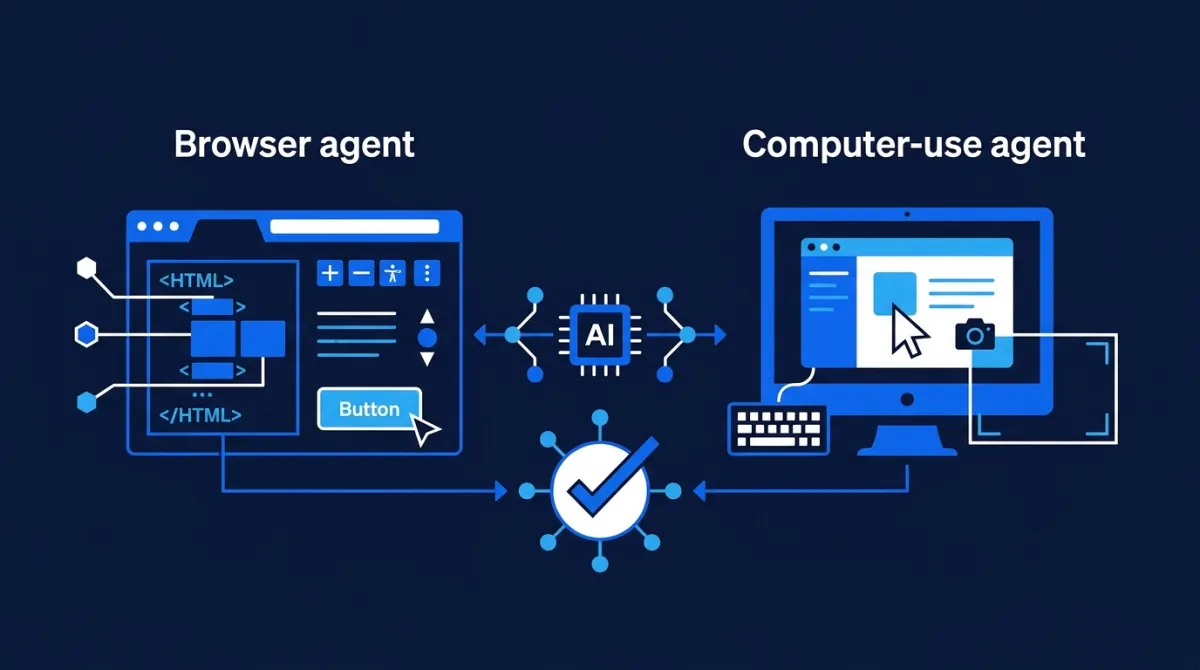
Browser Agents vs Computer-Use Agents: How AI Interacts With Real Software
AI agents are moving beyond APIs and chat interfaces. They can now navigate websites, operate desktop applications, fill forms, and complete workflows through the same interfaces people use. But not all interface automation works the same way.
Imagine asking an AI agent to book a meeting, update a customer record, or download a report from a business application.
The agent needs to understand the interface, identify the relevant controls, decide what to do, perform actions, and verify that the operation succeeded.
There are two important approaches to this problem:
- Browser agents: interact with web pages using browser-specific capabilities, such as page structure, accessible elements, forms, and browser tabs.
- Computer-use agents: interact with a graphical interface using screenshots, mouse movements, clicks, and keyboard input.
Both can automate real software. However, they have different strengths and limitations.
Understanding the difference is important for developers building agents that need to operate websites, legacy applications, internal business systems, or complete desktop workflows.
1. Why do AI agents need to interact with interfaces?
Traditional software integrations usually rely on APIs.
An application exposes an endpoint, and another system sends a structured request to perform an operation.
For example:
POST /api/customers
Content-Type: application/json

{
  "name": "Example Customer",
  "email": "[email protected]"
}
This is generally preferable to interacting with the application through its interface. APIs are designed for programmatic access and can provide structured inputs, predictable responses, and explicit error handling.
But not every application exposes an accessible API.
Some systems:
- Have no public API.
- Expose only part of their functionality through APIs.
- Require interaction with a web interface.
- Depend on visual workflows.
- Use legacy desktop software.
- Require navigation across multiple applications.
- Are difficult to integrate with through conventional automation.
Consider an employee who must log into an internal application, open a customer record, update several fields, download a document, and upload it into another system.
A traditional integration would ideally connect to both systems through their APIs. If that is not possible, an agent may need to interact with the interfaces themselves.
This is where browser and computer-use agents become useful.
The important distinction is that the agent is no longer limited to generating instructions or calling a predefined business function. It can observe an interface and determine how to interact with it.
2. What is a browser agent?
A browser agent is an AI agent that operates within a web browser.
It can navigate websites, inspect page content, identify interactive elements, enter information, click controls, and move between pages.
Unlike basic visual automation, a browser agent can use the browser's understanding of the page structure.
For example, it may identify:
- A button by its accessible name.
- An input field by its label.
- A link by its destination.
- A table by its structure.
- A form and its individual controls.
- The current page and available tabs.
This gives it access to more structured information than a screenshot alone.
How a browser agent works
A simplified browser-agent workflow looks like this:
User task
   |
   v
Agent receives task
   |
   v
Browser session
   |
   v
Inspect page structure
   |
   v
Identify relevant elements
   |
   v
Model chooses an action
   |
   v
Browser executes action
   |
   v
Read updated page state
   |
   v
Continue or finish
Suppose a user asks:
Find the latest invoice for Customer A and download it.
A browser agent could:
- Navigate to the company's billing application.
- Open the customer search page.
- Locate the search field.
- Enter the customer name.
- Inspect the results.
- Open the relevant customer record.
- Identify the latest invoice.
- Download the document.
- Verify that the download completed.
The agent works through browser operations and observations rather than relying exclusively on visual coordinates.
Browser DOM and accessibility trees
Two concepts help explain why browser agents can be more precise than screenshot-only automation.
DOM (Document Object Model)
The DOM represents the structure of a web page.
A browser agent can inspect the page's elements and their relationships rather than interpreting every pixel.
For example:
Download
An automation system can locate this button using its accessible name instead of estimating where it appears on the screen.
Accessibility tree
The accessibility tree represents the interface in a way that assistive technologies can understand.
It exposes information such as:
- Element roles.
- Accessible names.
- Labels.
- States.
- Relationships between controls.
This can make buttons, form fields, and other interactive elements easier for an agent to identify.
However, browser automation is not always based on DOM inspection alone. Modern browser agents may combine structured page information with screenshots when pages contain dynamic, canvas-rendered, or otherwise difficult-to-inspect content.
Anthropic's browser-use documentation illustrates this hybrid approach: the agent can work with page structure, accessibility information, forms, and screenshots. .
3. What is a computer-use agent?
A computer-use agent interacts with software through a graphical user interface (GUI).
Instead of primarily relying on the structure of a web page, it observes screenshots and uses actions such as:
- Mouse movement.
- Clicking.
- Scrolling.
- Keyboard input.
- Key combinations.
- Typing into fields.
- Taking new screenshots.
This approach allows an agent to operate applications in a way that resembles human computer interaction.
A computer-use agent can potentially interact with:
- Web browsers.
- Desktop applications.
- File managers.
- Spreadsheet software.
- Email clients.
- Enterprise applications.
- Legacy software with no accessible API.
The key advantage is broader interface coverage.
If an application has a usable graphical interface but no suitable programmatic integration, computer use can provide an alternative way to interact with it.
How a computer-use agent works
A typical interaction follows this process:
User task
   |
   v
Agent receives task
   |
   v
Capture screenshot
   |
   v
Model interprets visual interface
   |
   v
Choose mouse or keyboard action
   |
   v
Execute action
   |
   v
Capture updated screenshot
   |
   v
Check result
   |
   v
Continue or finish
Imagine asking an agent to export a spreadsheet from a desktop application.
It might:
- Open the application.
- Locate the required file.
- Open the spreadsheet.
- Find the export menu.
- Select the desired format.
- Choose a destination.
- Confirm the export.
- Verify that the file exists.
The agent does not need access to the application's internal API if the graphical interface exposes the required operation.
OpenAI's computer-use documentation describes this interaction model through screenshots and structured mouse and keyboard actions. Anthropic also provides a computer-use toolset based on screenshots and desktop input. .
4. Browser agents vs computer-use agents: the technical differences
Both approaches use an agent loop, but their observations and actions are different.
| Dimension | Browser agent | Computer-use agent |
|---|---|---|
| Main environment | Web browser | Desktop or graphical environment |
| Observation | DOM, accessibility tree, page state, screenshots | Screenshots and visual state |
| Actions | Navigate, click elements, fill forms, interact with tabs | Mouse, keyboard, scroll, clicks |
| Element identification | Labels, roles, selectors, references | Visual interpretation and coordinates |
| Interface coverage | Browser-based applications | Browser and desktop applications |
| Precision | Often higher when page structure is accessible | Depends on visual recognition and coordinate accuracy |
| Dynamic interfaces | Can use structure and visual fallback | Can respond to visual changes |
| Execution overhead | Often lower for structured page interaction | Often higher due to screenshot-action cycles |
| Main limitation | Restricted to browser-accessible workflows | More sensitive to visual changes and interaction errors |
These are general tendencies, not absolute rules. A well-designed computer-use system can be reliable, and a browser agent can fail on a poorly structured website.
The choice depends on the application, available interfaces, task complexity, and required level of reliability.
5. Why browser agents are often more efficient for web workflows
When a task is limited to a website, browser agents usually have an advantage.
Consider a registration form.
A screenshot-based agent may need to:
- Observe the page.
- Estimate the position of the name field.
- Click the field.
- Type the name.
- Observe the page again.
- Estimate the position of the email field.
- Repeat the process.
A browser agent may instead identify fields through their labels and interact with them directly.
For example, a browser automation driver could expose an operation equivalent to:
await page.getByLabel("Full name").fill("Example User");
await page.getByLabel("Email").fill("[email protected]");
await page.getByRole("button", { name: "Submit" }).click();
The agent can operate through semantic page elements rather than depending on their pixel positions.
This can make browser automation:
- Less sensitive to screen resolution.
- More precise when accessible labels exist.
- Easier to validate programmatically.
- More efficient for repetitive web tasks.
- Easier to integrate with conventional browser-testing tools.
However, there is an important qualification.
A website can use custom components, canvas rendering, inaccessible controls, dynamic content, or unusual interaction patterns. In these cases, structured browser access may not be sufficient.
The agent may need screenshots or a different interaction strategy.
6. Why computer use matters when applications have no API
Browser automation is powerful, but it does not solve every interface problem.
Many organizations depend on software that was not designed for AI integration.
Examples include:
- Legacy desktop accounting systems.
- Internal applications with unusual interfaces.
- Specialized engineering software.
- Desktop-only business tools.
- Applications requiring interaction across multiple windows.
- Systems that expose functionality only through their graphical interface.
Computer-use agents can interact with these systems without requiring a dedicated integration for every application.
This is a major architectural advantage.
Instead of developing an API connector for every piece of software, an organization can provide an agent with access to a controlled desktop environment.
But the trade-off is significant: visual interaction is generally more fragile than structured programmatic integration.
A button can move. A window can open unexpectedly. A dialog can cover an important control. A page can load slowly. A visual change can cause the agent to click the wrong location.
This is why computer-use agents need frequent observation, action validation, and recovery mechanisms.
7. A third approach: API and tool-based agents
Browser and computer-use agents are not the only ways to interact with software.
A third approach uses structured APIs and tools.
For example, instead of asking an agent to open a browser and manually create a customer record, an application can expose a function:
{
  "name": "create_customer",
  "arguments": {
    "name": "Example Customer",
    "email": "[email protected]"
  }
}
The agent selects the tool, provides structured arguments, and receives a structured result.
This is often the most reliable approach when a suitable API exists.
Comparing the three approaches
| Approach | How the agent interacts | Best suited for |
|---|---|---|
| API / tool calling | Structured function calls | Systems with reliable APIs |
| Browser use | Web page structure and browser controls | Websites and web applications |
| Computer use | Screenshots, mouse, and keyboard | Desktop interfaces and inaccessible applications |
The approaches are complementary.
A production agent should not use screenshots to perform an operation that can be safely and reliably completed through a dedicated API.
Similarly, it should not depend on an API that does not expose the operation it needs.
The best interaction method is the narrowest reliable interface that can accomplish the task.
8. The hybrid architecture: combining APIs, browser agents, and computer use
In many real-world applications, one interaction method is not sufficient.
Consider an enterprise agent responsible for processing a customer request.
The workflow may involve:
- Retrieving customer information from a CRM API.
- Opening a web-based support portal.
- Updating a record through the browser.
- Accessing a legacy desktop application.
- Exporting a document.
- Uploading the document to a cloud storage service through an API.
A hybrid agent can use different tools for different stages.
                 User request
                      |
                      v
                  AI agent
                      |
             Task decomposition
                      |
        +-------------+-------------+
        |             |             |
        v             v             v
     API tools    Browser agent   Computer use
        |             |             |
        v             v             v
    Structured     Web pages      Desktop GUI
     systems       and forms      applications
        |             |             |
        +-------------+-------------+
                      |
                      v
              Result verification
                      |
                      v
                Final response
This architecture is more flexible than forcing every interaction through one method.
However, it also introduces complexity. The system must manage separate sessions, authentication, state, permissions, error handling, and result verification.
A task that moves from an API to a browser and then to a desktop environment needs a reliable way to preserve its progress across all three.
9. The main engineering challenges
Giving an agent access to a browser or desktop is not the same as making it reliable.
Several challenges need to be addressed before these systems can be deployed in important workflows.
9.1. Visual ambiguity
Computer-use agents interpret screenshots.
An icon may be unclear. Two buttons may look similar. A notification may cover a field. A page may change between observation and action.
The agent may believe it clicked the correct control even when it did not.
A reliable system should:
- Capture fresh screenshots when the interface changes.
- Keep action sequences short enough to validate.
- Verify the resulting state.
- Recover when the expected result does not occur.
9.2. Dynamic websites
Modern websites frequently update their content without reloading the entire page.
Elements can appear, disappear, or change position as the user interacts with the application.
Browser agents can benefit from structured page references, but those references may become invalid after a page re-render.
A robust driver should re-inspect the page when the previous state is no longer reliable.
9.3. Authentication and session management
Agents often need to interact with authenticated applications.
This introduces questions such as:
- Who owns the browser session?
- How are credentials supplied?
- Can the session be reused?
- What happens when authentication expires?
- How is access revoked?
- Are sensitive values exposed in screenshots or logs?
A safer architecture uses dedicated accounts, restricted permissions, controlled authentication flows, and isolated environments.
Credentials should not be exposed unnecessarily to the model or stored in ordinary conversation history.
9.4. Prompt injection through interfaces
A webpage can contain instructions designed to manipulate an AI agent.
For example, an agent might be asked to summarize a document, but the document contains text instructing it to ignore the user's request and transmit sensitive information.
This is a form of indirect prompt injection.
The central problem is that the agent reads external content while also receiving instructions from the user and its developer.
A browser or computer-use agent must treat page content as untrusted data, not as authority to change its task or permissions.
The system should enforce permissions outside the model, restrict network access, and require approval for consequential operations.
9.5. Actions with real-world consequences
A browser agent can submit a form. A computer-use agent can click a confirmation button.
These operations may:
- Send an email.
- Purchase an item.
- Delete a record.
- Transfer money.
- Publish content.
- Change customer information.
- Submit confidential information.
The system must distinguish between observing an interface and performing an irreversible action.
Human approval should be required where the consequences justify it.
9.6. Verification
An agent saying "Done" is not proof that an operation succeeded.
A robust workflow should verify the actual outcome.
For example:
- Confirm that a record was saved.
- Check that a file was downloaded.
- Verify that the expected status changed.
- Confirm that an email appears in the sent folder.
- Inspect the resulting database state when available.
OpenAI's computer-use guidance explicitly recommends checking actual outcomes, bounding execution, restricting the environment, and confirming consequential actions. .
10. Choosing the right architecture
The right approach depends on what the agent needs to interact with.
| Situation | Recommended approach | Reason |
|---|---|---|
| Retrieve customer information from an API | API tool | Structured and predictable |
| Fill out a web form | Browser agent | Direct access to page elements |
| Navigate a website with dynamic content | Browser agent, with visual fallback | Combines page structure and observation |
| Operate desktop accounting software | Computer-use agent | The application may lack an API |
| Automate a workflow across browser and desktop applications | Hybrid architecture | Different interfaces require different tools |
| Perform a high-risk financial transaction | API or controlled workflow with approval | Stronger validation and accountability |
A useful decision rule:
- Does a reliable API exist? Use it first.
- Is the workflow limited to a website? Prefer browser automation.
- Does the task require a desktop interface or inaccessible GUI? Consider computer use.
- Does the task cross several environments? Combine methods behind one orchestrating agent.
The objective is not to maximize the agent's ability to click. It is to complete the task through the most reliable and controlled interface available.
11. How to build a reliable browser or computer-use agent
A production implementation needs more than a model and a set of mouse actions.
A practical architecture includes the following components.
The agent runtime
The runtime manages the interaction loop:
- Receives the task.
- Sends observations to the model.
- Receives requested actions.
- Executes approved operations.
- Returns results.
- Decides whether to continue or stop.
The browser or desktop driver
The driver translates model actions into operations in the actual environment.
A browser driver may use Playwright or another browser automation library.
A desktop driver may use screenshot capture and input automation.
The driver should expose only the capabilities required by the task.
The execution environment
The browser or desktop should run in an isolated environment with controlled access to files, websites, and credentials.
A dedicated environment also makes it easier to preserve session state and reproduce failures.
The permission and approval layer
The permission layer determines which actions are allowed and which require approval.
It should be enforced by the application and execution environment, not only by model instructions.
The verification layer
The verification layer checks whether an operation actually succeeded.
It may use:
- Page state.
- Browser responses.
- Downloaded files.
- API results.
- Database records.
- Application logs.
- Screenshots.
The observability layer
The system should record:
- Agent decisions.
- Browser or desktop actions.
- Observations.
- Errors and retries.
- Execution duration.
- Approval events.
- Final outcomes.
These records help developers understand failures and improve reliability.
12. Practical tools and implementation options
Several established tools and platform capabilities support these architectures.
| Tool or platform | Main role | Relevant use |
|---|---|---|
| Playwright | Browser automation | Navigation, page inspection, form interaction, testing |
| OpenAI Computer Use | Model-driven UI interaction | Browser and desktop interaction through an execution environment |
| Anthropic Browser Use | Structured browser interaction | Reading and interacting with web pages |
| Anthropic Computer Use | Screenshot-based desktop interaction | Mouse and keyboard control |
| Browser Use | Browser automation for AI agents | Browser-driven agent workflows |
| Microsoft Agent Framework | Agent and workflow development | Integrating tools and orchestrating agent tasks |
These products are not direct substitutes for one another. Some provide model-facing tools, others provide browser drivers, and others provide broader agent frameworks.
OpenAI Computer Use
OpenAI's computer-use documentation describes two broad integration approaches:
- Use the computer tool to return structured mouse and keyboard actions.
- Use a code-execution environment where the model can operate a browser or desktop through libraries such as Playwright or PyAutoGUI.
The developer supplies or configures the execution environment and remains responsible for permissions, session handling, and cleanup.
Official documentation: OpenAI Computer Use.
Anthropic Browser Use and Computer Use
Anthropic separates browser interaction from general computer interaction.
Browser Use provides page-aware tools for navigating and interacting with websites.
Computer Use provides screenshot, mouse, and keyboard capabilities for desktop environments.
This distinction reflects an important engineering principle: use browser-specific capabilities when the task is confined to webpages, and use broader desktop interaction when the workflow requires it.
Official documentation:
Playwright
Playwright is a browser automation framework, not an AI agent by itself.
It provides the programmatic controls that an agent can use to inspect and interact with a browser.
Developers can expose selected Playwright operations to a model, allowing the model to decide which actions to perform while the application controls execution.
Official documentation: Playwright.
Conclusion: the future is not just AI that can see a screen
Browser agents and computer-use agents extend AI beyond traditional APIs and text-based interactions.
Browser agents offer structured access to web pages, making them well suited to websites and web applications. Computer-use agents operate through graphical interfaces, making them useful when software has no accessible programmatic interface or when workflows span desktop applications.
Neither approach is universally better.
APIs remain preferable when they provide the required functionality. Browser automation is often the better choice for web workflows. Computer use expands the range of applications an agent can operate, but introduces additional visual uncertainty and execution risks.
The most capable systems will combine these approaches, selecting the right interaction method for each task.
Ultimately, the goal is not to create an agent that can click every button. It is to build an agent that can understand a task, interact with the right systems, respect permissions, recover from unexpected situations, and verify that the requested outcome actually happened.
The interface is becoming another tool an AI agent can use—but reliable interaction still requires careful engineering.
Sources and further reading
- OpenAI — Computer Use — Official guide to screenshot-based interaction, execution environments, permissions, and verification.
- OpenAI — Browser and Desktop Drivers — Explains how applications connect their own browser and desktop environments to model-driven actions.
- Anthropic — Browser Use Tool — Browser interaction through page structure, accessibility information, forms, and screenshots.
- Anthropic — Computer Use Tool — Desktop interaction through screenshots, mouse actions, and keyboard input, including security considerations.
- Playwright Documentation — Browser automation and testing infrastructure.
- Microsoft — Building Computer Use Agents — Practical introduction to browser and computer-use agents.
- OpenAI — Computer Use Integration Recipes — Implementation patterns for execution controls, observations, and human approval.