

BrowserStack AI
Use BrowserStack AI as the anchor for a real shortlist.
Instead of returning to a broad directory, jump straight into the strongest adjacent matchups for pricing, workflow fit, and differentiation.
Overview
Overview
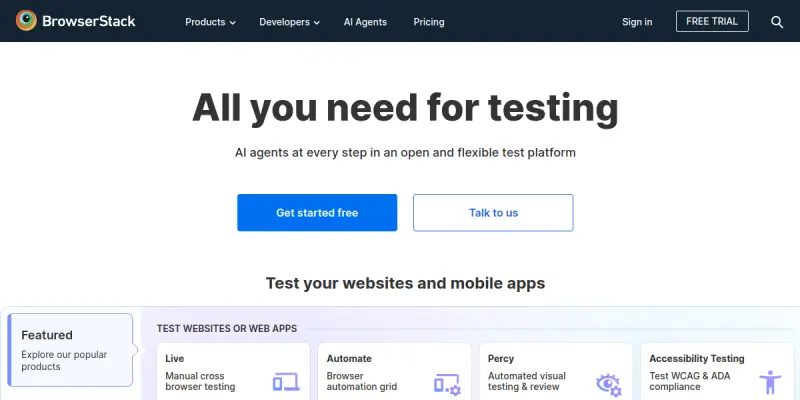
BrowserStack AI is a cloud-based software testing platform that combines instant access to over 3,000 real browsers and devices with artificial intelligence to accelerate cross-browser and cross-device testing. Originally launched in 2011 as a manual testing tool, BrowserStack introduced AI-powered features in recent years to help developers and QA teams automatically detect visual regressions, debug layout issues, and streamline the testing workflow. The platform supports both manual and automated testing across desktop browsers (Chrome, Firefox, Safari, Edge, etc.) and real mobile devices (iOS and Android).
Key Features
- Real Device Cloud: Test on thousands of real iOS and Android devices hosted in BrowserStack's data centers, ensuring accurate, real-world results.
- AI-Powered Visual Regression: Automatically compare screenshots across browsers and devices to catch visual inconsistencies without manual effort.
- Automated Testing Integrations: Run Selenium, Cypress, Puppeteer, and other test scripts directly on BrowserStack's infrastructure with parallel execution.
- Local Testing: Securely test staging or local environments using BrowserStack's Local Testing feature, which creates a secure tunnel.
- Debugging Tools: Use built-in DevTools, network logs, console logs, and video recordings to debug issues quickly.
- Integrations with CI/CD Pipelines: Connect with Jenkins, GitHub Actions, CircleCI, and other CI tools to automate testing inside your development workflow.
- Accessibility Testing: Use the integrated axe accessibility engine to audit web pages for compliance with WCAG standards.
- Team Management Dashboard: Assign roles, manage team access, and view usage analytics from a centralized admin panel.
Use Cases
Web Development and QA
Web developers and QA engineers use BrowserStack AI to ensure their websites render correctly across different browsers, operating systems, and screen sizes. By running manual or automated tests on real devices, they catch layout bugs and performance issues before release.
Mobile App Testing
Mobile app developers can test Android and iOS applications on real devices without maintaining a physical device lab. BrowserStack supports both manual app testing (install .apk or .ipa files) and automated app testing with Appium.
Continuous Integration and Deployment
Teams that follow CI/CD practices integrate BrowserStack with their pipeline to automatically run cross-browser tests on every code commit. This reduces manual regression testing time and helps catch bugs earlier in the development cycle.
Visual Regression and UI Consistency
Design teams and frontend developers rely on the AI-powered visual comparison tool to detect unintended UI changes across browser versions. This is especially useful for large projects where manual visual inspection would be time-consuming.
Pricing & Plans
BrowserStack AI operates on a freemium model. The free plan offers limited minutes of automated testing and a small number of manual testing sessions. Paid plans start with a Team plan (per user per month) that includes unlimited manual testing and increased automated testing minutes. Enterprise plans offer custom minutes, dedicated support, and advanced admin controls. Exact pricing details are available on the official website.
Integrations & Compatibility
- CI/CD Tools: Jenkins, GitHub Actions, CircleCI, GitLab CI, Travis CI, Bamboo, and more.
- Test Automation Frameworks: Selenium, Cypress, TestCafe, Puppeteer, Appium, Espresso, XCUITest.
- Bug Tracking: Jira, Slack, Trello.
- Local Development: Local Testing feature supports any local environment (localhost, internal servers, VPN).
- Accessibility: axe-core integration for automated accessibility audits.
Who Is It For?
BrowserStack AI is designed for web developers, mobile developers, QA engineers, and DevOps teams who need to validate cross-browser and cross-device compatibility without maintaining an in-house device lab. It is also suitable for design teams that want to check visual consistency across platforms.
Limitations
- Internet Dependency: The platform requires a stable internet connection, as tests run remotely on BrowserStack servers.
- Free Tier Limitations: The free plan is very restricted in terms of minutes and devices, limiting its usefulness for serious testing.
- Complex Setup for Automated Testing: New users may face a learning curve when setting up automated test scripts and integrating with CI pipelines.
- Pricing for Large Teams: Enterprise pricing is not transparent on the website, which may be a barrier for budget planning.
Final Verdict
BrowserStack AI is a robust and mature platform for cross-browser and mobile testing that has evolved to include useful AI-powered features. Its vast device inventory and deep integration with modern CI/CD workflows make it a strong choice for teams that prioritize quality assurance. While the free tier is limited and pricing can be opaque for enterprise plans, the platform's reliability and feature set justify the investment for most development teams.
Tool Facts
Screenshots & Interface
Pros
- ✓ Provides instant access to over 3,000 real browsers and devices, eliminating the need for an in-house device lab.
- ✓ AI-powered visual regression testing automatically catches UI differences across browser versions.
- ✓ Seamless integration with major CI/CD pipelines allows automated testing as part of the development workflow.
- ✓ Supports both manual and automated testing, catering to teams of all sizes and skill levels.
- ✓ Built-in debugging tools (DevTools, logs, video) speed up issue resolution.
Cons
- × The free tier is extremely limited in testing minutes and device access, making it unsuitable for thorough evaluation.
- × Enterprise pricing is not publicly listed, which can complicate budget planning for larger teams.
- × Automated testing setup can be complex for users new to Selenium or CI integration.
- × Visual regression AI may produce false positives on dynamic content or animations.
How to Use BrowserStack AI in Your Workflow
Integrating BrowserStack AI into your professional toolkit enhances efficiency by automating manual steps. By configuring it to suit your specific project requirements, you can optimize output quality and reduce project cycle times. Standard workflows involve testing the tool on simple tasks before scaling its use to complex operations.
Frequently Asked Questions
What is BrowserStack AI used for?
BrowserStack AI is a cloud-based testing platform that provides instant access to over 3000 real browsers and devices. It enables developers and QA teams to test websites and mobile apps for cross-browser compatibility and responsiveness. Its key differentiator is the combination of real device testing with AI-powered debugging and screenshot comparison.
What is the pricing model for BrowserStack AI?
BrowserStack AI uses a Freemium pricing model.
What are the main advantages of BrowserStack AI?
The key benefits of BrowserStack AI include: Provides instant access to over 3,000 real browsers and devices, eliminating the need for an in-house device lab., AI-powered visual regression testing automatically catches UI differences across browser versions., Seamless integration with major CI/CD pipelines allows automated testing as part of the development workflow., Supports both manual and automated testing, catering to teams of all sizes and skill levels., Built-in debugging tools (DevTools, logs, video) speed up issue resolution..
What are the main limitations of BrowserStack AI?
Some limitations or cons of BrowserStack AI are: The free tier is extremely limited in testing minutes and device access, making it unsuitable for thorough evaluation., Enterprise pricing is not publicly listed, which can complicate budget planning for larger teams., Automated testing setup can be complex for users new to Selenium or CI integration., Visual regression AI may produce false positives on dynamic content or animations..
Alternative AI Tools

Draftbit AI
Draftbit AI is a visual development platform for building native iOS and Android apps. It combines a drag-and-drop editor with full code access for developers. Its AI-powered features assist in generating components and automating repetitive tasks.

BMC AI
BMC AI provides enterprise-scale automation and IT operations intelligence to streamline workflows and predict system failures.

StackState AI
StackState AI helps teams monitor, troubleshoot, and optimize workloads across clouds. It provides fast, secure insights with guided remediation, leveraging AI for simplified complex tasks.
Rating Details
Based on 0 ratings
Related Tools
More AI tools from the same workflow, industry, or category.
AICode
AICode is a spec-driven AI coding copilot for developers using Visual Studio Code. It enforces a disciplined workflow to prevent AI-generated technical debt and ensures maintainable code. Its key differentiator is forcing line-by-line human review before changes are applied.
Opik
Opik is an open-source platform for LLM observability and evaluation. It helps developers trace, test, and monitor AI applications and autonomous agents throughout development and production.
PlanetScale AI
PlanetScale provides serverless cloud hosting for Vitess and PostgreSQL databases. It targets developers and engineering teams requiring high-performance, scalable database infrastructure. The platform enables instant scaling and branching workflows.
CodeReview AI
CodeReview AI is a tool that uses artificial intelligence to analyze code and suggest improvements. It helps developers identify bugs, security issues, and style inconsistencies automatically. The tool integrates with popular version control systems to fit into existing workflows.
Reviews
No reviews submitted yet. Be the first to share your experience.
Write a Review
Share Your Experience
Join the community to write reviews, submit ratings, and bookmark your favorite AI tools.