

Codiga
Use Codiga as the anchor for a real shortlist.
Instead of returning to a broad directory, jump straight into the strongest adjacent matchups for pricing, workflow fit, and differentiation.
Overview
Overview
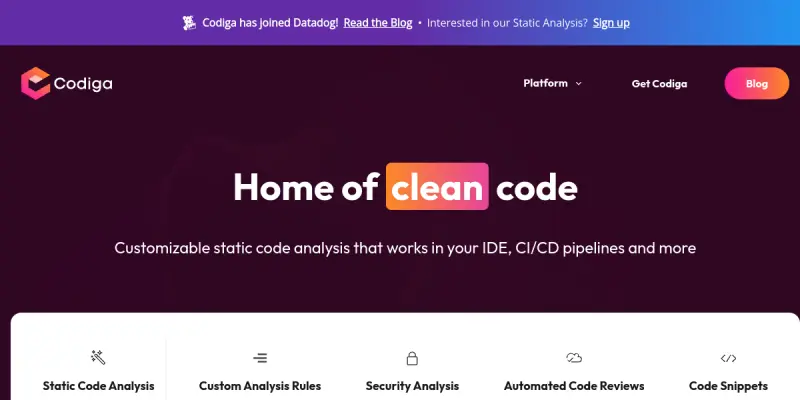
Codiga is a developer-centric static code analysis platform designed to improve code quality and security across the software development lifecycle. By integrating directly into popular IDEs like Visual Studio Code and JetBrains, as well as CI/CD pipelines, it provides developers and DevOps engineers with real-time feedback on code compliance, potential bugs, and security vulnerabilities.
Key Features
- IDE Integration: Native extensions for VS Code, IntelliJ IDEA, and Vim enable in-editor linting and suggestions.
- CI/CD Pipeline Support: Seamless integration with GitHub Actions, GitLab CI, and Bitbucket Pipelines for automated checks on every push.
- Custom Rules: Users can define specific coding standards and share them across teams or organizations.
- Security Scanning: Identifies common vulnerabilities such as SQL injection risks, hardcoded secrets, and insecure dependencies.
- Real-time Feedback: Instantly highlights issues as you type, reducing the feedback loop for bug fixing.
- Multi-Language Support: Capable of analyzing code written in JavaScript, TypeScript, Python, Java, and Go.
Use Cases
Pre-commit Checks
Implement Codiga as a pre-commit hook to ensure code quality before changes are committed to the repository, preventing bad code from entering the main branch.
Automated Code Review
Use Codiga rules to automate parts of the code review process, allowing human reviewers to focus on complex logic rather than style or syntax errors.
Security Compliance
Enforce security best practices and compliance standards (like OWASP) across the entire codebase to reduce the risk of security breaches.
Pricing & Plans
Codiga operates on a Freemium model. The free tier allows for basic analysis and rule sharing. Paid plans typically unlock advanced security scanning, unlimited custom rules, and priority support for teams. Exact pricing tiers may vary based on team size and specific feature requirements.
Integrations & Compatibility
Codiga connects with major version control systems (GitHub, GitLab, Bitbucket) and development environments (VS Code, JetBrains, Vim). It also offers CLI tools for custom workflows and integrates with standard CI/CD platforms.
Who Is It For?
This tool is ideal for software developers, QA engineers, DevOps professionals, and technical leads who are looking to maintain high code quality standards and automate the code review process.
Limitations
While powerful, Codiga requires a stable internet connection for cloud-based analysis. Additionally, setting up complex custom rules can require a learning curve for junior developers. The free tier may have limitations on the number of checks or the frequency of analysis.
Final Verdict
Codiga is a robust solution for teams prioritizing code quality and security automation. Its deep integration with existing workflows makes it a practical addition to any development stack, particularly for teams using GitHub or GitLab extensively.
Tool Facts
Screenshots & Interface
Pros
- ✓ Deep integration with major IDEs and CI/CD platforms
- ✓ Customizable rule sets allow teams to enforce specific standards
- ✓ Real-time feedback loop reduces debugging time
Cons
- × Requires initial setup and configuration for custom rules
- × Cloud-based nature means it depends on a stable internet connection
- × Free tier may have limitations on advanced security features
How to Use Codiga in Your Workflow
Integrating Codiga into your professional toolkit enhances efficiency by automating manual steps. By configuring it to suit your specific project requirements, you can optimize output quality and reduce project cycle times. Standard workflows involve testing the tool on simple tasks before scaling its use to complex operations.
Frequently Asked Questions
What is Codiga used for?
Automated code quality and security scanning tool for VS Code, JetBrains, and CI/CD pipelines. Integrates with GitHub, GitLab, and Bitbucket to enforce coding standards.
What is the pricing model for Codiga?
Codiga uses a Freemium pricing model.
What are the main advantages of Codiga?
The key benefits of Codiga include: Deep integration with major IDEs and CI/CD platforms, Customizable rule sets allow teams to enforce specific standards, Real-time feedback loop reduces debugging time.
What are the main limitations of Codiga?
Some limitations or cons of Codiga are: Requires initial setup and configuration for custom rules, Cloud-based nature means it depends on a stable internet connection, Free tier may have limitations on advanced security features.
Alternative AI Tools

CodiumAI
CodiumAI (Qodo) is an AI code review tool providing deep codebase context for IDEs and Pull Requests. It features over 15 agentic workflows for automated security and testing.

Codeium
Codeium's Windsurf Editor is an AI-native IDE designed to help developers code more efficiently. It provides context-aware code suggestions and commands to streamline the development workflow.

FireHydrant AI
Incident management platform for DevOps teams. Automates on-call schedules and incident response workflows to reduce downtime.
Rating Details
Based on 0 ratings
Quick Comparisons
Related Tools
More AI tools from the same workflow, industry, or category.
AICode
AICode is a spec-driven AI coding copilot for developers using Visual Studio Code. It enforces a disciplined workflow to prevent AI-generated technical debt and ensures maintainable code. Its key differentiator is forcing line-by-line human review before changes are applied.
Opik
Opik is an open-source platform for LLM observability and evaluation. It helps developers trace, test, and monitor AI applications and autonomous agents throughout development and production.
PlanetScale AI
PlanetScale provides serverless cloud hosting for Vitess and PostgreSQL databases. It targets developers and engineering teams requiring high-performance, scalable database infrastructure. The platform enables instant scaling and branching workflows.
CodeReview AI
CodeReview AI is a tool that uses artificial intelligence to analyze code and suggest improvements. It helps developers identify bugs, security issues, and style inconsistencies automatically. The tool integrates with popular version control systems to fit into existing workflows.
Reviews
No reviews submitted yet. Be the first to share your experience.
Write a Review
Share Your Experience
Join the community to write reviews, submit ratings, and bookmark your favorite AI tools.