

Dynatrace AI
Use Dynatrace AI as the anchor for a real shortlist.
Instead of returning to a broad directory, jump straight into the strongest adjacent matchups for pricing, workflow fit, and differentiation.
Overview
Overview
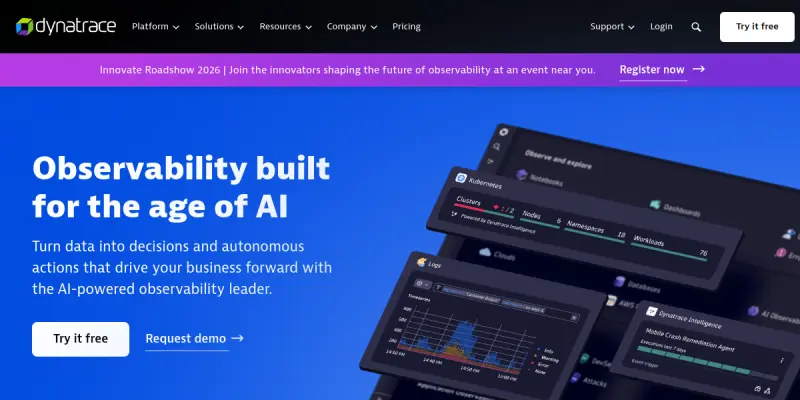
Dynatrace AI is an enterprise-grade observability platform that combines application performance monitoring (APM), infrastructure monitoring, AI-driven analytics, and application security in a single solution. It uses a unique causal AI engine to automatically detect, diagnose, and resolve performance issues across complex cloud environments. Designed for DevOps, Site Reliability Engineers (SREs), and IT operations teams, Dynatrace AI provides real-time insights and automated remediation to help organizations maintain high availability and optimize digital experiences.
Key Features
- Causal AI Engine: Automatically detects root causes of performance anomalies without manual configuration or rule setting.
- Davis AI: Proprietary AI that correlates metrics, events, logs, and topology to provide precise answers and predictive analytics.
- Full-Stack Monitoring: Monitors applications, microservices, containers, infrastructure, and user experience from a single interface.
- Automatic & Intelligent Observability: Auto-discovers services, dependencies, and process relationships to create an up-to-date topology map.
- Application Security: Built-in runtime application self-protection (RASP) and vulnerability detection without needing separate agents.
- Automated Remediation: Integrates with ITSM and automation tools to trigger actions (e.g., scaling, restarting services) when problems are detected.
- Digital Experience Management: Captures real user monitoring (RUM) and session replay to analyze frontend performance and user behavior.
- Open & Extensible API: Provides REST APIs and integrations with major cloud providers, CI/CD pipelines, and observability ecosystems.
Use Cases
Incident Response & Troubleshooting
SRE and DevOps teams use Dynatrace AI to shorten mean time to resolution (MTTR). When an application slowdown occurs, the causal AI pinpoints the exact root cause—such as a code change, resource saturation, or dependency failure—and displays the relevant traces, logs, and metrics in context.
Cloud Migration & Optimization
Organizations migrating to AWS, Azure, or GCP rely on Dynatrace AI to baseline pre-migration behaviour and continuously monitor after cutover. The AI recommends right-sizing resources, identifies orphaned services, and detects cost anomalies.
Application Security Posture
Security teams leverage Dynatrace AI to detect and prioritize vulnerabilities in real time, including library flaws and runtime attacks. It correlates security events with performance data to assess business impact.
Digital Experience Monitoring
E-commerce and media companies use Dynatrace AI to track frontend performance, user frustration signals, and conversion metrics. Session replay and RUM help optimize user journeys and reduce bounce rates.
Pricing & Plans
Dynatrace AI offers three main pricing tiers:
- Fullstack Monitoring: Pay-per-host or per-hundred-million Davis Data Units (DDUs). Includes full-stack observability, AI, and automation.
- Infrastructure Monitoring: Covers hosts, containers, and cloud services at a lower cost per host.
- Digital Experience Monitoring: Priced per session or per million DDUs. Also available as an add-on to Fullstack. Enterprise plans are negotiable and include dedicated support, advanced SLAs, and custom deployment options. Free trial is available (limited hosts / DDUs).
Integrations & Compatibility
Dynatrace AI integrates with major cloud providers (AWS, Azure, GCP), CI/CD tools (Jenkins, GitLab, Azure DevOps), ITSM platforms (ServiceNow, Jira), notification tools (Slack, PagerDuty), and container orchestration (Kubernetes, OpenShift). It also supports OpenTelemetry for data ingestion and has REST API access.
Who Is It For?
- DevOps & SRE Teams: For monitoring complex microservice architectures and automating incident response.
- IT Operations (ITOps): For maintaining infrastructure health and performance.
- Security Teams: For application vulnerability detection and runtime protection.
- Cloud Architects: For optimizing cost, capacity, and performance during cloud migrations.
- Digital Experience Managers: For understanding and improving end-user experiences.
Limitations
- Pricing Complexity: The DDU-based pricing model can be difficult to estimate and may become expensive at scale.
- Steep Learning Curve: The feature-rich interface and advanced AI concepts require training for new users.
- No Native Mobile App: Monitoring is primarily via web dashboard; mobile alerts rely on third-party integrations.
- Limited Offline Use: As a SaaS platform, it requires a constant internet connection and has no offline mode.
Final Verdict
Dynatrace AI is a top-tier observability platform for large enterprises that need deep, AI-driven insights into their cloud environments. Its causal AI and automated remediation capabilities are industry-leading, but the pricing can be a barrier for smaller teams. It's best suited for organizations already invested in cloud-native architectures and DevOps practices.
Tool Facts
Screenshots & Interface
Pros
- ✓ Causal AI engine automatically identifies root causes of performance issues without manual configuration.
- ✓ Full-stack monitoring covers applications, infrastructure, cloud services, and user experience from a single pane.
- ✓ Built-in runtime application security (RASP) eliminates the need for separate security agents.
- ✓ Integrates with major CI/CD, ITSM, and notification tools for seamless workflow automation.
- ✓ Automatic service discovery and topology mapping keeps dashboards current with dynamic environments.
Cons
- × Pricing based on Davis Data Units (DDUs) can be unpredictable and expensive at scale.
- × The platform's depth and complexity requires significant training and ramp-up time for new users.
- × No native mobile monitoring app; alerts and dashboards are web-only.
- × Offline capabilities are non-existent as the service is fully cloud-based.
How to Use Dynatrace AI in Your Workflow
Integrating Dynatrace AI into your professional toolkit enhances efficiency by automating manual steps. By configuring it to suit your specific project requirements, you can optimize output quality and reduce project cycle times. Standard workflows involve testing the tool on simple tasks before scaling its use to complex operations.
Frequently Asked Questions
What is Dynatrace AI used for?
Dynatrace AI is an observability and application security platform that uses AI to monitor, optimize, and secure cloud environments and applications. It helps DevOps and IT teams detect anomalies, automate responses, and improve system reliability through intelligent insights.
What is the pricing model for Dynatrace AI?
Dynatrace AI uses a Paid pricing model.
What are the main advantages of Dynatrace AI?
The key benefits of Dynatrace AI include: Causal AI engine automatically identifies root causes of performance issues without manual configuration., Full-stack monitoring covers applications, infrastructure, cloud services, and user experience from a single pane., Built-in runtime application security (RASP) eliminates the need for separate security agents., Integrates with major CI/CD, ITSM, and notification tools for seamless workflow automation., Automatic service discovery and topology mapping keeps dashboards current with dynamic environments..
What are the main limitations of Dynatrace AI?
Some limitations or cons of Dynatrace AI are: Pricing based on Davis Data Units (DDUs) can be unpredictable and expensive at scale., The platform's depth and complexity requires significant training and ramp-up time for new users., No native mobile monitoring app; alerts and dashboards are web-only., Offline capabilities are non-existent as the service is fully cloud-based..
Alternative AI Tools

Puppeteer AI
Puppeteer AI provides voice-enabled, HIPAA-compliant AI agents for healthcare practices. It automates patient intake, scheduling, and triage workflows to reduce administrative burden. Designed for clinics and hospitals, it helps streamline front-office operations.

Rootly AI
Rootly AI is an incident management platform for engineering teams that uses AI SRE agents to automate response and post-mortems. It helps teams detect, triage, and resolve incidents faster with integrated runbooks and communication tools.

Redis AI
Redis AI is a database solution for developers, offering advanced capabilities and blazing fast app development, with a key differentiator in its robust developer API.
Rating Details
Based on 0 ratings
Quick Comparisons
Related Tools
More AI tools from the same workflow, industry, or category.
AICode
AICode is a spec-driven AI coding copilot for developers using Visual Studio Code. It enforces a disciplined workflow to prevent AI-generated technical debt and ensures maintainable code. Its key differentiator is forcing line-by-line human review before changes are applied.
Opik
Opik is an open-source platform for LLM observability and evaluation. It helps developers trace, test, and monitor AI applications and autonomous agents throughout development and production.
PlanetScale AI
PlanetScale provides serverless cloud hosting for Vitess and PostgreSQL databases. It targets developers and engineering teams requiring high-performance, scalable database infrastructure. The platform enables instant scaling and branching workflows.
CodeReview AI
CodeReview AI is a tool that uses artificial intelligence to analyze code and suggest improvements. It helps developers identify bugs, security issues, and style inconsistencies automatically. The tool integrates with popular version control systems to fit into existing workflows.
Reviews
No reviews submitted yet. Be the first to share your experience.
Write a Review
Share Your Experience
Join the community to write reviews, submit ratings, and bookmark your favorite AI tools.