

GitLab CI AI
Use GitLab CI AI as the anchor for a real shortlist.
Instead of returning to a broad directory, jump straight into the strongest adjacent matchups for pricing, workflow fit, and differentiation.
Overview
Overview
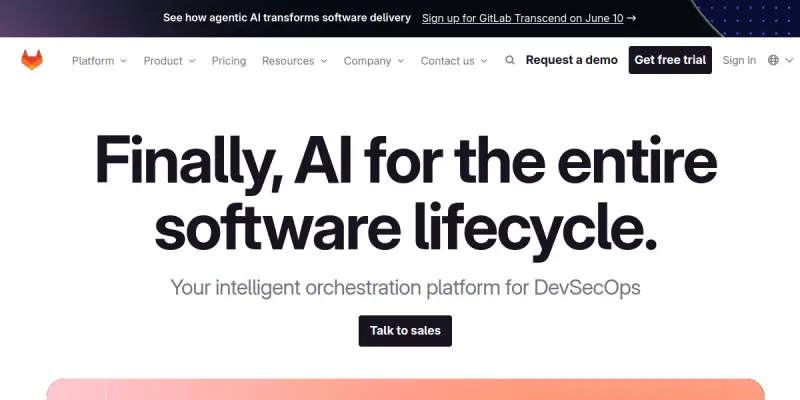
GitLab CI AI is an integrated feature within the GitLab platform designed to augment the CI/CD pipeline with artificial intelligence. It helps automate complex tasks, improve code quality, and enforce security standards throughout the software development lifecycle (SDLC). By leveraging machine learning, it provides actionable insights to developers and operations teams.
Key Features
- AI-Powered Pipeline Optimization: Analyzes pipeline execution to suggest improvements and identify bottlenecks.
- Intelligent Code Review: Uses AI to suggest fixes, explain code changes, and detect potential security vulnerabilities automatically.
- Predictive Testing: Prioritizes test cases based on risk and code changes to speed up the feedback loop.
- Automated Security Scanning: Integrates with SAST, DAST, and SCA tools to provide real-time threat detection.
- Self-Healing Pipelines: Automatically detects and fixes common pipeline failures without manual intervention.
- Integration with GitLab: Native integration means no additional setup required for version control.
- Resource Optimization: Suggests caching strategies to reduce build times and costs.
Use Cases
Continuous Integration and Deployment (CI/CD)
Teams use GitLab CI AI to automate the build, test, and release phases, ensuring code is deployed to production reliably and frequently. The AI assists in identifying steps that can be parallelized or optimized to reduce deployment times.
Application Security (DevSecOps)
Developers leverage the AI features to scan code for vulnerabilities early in the development process. This proactive approach reduces the risk of security breaches in production and ensures compliance with industry standards.
Code Quality Improvement
QA engineers utilize the intelligent code review suggestions to maintain high code standards and reduce technical debt across the project. The tool helps enforce coding conventions and best practices automatically.
Pricing & Plans
GitLab offers a free tier for individual developers and small teams (Community Edition). For more advanced features and unlimited projects, paid plans (Premium and Ultimate) are required. The AI features are generally included in the paid tiers or available on the free tier depending on the specific GitLab version and plan.
Integrations & Compatibility
Native integration with GitLab's repository management, issue tracking, and monitoring. Supports standard CI/CD languages (Node.js, Python, Java, etc.) and cloud providers (AWS, Azure, GCP). Integrates with popular security and testing tools.
Who Is It For?
Software developers, DevOps engineers, QA testers, and security professionals involved in the software development lifecycle.
Limitations
- The AI features may not cover every specific programming language or framework out of the box.
- Advanced customization of AI models may require significant technical expertise.
- The free tier has limitations on concurrent runners and pipeline execution time.
Final Verdict
GitLab CI AI is a robust solution for teams already invested in the GitLab ecosystem, offering significant value in automation and security. While it requires a paid subscription for full access to some advanced AI capabilities, its seamless integration and comprehensive feature set make it a strong contender for modern DevOps teams.
Tool Facts
Screenshots & Interface
Pros
- ✓ Provides automated security scanning within the CI pipeline to identify vulnerabilities early.
- ✓ Integrates seamlessly with the existing GitLab workflow, reducing context switching.
- ✓ Offers self-healing capabilities that automatically resolve common pipeline failures.
- ✓ Utilizes predictive analytics to optimize build times and reduce resource costs.
Cons
- × The free tier imposes strict limits on concurrent jobs and storage.
- × Advanced AI features for code review are locked behind the Premium and Ultimate paid plans.
- × Customizing AI models for specific organizational needs requires deep technical knowledge.
How to Use GitLab CI AI in Your Workflow
Integrating GitLab CI AI into your professional toolkit enhances efficiency by automating manual steps. By configuring it to suit your specific project requirements, you can optimize output quality and reduce project cycle times. Standard workflows involve testing the tool on simple tasks before scaling its use to complex operations.
Frequently Asked Questions
What is GitLab CI AI used for?
GitLab CI AI enhances software development pipelines by automating testing, security scanning, and deployment tasks. It integrates directly into the GitLab workflow to provide AI-driven recommendations for code quality and security. This tool is designed for development teams seeking to streamline CI/CD processes.
What is the pricing model for GitLab CI AI?
GitLab CI AI uses a Freemium pricing model.
What are the main advantages of GitLab CI AI?
The key benefits of GitLab CI AI include: Provides automated security scanning within the CI pipeline to identify vulnerabilities early., Integrates seamlessly with the existing GitLab workflow, reducing context switching., Offers self-healing capabilities that automatically resolve common pipeline failures., Utilizes predictive analytics to optimize build times and reduce resource costs..
What are the main limitations of GitLab CI AI?
Some limitations or cons of GitLab CI AI are: The free tier imposes strict limits on concurrent jobs and storage., Advanced AI features for code review are locked behind the Premium and Ultimate paid plans., Customizing AI models for specific organizational needs requires deep technical knowledge..
Alternative AI Tools

PRTG AI
PRTG AI is a network monitoring tool that uses artificial intelligence to analyze and oversee IT infrastructure. It helps IT professionals detect anomalies and automate responses to network issues.

Komodor AI
Komodor is an AI-powered SRE platform that simplifies Kubernetes troubleshooting and incident management for DevOps teams. It provides context-aware insights to reduce mean time to resolution.
Kubernetes AI
Kubernetes AI is a container management tool for DevOps. It uses AI to simplify workflow automation and deployment tasks.
Rating Details
Based on 0 ratings
Quick Comparisons
Related Tools
More AI tools from the same workflow, industry, or category.
AICode
AICode is a spec-driven AI coding copilot for developers using Visual Studio Code. It enforces a disciplined workflow to prevent AI-generated technical debt and ensures maintainable code. Its key differentiator is forcing line-by-line human review before changes are applied.
Opik
Opik is an open-source platform for LLM observability and evaluation. It helps developers trace, test, and monitor AI applications and autonomous agents throughout development and production.
PlanetScale AI
PlanetScale provides serverless cloud hosting for Vitess and PostgreSQL databases. It targets developers and engineering teams requiring high-performance, scalable database infrastructure. The platform enables instant scaling and branching workflows.
CodeReview AI
CodeReview AI is a tool that uses artificial intelligence to analyze code and suggest improvements. It helps developers identify bugs, security issues, and style inconsistencies automatically. The tool integrates with popular version control systems to fit into existing workflows.
Reviews
No reviews submitted yet. Be the first to share your experience.
Write a Review
Share Your Experience
Join the community to write reviews, submit ratings, and bookmark your favorite AI tools.