

KNIME AI
Use KNIME AI as the anchor for a real shortlist.
Instead of returning to a broad directory, jump straight into the strongest adjacent matchups for pricing, workflow fit, and differentiation.
Overview
Overview
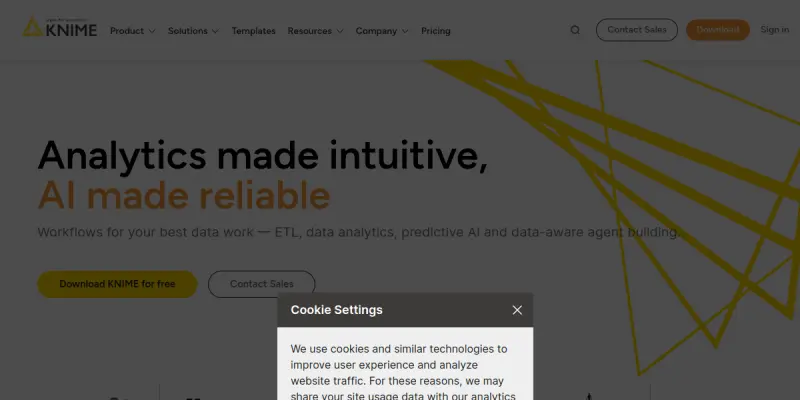
KNIME AI is a free and open-source data analytics platform designed to empower data scientists, analysts, and business users to create, automate, and deploy data science solutions. With its intuitive visual workflow builder, KNIME enables users to perform complex data transformations, machine learning, and statistical analysis without extensive coding. The platform supports integration with numerous data sources and formats, making it a versatile tool for organizations seeking to harness the power of their data.
Key Features
- Visual Workflow Builder: Drag-and-drop interface to design data processing pipelines, from data ingestion to model deployment, without writing code.
- Extensive Node Library: Over 2,000 nodes covering data access, transformation, analysis, visualization, and machine learning algorithms.
- Integration with Major Data Sources: Connect to databases, cloud storage, spreadsheets, and big data platforms like Hadoop and Spark.
- Machine Learning and AI Capabilities: Built-in support for supervised and unsupervised learning, deep learning, and model evaluation.
- Automation and Scheduling: Execute workflows on a schedule or trigger them based on events, enabling automated data processing.
- Collaboration and Sharing: Share workflows, components, and results with team members via KNIME's collaboration server.
- Enterprise Scalability: Deploy workflows in production environments using KNIME Server, supporting high availability and security.
- Open and Extensible: Extend functionality with custom nodes, Python, R, and Java scripts, and leverage a large community of contributors.
Use Cases
Data Preparation and Cleaning
Data scientists spend a significant portion of their time cleaning and preparing data. KNIME's visual workflow builder allows users to easily combine, filter, transform, and normalize data from multiple sources, ensuring high data quality before analysis.
Predictive Modeling
Analysts can build and compare multiple machine learning models using pre-built nodes for regression, classification, clustering, and time series forecasting. The platform includes tools for feature selection, hyperparameter tuning, and model validation.
Business Intelligence and Reporting
KNIME enables the creation of interactive dashboards and reports that visualize key metrics and trends. Users can schedule automated reports and share them with stakeholders through the KNIME WebPortal.
Data Integration and ETL
For organizations with disparate data sources, KNIME serves as a powerful ETL (Extract, Transform, Load) tool. It can connect to databases, APIs, and flat files, and transform data into a unified format for downstream consumption.
Text and Image Analytics
KNIME provides nodes for natural language processing, text mining, and image analysis, enabling use cases such as sentiment analysis, document classification, and object detection.
Pricing & Plans
KNIME offers a freemium pricing model. The open-source KNIME Analytics Platform is free for individual use and includes all core features. For enterprise teams requiring collaboration, automation, and support, KNIME offers paid subscriptions such as KNIME Server and KNIME Team Plan. Pricing details are available on the KNIME website.
Integrations & Compatibility
KNIME integrates with a wide range of data sources and tools, including databases (PostgreSQL, MySQL, SQL Server), cloud platforms (AWS, Azure, Google Cloud), big data frameworks (Apache Hadoop, Spark), and programming languages (Python, R, Java). It also supports file formats such as CSV, Excel, JSON, and Parquet.
Who Is It For?
KNIME is designed for data scientists, data analysts, business intelligence professionals, and anyone who needs to work with data in a visual and collaborative environment. It is suitable for both small teams and large enterprises.
Limitations
- Steep Learning Curve for Advanced Features: While basic workflows are easy to create, advanced nodes and custom scripting require familiarity with data science concepts.
- Performance with Very Large Datasets: Processing extremely large datasets may require significant computational resources and optimization.
- Limited Native Real-Time Analytics: KNIME is primarily designed for batch processing; real-time streaming analytics are supported but may need additional setup.
Final Verdict
KNIME AI is a robust, open-source data analytics platform that offers extensive functionality for data preparation, analysis, and deployment. Its visual workflow builder lowers the barrier to entry for non-programmers, while its extensibility and enterprise features cater to advanced users. It is a strong choice for organizations looking for a versatile, cost-effective data science solution.
Tool Facts
Screenshots & Interface
Pros
- ✓ Visual workflow builder enables no-code data pipeline creation, reducing development time.
- ✓ Extensive node library provides over 2,000 pre-built components for diverse analytics tasks.
- ✓ Open-source model ensures no licensing costs for individual users and fosters community contributions.
- ✓ Integration with major data sources and programming languages offers flexibility in heterogeneous environments.
- ✓ Enterprise features like scheduling and collaboration support team-based workflow management.
Cons
- × Advanced features like custom scripting require familiarity with data science concepts.
- × Processing very large datasets may need significant computational resources and optimization.
- × Real-time streaming analytics support is limited compared to dedicated stream processing platforms.
- × Community support may be insufficient for mission-critical enterprise deployments without a paid subscription.
How to Use KNIME AI in Your Workflow
Integrating KNIME AI into your professional toolkit enhances efficiency by automating manual steps. By configuring it to suit your specific project requirements, you can optimize output quality and reduce project cycle times. Standard workflows involve testing the tool on simple tasks before scaling its use to complex operations.
Frequently Asked Questions
What is KNIME AI used for?
KNIME AI is a free, open-source data analytics platform that helps data scientists build visual workflows for data processing, analysis, and machine learning. It supports integration with various data sources and enables users to deploy analytical solutions in enterprise environments.
What is the pricing model for KNIME AI?
KNIME AI uses a Freemium pricing model.
What are the main advantages of KNIME AI?
The key benefits of KNIME AI include: Visual workflow builder enables no-code data pipeline creation, reducing development time., Extensive node library provides over 2,000 pre-built components for diverse analytics tasks., Open-source model ensures no licensing costs for individual users and fosters community contributions., Integration with major data sources and programming languages offers flexibility in heterogeneous environments., Enterprise features like scheduling and collaboration support team-based workflow management..
What are the main limitations of KNIME AI?
Some limitations or cons of KNIME AI are: Advanced features like custom scripting require familiarity with data science concepts., Processing very large datasets may need significant computational resources and optimization., Real-time streaming analytics support is limited compared to dedicated stream processing platforms., Community support may be insufficient for mission-critical enterprise deployments without a paid subscription..
Alternative AI Tools

Qlik AI
Qlik AI is a cloud-based analytics platform that integrates data from multiple sources and provides AI-driven insights. It helps analysts and business users visualize trends, detect patterns, and make data-driven decisions. The platform's associative engine sets it apart by enabling freeform exploration without pre-defined queries.

Goalfinder
Goalfinder provides AI-driven audits for pre-launch, post-launch, and market analysis, helping early-stage startups identify growth blockers in under 60 seconds. It targets founders who need a quick, unbiased reality check on product-market fit and distribution challenges.

Fivetran AI
Fivetran is an automated data integration platform that connects various data sources to data warehouses. It ensures consistent, high-quality data delivery without manual coding, serving data engineers and analytics teams.
Rating Details
Based on 0 ratings
Quick Comparisons
Related Tools
More AI tools from the same workflow, industry, or category.
NewsData.io
NewsData.io delivers structured global news data via a real-time API. It supports 100,000+ sources across 200+ countries with filtering by keyword and date. This tool helps developers integrate news intelligence into applications and dashboards.
Wisegrid
Wisegrid is a work management platform that combines spreadsheet functionality with application features like dashboards and automations. It allows teams to manage projects and data using rows and columns, including AI-driven formulas, with a flat pricing model.
TradeBB
TradeBB is a All-in-One Trading Journal and analysis tool that helps traders seamlessly record each transaction, deeply analyze trading data, and review trading processes.
Pinecone
Pinecone is a fully managed vector database for AI applications, enabling fast similarity search and retrieval-augmented generation (RAG). It targets developers and data scientists who need scalable vector storage without managing infrastructure.
Reviews
No reviews submitted yet. Be the first to share your experience.
Write a Review
Share Your Experience
Join the community to write reviews, submit ratings, and bookmark your favorite AI tools.