

Puppeteer AI
Use Puppeteer AI as the anchor for a real shortlist.
Instead of returning to a broad directory, jump straight into the strongest adjacent matchups for pricing, workflow fit, and differentiation.
Overview
Overview
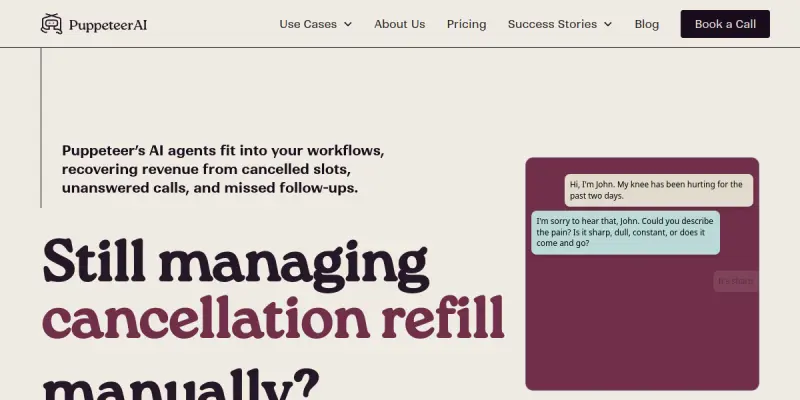
Puppeteer AI is a platform that specializes in building voice-enabled, HIPAA-compliant AI agents tailored for healthcare organizations. It focuses on automating patient-facing interactions such as intake form completion, appointment scheduling, and symptom triage. By leveraging natural language processing and voice synthesis, the tool aims to reduce the workload on administrative staff and improve patient experience.
Key Features
- HIPAA-Compliant Voice Agents: All agents are built to comply with healthcare privacy regulations, ensuring patient data is handled securely.
- Automated Patient Intake: Collect patient information through conversational voice interactions, replacing manual form filling.
- AI Scheduling: Allow patients to book, reschedule, or cancel appointments using natural speech, integrated with practice management systems.
- AI Symptom Triage: Guide patients through symptom questionnaires to assess urgency, helping prioritize cases before human review.
- Multilingual Support: Agents can communicate in multiple languages, broadening accessibility for diverse patient populations.
- Customizable Agent Persona: Configure tone, personality, and script to match the practice’s brand and communication style.
- Analytics Dashboard: Monitor call metrics, patient satisfaction, and operational efficiency with built-in reporting tools.
Use Cases
Reducing Front-Desk Overload
Healthcare providers often struggle with high volumes of incoming calls for appointment scheduling and basic inquiries. Puppeteer AI can handle these calls autonomously, freeing up front-desk staff for more complex tasks.
Streamlining Patient Onboarding
New patients typically fill out lengthy intake forms. With Puppeteer AI, the process is conversational: patients speak their information, which is automatically transcribed and entered into the EHR system, reducing errors and wait times.
Triage for Urgent Care
Urgent care centers can use the AI to perform preliminary symptom assessment. Patients calling after hours are guided through a triage protocol, and high-priority cases are flagged for immediate callback.
Pricing & Plans
Puppeteer AI operates on a freemium model. A free tier is available with limited call minutes and basic features. Paid plans are structured around usage volume (call minutes, number of agents) and advanced features such as custom integrations and analytics. Exact pricing is not publicly disclosed and is available upon request.
Integrations & Compatibility
Puppeteer AI integrates with popular EHR/EMR systems and practice management platforms. It also offers a REST API for custom integrations. The platform is cloud-based and accessible via web dashboard.
Who Is It For?
This tool is designed for healthcare providers of all sizes—from small private practices to large hospital networks—that want to automate routine patient communications while maintaining HIPAA compliance.
Limitations
- Currently only available as a cloud service; no self-hosted or on-premise option.
- Performance depends on reliable internet connectivity and quality of speech recognition in noisy environments.
- Limited to voice interactions; does not handle text-based chat natively.
- The free tier has restrictive usage caps.
Final Verdict
Puppeteer AI addresses a real need in healthcare: reducing administrative overhead through intelligent, compliant voice automation. Its focus on HIPAA compliance and specialized healthcare workflows sets it apart from general-purpose voice bots. However, the low user rating (2.3/5) suggests potential issues with reliability, integration stability, or customer support. Prospective users should evaluate the tool thoroughly with a pilot program before committing to a paid plan.
Tool Facts
Screenshots & Interface
Pros
- ✓ Designed specifically for healthcare with built-in HIPAA compliance.
- ✓ Automates multiple front-desk tasks including intake, scheduling, and triage via voice.
- ✓ Offers a freemium tier, allowing low-cost evaluation.
- ✓ Supports multilingual voice interactions for diverse patient populations.
Cons
- × Voice accuracy degrades in noisy clinical environments.
- × No self-hosted or on-premise deployment option available.
- × Free tier has limited call minutes and features.
- × Does not support text-based chat interactions natively.
- × Low user rating (2.3/5) indicates potential reliability or support issues.
How to Use Puppeteer AI in Your Workflow
Integrating Puppeteer AI into your professional toolkit enhances efficiency by automating manual steps. By configuring it to suit your specific project requirements, you can optimize output quality and reduce project cycle times. Standard workflows involve testing the tool on simple tasks before scaling its use to complex operations.
Frequently Asked Questions
What is Puppeteer AI used for?
Puppeteer AI provides voice-enabled, HIPAA-compliant AI agents for healthcare practices. It automates patient intake, scheduling, and triage workflows to reduce administrative burden. Designed for clinics and hospitals, it helps streamline front-office operations.
What is the pricing model for Puppeteer AI?
Puppeteer AI uses a Freemium pricing model.
What are the main advantages of Puppeteer AI?
The key benefits of Puppeteer AI include: Designed specifically for healthcare with built-in HIPAA compliance., Automates multiple front-desk tasks including intake, scheduling, and triage via voice., Offers a freemium tier, allowing low-cost evaluation., Supports multilingual voice interactions for diverse patient populations..
What are the main limitations of Puppeteer AI?
Some limitations or cons of Puppeteer AI are: Voice accuracy degrades in noisy clinical environments., No self-hosted or on-premise deployment option available., Free tier has limited call minutes and features., Does not support text-based chat interactions natively., Low user rating (2.3/5) indicates potential reliability or support issues..
Alternative AI Tools

Carrd AI
Carrd is a free, no-code platform that lets users build simple, fully responsive one-page websites. It is designed for individuals and small businesses who need a quick online presence without technical skills. Its key differentiator is the ability to create polished, mobile-friendly pages with minimal effort.

Squarespace AI
Squarespace AI is an AI-powered website builder that helps users create professional websites quickly. It offers customizable templates, AI-driven design suggestions, and built-in business tools for entrepreneurs and small businesses. Its key differentiator is the seamless integration of AI within a full-featured website-building and e-commerce platform.

Codacy AI
Codacy AI automates code quality and security checks for development teams, offering AI-powered suggestions to streamline engineering workflows.
Rating Details
Based on 0 ratings
Quick Comparisons
Related Tools
More AI tools from the same workflow, industry, or category.
AICode
AICode is a spec-driven AI coding copilot for developers using Visual Studio Code. It enforces a disciplined workflow to prevent AI-generated technical debt and ensures maintainable code. Its key differentiator is forcing line-by-line human review before changes are applied.
Opik
Opik is an open-source platform for LLM observability and evaluation. It helps developers trace, test, and monitor AI applications and autonomous agents throughout development and production.
PlanetScale AI
PlanetScale provides serverless cloud hosting for Vitess and PostgreSQL databases. It targets developers and engineering teams requiring high-performance, scalable database infrastructure. The platform enables instant scaling and branching workflows.
CodeReview AI
CodeReview AI is a tool that uses artificial intelligence to analyze code and suggest improvements. It helps developers identify bugs, security issues, and style inconsistencies automatically. The tool integrates with popular version control systems to fit into existing workflows.
Reviews
No reviews submitted yet. Be the first to share your experience.
Write a Review
Share Your Experience
Join the community to write reviews, submit ratings, and bookmark your favorite AI tools.