

Selenium AI
Use Selenium AI as the anchor for a real shortlist.
Instead of returning to a broad directory, jump straight into the strongest adjacent matchups for pricing, workflow fit, and differentiation.
Overview
Overview
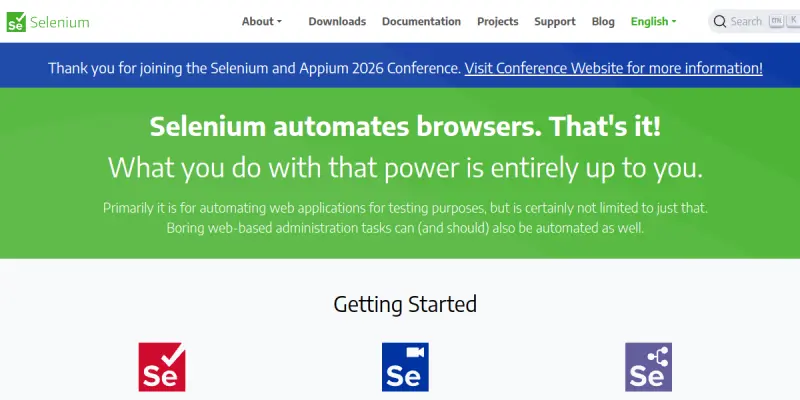
Selenium is an open-source suite of tools designed for automating web browsers. It allows developers and quality assurance engineers to write test scripts in various languages (Java, Python, C#, Ruby, JavaScript, and more) and run them across different browsers like Chrome, Firefox, Safari, and Edge. Selenium is not an AI tool by itself; it is a browser automation framework that can be integrated with AI-powered testing platforms. Its modular architecture includes WebDriver, IDE, and Grid components, enabling everything from simple record-and-playback to distributed test execution.
Key Features
- Multi-Browser Support: Automate tests on Chrome, Firefox, Safari, Edge, and others using browser-specific drivers.
- Language Bindings: Write test scripts in Java, Python, C#, Ruby, JavaScript (Node.js), Kotlin, or PHP.
- WebDriver API: Directly control browser actions (click, type, navigate) with a standardised API.
- Selenium IDE: A browser extension for record-and-playback test creation without coding.
- Selenium Grid: Run tests in parallel across multiple machines and browsers to accelerate execution.
- Cross-Platform Compatibility: Works on Windows, macOS, and Linux.
- Headless Mode: Execute tests without a visible browser UI for faster, CI/CD-friendly runs.
- Integration with Testing Frameworks: Works seamlessly with JUnit, TestNG, PyTest, Behave, and other test runners.
- Community Ecosystem: Extensive plugins, drivers, and support from a large open-source community.
- No Licensing Costs: Completely open-source under the Apache 2.0 license.
Use Cases
Automated Regression Testing
QA teams use Selenium to automate repetitive regression tests, ensuring new code changes do not break existing functionality. By scripting common user flows (login, form submission, navigation), developers can run hundreds of tests in minutes, catching bugs early.
Cross-Browser Compatibility Testing
Ensuring a web application renders and behaves consistently across multiple browsers is a major challenge. Selenium Grid lets teams run the same test suite on Chrome, Firefox, Safari, and Edge simultaneously, flagging browser-specific issues before release.
Data Scraping and Web Monitoring
Selenium can automate data extraction from dynamic websites that rely on JavaScript to load content. It is also used to monitor web application uptime and page content changes by scripting periodic checks and reporting differences.
CI/CD Pipeline Integration
DevOps engineers embed Selenium tests into CI/CD pipelines (Jenkins, GitHub Actions, GitLab CI) so that every code commit triggers an automated test run. This ensures that only passing builds proceed to deployment, maintaining code quality.
Educational Tool for Test Automation
Instructors and students use Selenium to learn test automation concepts. Its simple API and record-and-playback IDE lower the barrier to entry for beginners while still offering depth for advanced practitioners.
Pricing & Plans
Selenium is entirely free and open-source. There are no paid tiers or licenses required. However, Selenium can be integrated with third-party cloud testing services (e.g., Sauce Labs, BrowserStack) that charge for access to their infrastructure. The core Selenium framework itself is priced at $0.
Integrations & Compatibility
- Programming Languages: Java, Python, C#, Ruby, JavaScript (Node.js), Kotlin, PHP, Groovy.
- Test Runners/Frameworks: JUnit, TestNG, PyTest, RSpec, Mocha, Behave, Cucumber.
- CI/CD Tools: Jenkins, Travis CI, CircleCI, GitLab CI, GitHub Actions, Bamboo.
- Cloud Providers: Sauce Labs, BrowserStack, LambdaTest, TestingBot.
- Reporting: Allure, ExtentReports, TestNG Reports.
- Browser Drivers: ChromeDriver, GeckoDriver (Firefox), EdgeDriver, SafariDriver.
Who Is It For?
- Software Developers: To write end-to-end and integration tests for web apps.
- QA Engineers: To build and maintain automated test suites.
- DevOps Engineers: To embed testing into deployment pipelines.
- Data Engineers: To scrape dynamic web content.
- Students & Educators: To study test automation techniques.
Limitations
- No Native AI or Self-Healing: Selenium does not inherently include AI-based element locators or self-healing tests; these features require third-party tools.
- Maintenance Overhead: Tests can become brittle when UI elements change, requiring frequent script updates.
- No Built-in Reporting: Reporting and dashboards are not included; you must integrate external libraries.
- Browser Version Sensitivity: Updates to browsers can break drivers, causing test failures unrelated to code changes.
- Learning Curve: Writing robust, maintainable test scripts requires a solid understanding of programming and testing concepts.
Final Verdict
Selenium remains the gold standard for open-source web browser automation. It excels in flexibility, cross-browser support, and community-driven innovation. While it lacks built-in AI features and can be maintenance-heavy, its zero cost, extensive integration options, and mature ecosystem make it an indispensable tool for any team serious about web test automation. For those needing AI enhancements, pairing Selenium with AI-driven test intelligence platforms can fill the gap.
Tool Facts
Screenshots & Interface
Pros
- ✓ Free and open-source with no licensing costs.
- ✓ Supports multiple programming languages (Java, Python, C#, Ruby, JavaScript).
- ✓ Cross-browser and cross-platform compatibility (Chrome, Firefox, Safari, Edge, Windows, macOS, Linux).
- ✓ Large community with extensive documentation, plugins, and drivers.
- ✓ Integrates with CI/CD pipelines (Jenkins, GitHub Actions, GitLab CI).
- ✓ Selenium Grid enables parallel test execution across multiple machines.
Cons
- × No built-in AI or self-healing capabilities; tests are brittle to UI changes.
- × Requires significant programming knowledge to write maintainable test scripts.
- × No native reporting or dashboard; must integrate third-party libraries.
- × Browser driver updates can break tests unexpectedly.
How to Use Selenium AI in Your Workflow
Integrating Selenium AI into your professional toolkit enhances efficiency by automating manual steps. By configuring it to suit your specific project requirements, you can optimize output quality and reduce project cycle times. Standard workflows involve testing the tool on simple tasks before scaling its use to complex operations.
Frequently Asked Questions
What is Selenium AI used for?
Selenium is an open-source framework for automating web browser interactions. It is used by developers and QA engineers to write reliable, cross-browser tests for web applications. Its key differentiator is its support for multiple programming languages and browser drivers.
What is the pricing model for Selenium AI?
Selenium AI uses a Freemium pricing model.
What are the main advantages of Selenium AI?
The key benefits of Selenium AI include: Free and open-source with no licensing costs., Supports multiple programming languages (Java, Python, C#, Ruby, JavaScript)., Cross-browser and cross-platform compatibility (Chrome, Firefox, Safari, Edge, Windows, macOS, Linux)., Large community with extensive documentation, plugins, and drivers., Integrates with CI/CD pipelines (Jenkins, GitHub Actions, GitLab CI)., Selenium Grid enables parallel test execution across multiple machines..
What are the main limitations of Selenium AI?
Some limitations or cons of Selenium AI are: No built-in AI or self-healing capabilities; tests are brittle to UI changes., Requires significant programming knowledge to write maintainable test scripts., No native reporting or dashboard; must integrate third-party libraries., Browser driver updates can break tests unexpectedly..
Alternative AI Tools

Xata AI
Xata AI provides instant database branching for Postgres, letting you create isolated, copy-on-write branches with anonymized production data. It is designed for developers and DevOps teams that want to accelerate their development workflow without the cost and overhead of traditional staging replicas. Its key differentiator is the ability to spawn full database environments in seconds, directly from production data.

Moogsoft
Moogsoft is an AIOps platform that helps IT operations teams monitor infrastructure health, detect anomalies, and reduce alert noise. It uses machine learning to correlate events and automate incident response for faster mean time to resolution.

CockroachDB AI
CockroachDB is a distributed SQL database designed for cloud-native applications that require high availability and horizontal scalability. It enables developers to build resilient, multi-region apps with standard PostgreSQL compatibility and minimal operational overhead.
Rating Details
Based on 0 ratings
Quick Comparisons
Related Tools
More AI tools from the same workflow, industry, or category.
AICode
AICode is a spec-driven AI coding copilot for developers using Visual Studio Code. It enforces a disciplined workflow to prevent AI-generated technical debt and ensures maintainable code. Its key differentiator is forcing line-by-line human review before changes are applied.
Opik
Opik is an open-source platform for LLM observability and evaluation. It helps developers trace, test, and monitor AI applications and autonomous agents throughout development and production.
PlanetScale AI
PlanetScale provides serverless cloud hosting for Vitess and PostgreSQL databases. It targets developers and engineering teams requiring high-performance, scalable database infrastructure. The platform enables instant scaling and branching workflows.
CodeReview AI
CodeReview AI is a tool that uses artificial intelligence to analyze code and suggest improvements. It helps developers identify bugs, security issues, and style inconsistencies automatically. The tool integrates with popular version control systems to fit into existing workflows.
Reviews
No reviews submitted yet. Be the first to share your experience.
Write a Review
Share Your Experience
Join the community to write reviews, submit ratings, and bookmark your favorite AI tools.