

An in-depth, vendor-neutral analysis of SnapLogic's Intelligent Integration Platform — its architecture, capabilities, real-world use cases, limitations, customer reception, and how it stacks up against MuleSoft, Boomi, Informatica, Airbyte, and Tray.io.
1. SnapLogic Overview
SnapLogic is a leading Intelligent Integration Platform (IIP) that enables organizations to connect applications, data, and devices across their enterprise ecosystem. Founded in 2006 by Gaurav Dhillon — the former CEO of Informatica who previously led that company through its formative decade — SnapLogic was conceived from the very beginning as a cloud-native alternative to the heavyweight, on-premises integration suites that dominated the early 2000s. Backed by prominent investors including Andreessen Horowitz, Ignition Partners, and Triangle Peak Capital, the company has raised more than $130 million in funding and used that capital to build out a genuinely differentiated platform rather than yet another ETL tool with a web UI bolted on.
The platform occupies a specific niche in the integration Platform as a Service (iPaaS) market: it sits between lightweight workflow tools (like Tray.io or Zapier) and full-stack API management suites (like MuleSoft). Its mission centers on democratizing integration — letting business analysts build their first integration in an afternoon while still giving developers the depth they need for mission-critical, high-throughput pipelines. The platform serves over 1,500 customers globally, including industry leaders such as Adobe, General Motors, McAfee, T-Mobile, and AstraZeneca, who rely on SnapLogic to streamline their data operations and accelerate digital transformation initiatives.
What sets SnapLogic apart is its unique combination of enterprise-grade capabilities with consumer-grade usability. Where competitors often force a choice between power and approachability, SnapLogic has invested heavily in making both work in the same product. The result is a platform that consistently ranks as a Leader in G2's iPaaS category, has been recognized in Gartner's Peer Insights, and was named to the Forbes Cloud 100 in multiple years. The company's AI strategy — branded first as Iris and more recently extended under the Generative Integration banner — has been a key differentiator as the broader market scrambles to add AI features to legacy products.
1.1 A Brief History
| Year | Milestone |
|---|---|
| 2006 | SnapLogic founded by Gaurav Dhillon in San Mateo, CA |
| 2012 | First cloud-hosted Designer released; Snaplex architecture introduced |
| 2017 | Iris AI launched — first ML-powered field-mapping assistant in iPaaS |
| 2019 | Named a Leader in G2 iPaaS Grid for the first time |
| 2021 | Ultra Task (serverless execution) generally available |
| 2023 | Generative Integration announced; integration with OpenAI / LLM providers |
| 2025 | 1,500+ customers; expanded presence in EMEA and APAC |
2. Platform Architecture & Core Technology
SnapLogic's architecture is built on its proprietary Intelligent Integration Platform (IIP), which combines several advanced technologies — a visual designer, a distributed execution runtime, an AI recommendation layer, and a governance plane — into a single, coherent platform. Unlike first-generation iPaaS products that assembled their stacks through acquisitions, SnapLogic built all of these layers natively, which shows in how smoothly they interoperate.
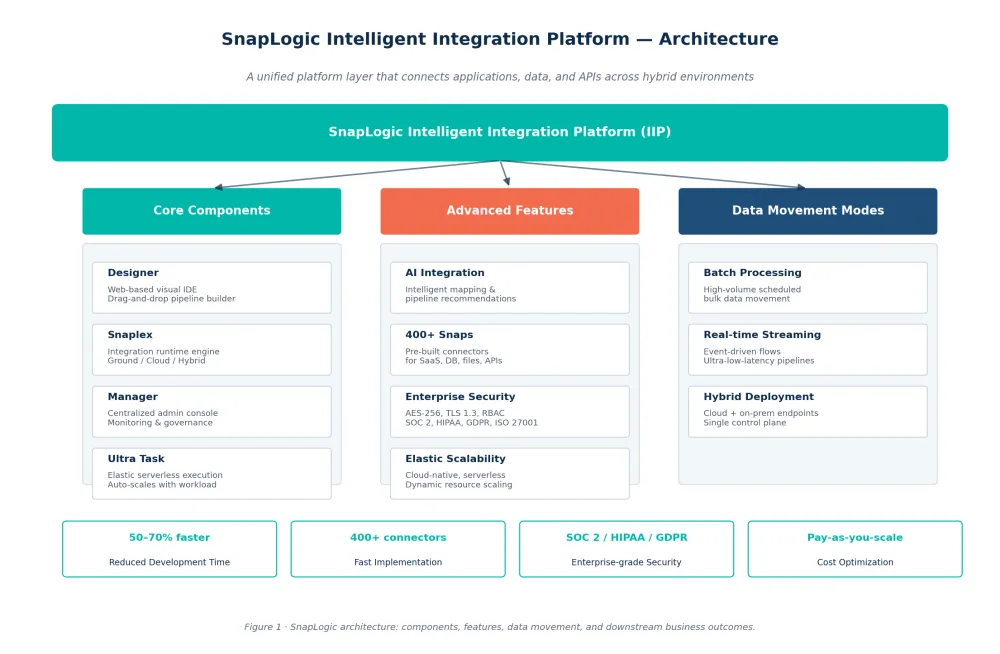
Figure 1 — The four pillars of the IIP: core components (Designer, Snaplex, Manager, Ultra Task), advanced features (AI, Snaps, security, scalability), data movement modes (batch, streaming, hybrid), and the downstream business outcomes they enable.
At the heart of the platform is SnapLogic's integration runtime (Snaplex), which can be deployed either cloud-hosted or on-premises, giving organizations maximum flexibility in their deployment strategy. The platform features a web-based Designer that offers a visual, drag-and-drop interface for building integration pipelines without extensive coding. These pipelines are composed of modular units called "Snaps" — pre-built integration components that connect to specific applications, data sources, or protocols.

2.1 Key Architectural Components
-
Designer: A web-based IDE that provides a visual interface for designing, testing, and deploying integration pipelines. The Designer features a low-code environment that enables both developers and business users to create complex integrations through drag-and-drop functionality and visual configuration. Recent releases have added in-pipeline AI suggestions, live data preview at every step, and a "snap-as-you-go" pattern that recommends the next logical component based on what's already on the canvas.
-
Snaplex: The integration runtime engine that executes pipelines created in the Designer. Snaplex can be deployed in three configurations:
- Ground Snaplex: Deployed within the customer's infrastructure (on-premises or private cloud) for secure access to internal systems. This is critical for organizations with data residency requirements or systems that cannot be exposed to the public internet.
- Cloud Snaplex: Hosted by SnapLogic in their cloud environment for optimal performance and reduced infrastructure management. Customers can choose between AWS, Azure, or GCP-backed Snaplex regions for data sovereignty.
- Hybrid Snaplex: Combines both ground and cloud components, allowing a single pipeline to flow through both environments — for example, reading from an on-prem Oracle database and writing to a cloud data warehouse without intermediate hops.
-
SnapLogic Manager: A centralized administration console that provides comprehensive monitoring, management, and governance capabilities across all integration activities. The Manager offers real-time visibility into pipeline performance, execution statistics, and system health metrics. It also serves as the single pane of glass for RBAC, environment promotion (dev → test → prod), and scheduled task orchestration.
-
Ultra Task: SnapLogic's elastic execution engine that dynamically scales resources based on workload demands. Ultra Task pipelines are designed for sub-second latency use cases — things like real-time fraud scoring, on-demand API responses, and event-triggered micro-integrations. The serverless architecture eliminates the need to provision for peak load, which is particularly valuable for workloads with spiky traffic patterns such as e-commerce checkout or end-of-quarter financial close.
2.2 The Pipeline Model
A SnapLogic pipeline is a directed graph of Snaps, each performing one well-defined operation — read, transform, filter, join, write, or invoke. Snaps pass documents between them as JSON objects, which makes the model both schema-flexible (you can handle messy real-world data without rigid schemas) and inspectable (you can see exactly what flowed through each step during debugging). Pipelines can run in three modes:
- Scheduled — triggered by cron-like schedules for batch jobs
- Triggered — invoked via REST API or webhook for synchronous request/response patterns
- Ultra / Streaming — continuously processing events from Kafka, Kinesis, or JMS queues with sub-second latency
This unified pipeline model is one of SnapLogic's quietest but most powerful architectural decisions: a single pipeline can serve batch, API, and streaming use cases without rewriting, which dramatically improves reuse across teams.
3. Core Features & Capabilities
SnapLogic's comprehensive feature set addresses the diverse integration needs of modern enterprises, from simple data migrations to complex, real-time application networks. Below we cover the four areas where the platform most clearly differentiates itself.
3.1 AI-Powered Integration
SnapLogic's most innovative feature is its incorporation of artificial intelligence and machine learning directly into the integration process. While many competitors have retrofitted AI as a chat assistant bolted onto a legacy UI, SnapLogic has been building AI into the pipeline authoring workflow since 2017, when it shipped Iris — the first ML-powered field-mapping assistant in the iPaaS category. The 2023 Generative Integration release layered LLM capabilities on top, so users can now describe an integration in natural language and receive a draft pipeline to refine.
-
Intelligent Mapping: The platform automatically suggests field mappings between different systems based on data type matching, naming conventions, and historical patterns from similar integrations. For a typical Salesforce-to-NetSuite customer sync, this can reduce manual mapping work by 40–60%, and the suggestions improve as more pipelines are built in the tenant.
-
Pipeline Recommendations: SnapLogic's AI analyzes existing integration patterns and recommends optimal pipeline configurations based on similar use cases. When a developer drops a Salesforce Snap onto the canvas, the AI suggests the most common next steps (filter, transform, write to NetSuite) along with template pipelines from the SnapLogic community.
-
Anomaly Detection: The platform continuously monitors integration performance and automatically identifies and flags anomalies such as unexpected data formats, performance bottlenecks, or potential errors. Operations teams can subscribe to alerts via Slack, PagerDuty, or email, and the system includes suggested root-cause hypotheses rather than just raw metrics.
-
Self-Documenting Pipelines: The AI automatically generates documentation for integration pipelines, including data lineage, transformation logic, and dependency mapping. This dramatically simplifies compliance audits (SOX, GDPR) and onboarding of new team members — a pipeline built three years ago still has up-to-date documentation rather than a stale wiki page.
3.2 Extensive Connector Library
SnapLogic offers one of the industry's most comprehensive libraries of pre-built connectors (called "Snaps"), with over 400+ ready-to-use integrations for popular applications, data sources, and technologies. This extensive catalog eliminates the need for custom connector development and accelerates time-to-value. Unlike some competitors where "connectors" are thin wrappers around REST endpoints, SnapLogic Snaps are substantive — they handle authentication, pagination, rate limiting, error retry, and bulk operations as first-class concerns.
📦 Explore SnapLogic's Connector Categories
- SaaS Applications: Salesforce, ServiceNow, NetSuite, Workday, Adobe Creative Cloud, Microsoft Office 365, Google Workspace, HubSpot, Zendesk, Slack, Jira
- Databases: Oracle, SQL Server, PostgreSQL, MySQL, MongoDB, Cassandra, Snowflake, Redshift, BigQuery, Databricks
- File Formats: CSV, JSON, XML, Avro, Parquet, Excel, fixed-width
- Protocols: REST, SOAP, GraphQL, JDBC, ODBC, FTP, SFTP, HTTP/HTTPS, AS2
- Big Data & Streaming: Hadoop, Spark, Kafka, Hive, Impala, Kinesis, Event Hubs
- Enterprise Applications: SAP (S/4HANA, ECC, BAPI, IDoc), Oracle E-Business Suite, Siebel, PeopleSoft, Workday HCM/Financials
- Cloud Services: AWS (Redshift, S3, RDS, Lambda, DynamoDB), Azure (SQL Database, Blob Storage, Functions, Synapse), Google Cloud Platform (BigQuery, Cloud Storage, Cloud Functions, Pub/Sub)
- Mainframe & Legacy: IBM MQ, CICS, VSAM (via partner snaps)
- AI/ML Services: OpenAI, Anthropic, AWS Bedrock, Azure OpenAI, Hugging Face
3.3 Enterprise-Grade Security & Compliance
SnapLogic provides comprehensive security capabilities designed to meet the stringent requirements of enterprise IT organizations. Security is baked into the architecture rather than added as an afterthought, and the company undergoes regular third-party audits to maintain its compliance posture.
- Data Encryption: All data is encrypted at rest and in transit using industry-standard encryption protocols (AES-256, TLS 1.3). Customer data is logically isolated per tenant, and encryption keys can be customer-managed via AWS KMS or Azure Key Vault for organizations that require bring-your-own-key (BYOK).
- Role-Based Access Control (RBAC): Granular permission settings ensure that users only have access to the pipelines, data, and resources appropriate for their role. SnapLogic supports fine-grained asset-level permissions, project-based grouping, and environment-scoped roles (e.g., "deploy to prod" can be restricted to a specific group).
- Compliance Certifications: The platform maintains compliance with major industry standards including SOC 2 Type II, HIPAA, GDPR, PCI DSS, ISO 27001, and FedRAMP Moderate (for U.S. government workloads). Annual audit reports are available under NDA.
- Audit Logging: Comprehensive audit trails track all user activities, pipeline changes, and data access events for security monitoring and compliance reporting. Logs are exportable to SIEM systems (Splunk, Datadog, Sumo Logic) via webhook or syslog.
- Secrets Management: Secure storage and management of credentials, API keys, and other sensitive information using industry best practices. SnapLogic's Accounts feature supports OAuth refresh-token rotation, vault integrations (HashiCorp Vault, AWS Secrets Manager), and per-environment secret scoping.
3.4 Advanced Data Processing
SnapLogic provides robust capabilities for data transformation and enrichment as part of the integration process. The transformation engine is Turing-complete — you can write arbitrary logic in JavaScript or Python within an Expression Snap when declarative options aren't enough — but most common transformations are achievable visually.
- Visual Data Mapping: Intuitive interface for defining complex data transformations without coding, including nested object handling, array operations, and conditional logic.
- Data Validation: Built-in validation rules ensure data quality and consistency throughout the integration process. Invalid records can be routed to a dead-letter queue for manual review.
- Data Transformation: Support for complex transformations including joins, aggregations, filtering, lookups, and custom logic. The Join Snap supports inner, left, right, and full outer joins across any data source.
- Real-time Processing: Capabilities for streaming data processing and real-time integration scenarios via Ultra Task pipelines and Kafka/Kinesis Snaps.
- Batch Processing: Efficient handling of large data volumes through optimized batch processing capabilities. Pipelines can process tens of millions of records per hour on a single Snaplex node, and scale horizontally for larger workloads.
4. Platform Benefits & Business Value
Organizations that implement SnapLogic realize significant business value across multiple dimensions. The benefits compound: faster development cycles lead to more integrations being built, which generates more reusable assets, which accelerates the next project.

4.1 Reduced Development Time
- 50–70% faster integration development through the visual interface and AI-assisted features. SnapLogic customers regularly report that integrations that previously took 4–6 weeks of custom coding now ship in 3–5 days.
- Pre-built connectors eliminate weeks of custom development work, particularly for popular SaaS applications where the SnapLogic Snap handles authentication, pagination, and rate limiting that would otherwise consume engineering cycles.
- Reusable components and templates accelerate similar integration projects. Most SnapLogic customers build a library of "golden" pipelines that new projects fork from.
- Self-service capabilities reduce dependency on specialized integration teams. Business analysts can build and maintain moderately complex integrations, freeing developers to focus on architecture and edge cases.
4.2 Scalability & Performance
- Elastic architecture automatically scales resources based on workload demands. Ultra Task pipelines can scale from zero to thousands of concurrent executions in seconds.
- Serverless execution eliminates infrastructure management overhead. Customers do not need to provision, patch, or scale servers for cloud-only workloads.
- Optimized performance for high-volume data processing and real-time scenarios. SnapLogic publishes performance benchmarks showing throughput of millions of records per hour on standard Snaplex configurations.
- Hybrid deployment options provide flexibility for different use cases. The same pipeline can run in dev, test, and prod environments with different Snaplex configurations, simplifying environment promotion.
4.3 Enhanced Governance & Control
- Centralized management of all integration activities across the enterprise. A single Manager console provides visibility into every pipeline across every environment.
- Self-documenting pipelines maintain clear records of integration logic and data lineage. This is increasingly important as data privacy regulations (GDPR, CCPA) require organizations to demonstrate where personal data flows.
- Built-in monitoring and alerting capabilities ensure proactive issue resolution. Alerts can be routed to Slack, PagerDuty, or email, and include suggested remediations.
- Version control and change management features support compliance requirements. Every pipeline change is tracked, and rollback to previous versions is a one-click operation.
4.4 Cost Optimization
- Reduced TCO through lower development and maintenance requirements. Customers typically report payback periods of 9–18 months compared to custom-coded alternatives.
- Flexible pricing model aligns costs with actual usage. Snaps consumed, pipeline executions, and data volume are the primary cost drivers, allowing organizations to start small and scale.
- Elimination of custom code reduces ongoing maintenance burden. No more brittle scripts that only one developer understands; pipelines are visual, documented, and transferable.
- Improved productivity allows IT teams to focus on strategic initiatives rather than integration plumbing. The "integration backlog" — a common frustration in IT organizations — shrinks dramatically.
5. Primary Use Cases
SnapLogic serves a diverse range of integration scenarios across industries and organizational functions. The four use cases below represent the majority of production deployments we see across SnapLogic's customer base.
5.1 Data Migration & Consolidation
Organizations leverage SnapLogic for large-scale data migration projects, which remain one of the most common — and most painful — enterprise integration scenarios:
- Legacy system modernization: Migrating data from legacy applications (mainframe, AS/400, older ERPs) to modern SaaS solutions. SnapLogic's ability to handle both source and target in a single pipeline, with full data quality and reconciliation reporting, makes it particularly well-suited for these projects.
- M&A integration: Consolidating data from acquired companies into unified systems. Time-to-integration is often a critical success factor in M&A, and SnapLogic's pre-built connectors and rapid development model shine here.
- Cloud migration: Moving on-premises data to cloud data warehouses and applications. The hybrid Snaplex deployment model allows data to flow from on-prem sources to cloud targets without exposing internal systems directly to the internet.
- Data warehouse updates: Populating and updating enterprise data warehouses and data lakes. SnapLogic's ELT support, including pushdown optimization to Snowflake and BigQuery, makes it competitive with dedicated ETL tools for many analytical workloads.
5.2 Application Integration
SnapLogic excels at connecting disparate applications to enable seamless business processes:
- CRM and ERP synchronization: Ensuring data consistency between Salesforce, SAP, Oracle, and other systems. Bi-directional sync with conflict resolution is supported natively.
- Supply chain integration: Connecting ERP systems with supplier and logistics systems, including EDI translation for B2B transactions.
- HR process automation: Integrating HR systems with payroll, benefits, and recruiting platforms. Common pattern: Workday → payroll provider → benefits platform → 401(k) provider, all triggered by employee lifecycle events.
- Customer experience orchestration: Connecting marketing, sales, and service applications for a 360-degree customer view. SnapLogic's ability to compose APIs from multiple backends supports the "Customer 360" pattern that many organizations are pursuing.
5.3 Data Analytics & BI
Organizations use SnapLogic to populate analytics platforms and enable data-driven decision-making. While dedicated ETL/ELT tools (Fivetran, Airbyte, dbt) compete in this space, SnapLogic's advantage is that the same platform can handle both analytical and operational integrations — a single tool for the entire integration estate.

- Data warehouse population: Extracting, transforming, and loading data into analytical platforms including Snowflake, BigQuery, Redshift, and Databricks.
- Real-time analytics: Streaming data to analytics platforms for immediate insights. Ultra Task pipelines support change data capture (CDC) from source databases for near-real-time dashboards.
- Self-service data preparation: Empowering business users to prepare data for analysis without IT dependency. The Designer's visual interface is approachable enough for analyst-tier users.
- Data quality enhancement: Improving data quality through validation, standardization, and enrichment processes. Built-in address validation, phone normalization, and duplicate detection Snaps cover common quality use cases.
5.4 API Management
SnapLogic serves as a foundation for API initiatives by enabling:

- API creation: Quickly exposing data and functionality through REST APIs. Any pipeline can be exposed as an API endpoint with a single configuration change.
- API composition: Combining multiple services into composite APIs. The "API-led" pattern popularized by MuleSoft is achievable in SnapLogic through reusable task pipelines.
- API modernization: Modernizing legacy systems by wrapping them with modern APIs. SOAP-to-REST transformation is a built-in capability.
- B2B integration: Exposing APIs to partners and external systems, including OAuth2 client credentials flow and rate limiting for partner-facing endpoints.
6. Platform Limitations & Considerations
While SnapLogic offers compelling benefits, organizations should consider potential limitations honestly. No platform is the right fit for every use case, and acknowledging where SnapLogic falls short helps prospective customers make better decisions.
6.1 Learning Curve
- While the visual interface is user-friendly for simple integrations, complex scenarios — particularly those involving nested data, complex transformations, or async patterns — require specialized training. SnapLogic University offers role-based certifications, but reaching "developer" proficiency typically takes 40–60 hours of dedicated learning.
- Full utilization of advanced features like Ultra Task, API management, and AI-powered integration requires understanding of integration best practices. Organizations new to iPaaS concepts often need an experienced architect for the first major project.
- Organizations with limited integration expertise may need to invest in training or professional services initially. SnapLogic's professional services team is well-regarded but adds to first-year costs.
6.2 Pricing Model
- SnapLogic's quote-based pricing can be complex to budget for compared to fixed-price alternatives. Prospective customers should expect a procurement cycle and a contract that includes specific Snap usage limits, pipeline execution counts, and data volume tiers.
- Costs can scale significantly with high-volume usage. A pipeline processing 50M records per day will consume substantially more "Snaps" than one processing 50K records per day, and the pricing reflects that. Organizations with very large batch workloads should negotiate volume discounts upfront.
- Smaller organizations with simple integration needs may find the platform more expensive than simpler alternatives. A 50-person company that just needs to sync QuickBooks to Salesforce may be better served by a $100/month Zapier or Tray.io plan.
6.3 Customization Limitations
- While the platform offers extensive pre-built capabilities, highly specialized or unique integration scenarios may still require custom development. SnapLogic's SDK allows customers to build custom Snaps in Java, but this is a non-trivial undertaking and creates long-term maintenance burden.
- Advanced customization sometimes requires workaround solutions that may not be as elegant as custom-coded solutions. For example, complex event correlation across multiple streams is achievable but requires more effort than in a dedicated streaming platform like Confluent or Databricks.
6.4 Geographic and Vertical Limitations
- SnapLogic's data center footprint is concentrated in North America and Europe. Organizations with strict data residency requirements in regions like China, Russia, or the Middle East may face deployment challenges.
- Industry-specific connectors (healthcare HL7, financial services FIX protocol, manufacturing OPC UA) are thinner than for general SaaS. Organizations in these verticals should verify connector coverage before committing.
7. User Reviews & Market Perception
SnapLogic maintains strong user ratings and reviews across major software review platforms. The pattern is consistent: users praise ease of use and connector breadth, and they want better documentation and pricing transparency.
7.1 G2 Ratings (as of 2025)
| Category | Rating | Total Reviews |
|---|---|---|
| Overall | 4.4/5 | 450+ |
| Ease of Use | 4.3/5 | 450+ |
| Quality of Support | 4.2/5 | 450+ |
| Ease of Setup | 4.1/5 | 450+ |
| Meets Requirements | 4.4/5 | 450+ |
7.2 What Users Praise
- Intuitive visual interface that accelerates development, particularly for new users coming from a coding background.
- Comprehensive connector library that reduces custom development and covers most popular SaaS, database, and file system targets.
- Scalability and performance for handling large data volumes, including positive feedback on Ultra Task for real-time use cases.
- Strong customer support and professional services team. SnapLogic's customer success model assigns named CSMs to enterprise accounts.
7.3 What Users Want Improved
- Initial learning curve for advanced features. Several reviewers note that the first 2–3 months are slower than expected.
- Documentation could be more comprehensive for complex scenarios, particularly around Ultra Task and API management edge cases.
- Pricing transparency could be improved for budget planning. Quote-based pricing makes initial cost estimation difficult.
💡 User Quote: "SnapLogic has transformed our integration approach. What used to take weeks now takes days, and our business users can even handle simple integrations themselves. The AI features are particularly impressive and have saved us countless hours of development time." — IT Director, Midsize Manufacturing Company
⚠️ Critical Quote: "The platform is powerful, but be prepared for a meaningful learning curve on advanced features. We underestimated the time required to train our team on Ultra Task and API management, and our first major project took longer than expected." — Integration Architect, Financial Services
8. Competitive Landscape & Market Position
SnapLogic operates in the competitive integration Platform as a Service (iPaaS) market, which is projected to reach $15.5 billion by 2026 according to industry analysts at Gartner and IDC. The market is characterized by intense competition and rapid innovation, with vendors differentiating through various capabilities such as AI features, connector breadth, deployment flexibility, and pricing models.
SnapLogic positions itself as a premium, enterprise-focused iPaaS solution with strong capabilities for complex integration scenarios. The company differentiates through its AI-powered integration capabilities (the longest-tenured AI strategy in the category) and comprehensive enterprise features (FedRAMP, hybrid deployment, robust governance). According to G2's 2025 Grid Reports, SnapLogic is recognized as a Leader in the iPaaS category, with high scores for both market presence and customer satisfaction.
The broader market is consolidating. Salesforce acquired MuleSoft in 2018 for $6.5B. Dell spun off Boomi in 2021 to Francisco Partners and TPG for $4B. Informatica was taken private by Permira and the Canadian Pension Plan Investment Board. This consolidation has created clear ownership tiers — SnapLogic remains one of the few independent, pure-play iPaaS vendors at scale, which is either a strategic advantage (no platform lock-in to a hyperscaler's ecosystem) or a strategic risk (potential acquisition target).
9. Top SnapLogic Alternatives
While SnapLogic offers a compelling solution, organizations should evaluate alternatives based on their specific requirements, budget, and technical capabilities. Below are the leading alternatives in the integration market.
9.1 MuleSoft (Anypoint Platform)

Strengths:
- Comprehensive platform covering integration, API management, and the full API lifecycle (design, implementation, management, monetization).
- Strong ecosystem with extensive developer community and Anypoint Exchange marketplace of pre-built templates and connectors.
- MuleSoft Composer offers low-code capabilities for business users, extending the platform beyond developers.
- Unified platform for both API-led and event-driven architectures. Anypoint Studio provides a full IDE for complex flows.
Weaknesses:
- Higher total cost of ownership compared to most alternatives. Enterprise licenses frequently exceed $500K/year and require multi-year commitments.
- Steeper learning curve for non-technical users. The platform assumes developer-level skills for non-trivial work.
- Pricing complexity with multiple components (runtime, API manager, Exchange, Composer) sold separately.
Best For: Large enterprises requiring comprehensive API management and integration capabilities with a unified platform, particularly those already standardized on the Salesforce ecosystem.
9.2 Dell Boomi

Strengths:
- Low-code interface accessible to both developers and business users — arguably the most approachable of the enterprise iPaaS platforms.
- Extensive connector library with 200+ pre-built connectors, including strong coverage of mid-market applications.
- AtomSphere architecture provides flexible deployment options via lightweight "atoms" that can run anywhere — cloud, on-prem, or edge.
- Strong community support and user resources, including an active user community and Boomi World annual conference.
Weaknesses:
- Limited advanced features compared to premium alternatives like MuleSoft or SnapLogic. AI capabilities are relatively nascent.
- Performance can vary for very high-volume scenarios. Customers processing billions of records per day sometimes partition work across multiple atoms.
- Customization limitations for highly specialized requirements. Custom connector development requires Boomi's proprietary scripting approach.
Best For: Midsize organizations seeking balance between capabilities and usability with moderate pricing, particularly those with hybrid deployment needs.
9.3 Informatica Intelligent Integration Platform

Strengths:
- Enterprise-grade capabilities for complex data integration scenarios, particularly high-volume batch ETL.
- Advanced data quality and data governance features — the industry benchmark for these capabilities.
- Strong performance for large-scale data processing. Informatica's CLAIRE AI engine brings ML to optimization and recommendations.
- Comprehensive metadata management and data lineage, particularly important for heavily regulated industries.
Weaknesses:
- Traditional interface may feel dated compared to modern alternatives. The IDQ/PowerCenter UIs are powerful but show their age.
- Higher cost, particularly for advanced features. Informatica licenses are typically the most expensive in any comparison.
- Steeper learning curve for casual users. The platform assumes data integration expertise.
Best For: Large enterprises with complex data integration requirements and existing investments in Informatica's broader data management platform.
9.4 Airbyte

Strengths:
- Open-source core with transparent pricing for commercial version. The connector framework is fully open and community-driven.
- Modern ELT approach optimized for data warehouse replication. Airbyte pushes transformation down to the warehouse (dbt-style) rather than doing it in-flight.
- Rapidly growing connector library with community contributions — over 350 connectors as of 2025, with new ones added weekly.
- Cost-effective for high-volume data movement scenarios. Self-hosted deployments can be essentially free for the software, with infrastructure as the only cost.
Weaknesses:
- Limited transformation capabilities compared to full-featured ETL tools. Airbyte is intentionally ELT, so complex transformations must happen in the target warehouse.
- Smaller ecosystem and fewer enterprise features than mature platforms. SOC 2, SSO, RBAC, and audit logging are only available in the paid Cloud tier.
- Primarily focused on data movement rather than application integration. Airbyte is not a good fit for real-time API orchestration or workflow automation.
Best For: Organizations primarily focused on data replication to data warehouses and data lakes, particularly those with open-source preferences and strong data engineering teams.
9.5 Tray.io

Strengths:
- Extremely user-friendly interface with visual workflow builder — the lowest learning curve of any platform in this list.
- Strong API integration capabilities with flexible authentication, including native OAuth flow handling for hundreds of SaaS apps.
- Embedded iPaaS capabilities (via Tray.io Embedded) for integrating workflows into customer-facing applications.
- Affordable pricing for small to midsize organizations, with entry-level plans starting around $500/month.
Weaknesses:
- Limited enterprise features compared to comprehensive platforms. Governance, RBAC, and audit capabilities are thinner than SnapLogic or MuleSoft.
- Less suited for complex data transformations. Tray.io is workflow-first, not data-first.
- Scalability limitations for very high-volume scenarios. Tray.io is built for event-driven workflows, not bulk ETL.
Best For: Small to midsize organizations focused on workflow automation and API integration with limited IT resources, or SaaS companies wanting to embed integrations in their products.
10. Feature Comparison: SnapLogic vs. Top Alternatives
The following table provides a detailed comparison of SnapLogic with its leading alternatives across key features. Ratings are on a 1–5 star scale based on a combination of analyst reports, user reviews, and hands-on evaluation.
| Feature | SnapLogic | MuleSoft | Dell Boomi | Informatica | Airbyte | Tray.io |
|---|---|---|---|---|---|---|
| Deployment Flexibility | Cloud, On-prem, Hybrid | Cloud, On-prem, Hybrid | Cloud, On-prem, Hybrid | Primarily Cloud, some On-prem | Cloud (self-host available) | Cloud only |
| Visual Interface | ★★★★★ | ★★★★☆ | ★★★★★ | ★★★☆☆ | ★★★☆☆ | ★★★★★ |
| AI Capabilities | ★★★★★ | ★★★★☆ | ★★★☆☆ | ★★★★☆ | ★☆☆☆☆ | ★★☆☆☆ |
| Connector Library | 400+ | 300+ | 200+ | 250+ | 350+ | 600+ |
| Transformation Capabilities | ★★★★★ | ★★★★★ | ★★★★☆ | ★★★★★ | ★★☆☆☆ | ★★★☆☆ |
| API Management | ★★★★☆ | ★★★★★ | ★★★★☆ | ★★★★☆ | ★★☆☆☆ | ★★★★☆ |
| Enterprise Security | ★★★★★ | ★★★★★ | ★★★★☆ | ★★★★★ | ★★★☆☆ | ★★★☆☆ |
| Scalability | ★★★★★ | ★★★★★ | ★★★★☆ | ★★★★★ | ★★★★☆ | ★★★☆☆ |
| Pricing Model | Quote-based | Quote-based | Quote-based | Quote-based | Consumption-based | Subscription + Usage |
| Best For | Enterprise complex integrations | Comprehensive API management | Balanced enterprise capabilities | Complex data integration | Data warehouse replication | Workflow automation |
| Starting Price | ~$1,500/month | ~$2,000/month | ~$1,200/month | ~$2,500/month | Free (open source) | ~$500/month |
Table 1 — Comparative analysis of SnapLogic and leading integration platforms based on 2025 market data.
For a more visual comparison, the radar chart below shows how each platform scores across six capability dimensions.

Figure 3 — Capability radar across six dimensions. SnapLogic leads on AI and visual UX; MuleSoft leads on API management; Informatica leads on transformation depth; Airbyte and Tray.io are more specialized.
11. Selection Guidance: Choosing the Right Integration Platform
Selecting the right integration platform requires careful consideration of your organization's specific requirements, constraints, and technical capabilities. The following decision framework can help guide your evaluation.

Figure 2 — Decision framework: start from your dominant use case, branch on organizational context, and land on a shortlist of two or three platforms to pilot.
11.1 Key Selection Criteria
When evaluating integration platforms, consider the following critical factors in order of typical importance:
- Functional Requirements — Match platform capabilities to your specific integration use cases, including application integration, data migration, API management, and workflow automation. List your top 10 integration scenarios and verify each platform can handle them.
- Technical Requirements — Consider deployment preferences (cloud, on-premises, hybrid), scalability needs, security requirements, and compliance certifications. If you need HIPAA or FedRAMP, narrow the field immediately.
- Usability Requirements — Assess the technical expertise of your team and choose a platform that matches their skill levels. A platform that requires developers when you only have business analysts will fail to achieve ROI.
- Integration Ecosystem — Evaluate the breadth and quality of pre-built connectors for your specific application and technology stack. Ask the vendor to demo the connectors for your top 5 most important systems.
- Total Cost of Ownership — Consider not just subscription costs but also implementation expenses, training requirements, and ongoing maintenance costs. A "cheaper" platform that requires expensive consultants can be more expensive in year one.
- Vendor Roadmap — Assess the vendor's innovation trajectory and commitment to R&D, particularly in emerging areas like AI and event-driven architectures. Ask for the 12-month and 24-month roadmap under NDA.
11.2 Decision Framework
The decision tree in Figure 2 condenses these criteria into a practical flow. Start with your primary use case (most organizations have one dominant pattern even if multiple are present), branch on organizational context (size, budget, IT maturity), and land on a shortlist of two or three platforms to pilot.
11.3 Pilot Best Practices
Once you've narrowed the field, run a 30/60/90-day pilot:
- Days 0–30: Stand up the platform, train two or three developers, and migrate one simple existing integration. Focus on training and onboarding metrics.
- Days 30–60: Build one new integration end-to-end, ideally a representative workload (not the simplest, not the most complex). Measure development time, defect rate, and user adoption.
- Days 60–90: Stress-test with production-like volumes. Run a disaster recovery drill. Validate security and audit capabilities with your CISO's team.
At the end of 90 days, you should have enough data to make a confident, fact-based decision — and a working integration to show for the effort.
12. Conclusion: SnapLogic's Value Proposition
SnapLogic has established itself as a leading enterprise integration platform with a compelling combination of powerful capabilities, user-friendly design, and innovative AI features. The platform excels in complex integration scenarios where organizations need to connect diverse applications and data sources across their enterprise ecosystem.
Key strengths include its comprehensive feature set (400+ connectors, hybrid deployment, serverless execution), extensive enterprise capabilities (FedRAMP, SOC 2, RBAC), elastic scalability, and the most mature AI strategy in the iPaaS category. The AI-powered integration capabilities — from Iris field-mapping recommendations to the 2023 Generative Integration release — differentiate SnapLogic from competitors and meaningfully reduce development time for complex integrations.
Potential limitations include a learning curve for advanced features (realistic 40–60 hour investment for developer proficiency) and a pricing model that may be prohibitive for smaller organizations or those with simple integration needs. Organizations with highly specialized requirements — niche industry protocols, extreme low-latency streaming, or unusual data residency constraints — may also encounter limitations in customization options.
12.1 SnapLogic is Particularly Well-Suited For
- Midsize to large enterprises with complex integration requirements spanning multiple systems, geographies, and data types.
- Organizations seeking to accelerate integration development through AI capabilities, particularly those with limited specialized integration teams.
- Companies with hybrid cloud environments requiring flexible deployment options and a single platform for both cloud and on-premises integration.
- Teams looking for a balance between powerful features and user-friendly design — the "Goldilocks" platform between Tray.io's simplicity and MuleSoft's complexity.
12.2 When to Look Elsewhere
For organizations with simpler requirements or limited budgets, alternatives like Airbyte for data movement or Tray.io for workflow automation may provide more cost-effective solutions. Large enterprises requiring comprehensive API management might prefer MuleSoft, while those with complex data transformation needs and existing data-management investments might consider Informatica. Midsize organizations seeking a balance might find Boomi a better cultural fit, particularly if their team skews toward business analyst profiles.
12.3 Final Assessment
Ultimately, SnapLogic represents a premium integration platform that delivers significant business value for organizations willing to invest in its capabilities. The 50–70% development time reduction, combined with strong enterprise security and the most mature AI story in the category, justifies the premium pricing for the right use cases. As the integration landscape continues to evolve with trends like event-driven architectures, microservices, AI-powered automation, and composable enterprise patterns, SnapLogic is well-positioned to remain a leader in this critical technology category — provided it continues to invest in AI innovation and connector depth in the face of aggressive competition from both hyperscaler-native tools and open-source challengers.
The right way to evaluate SnapLogic is not in isolation but against your specific integration backlog, team capabilities, and three-year digital roadmap. For most mid-to-large enterprises with hybrid environments and a meaningful integration backlog, SnapLogic deserves a place on the shortlist — and very often, the top of it.
Article last updated: June 2025. Pricing and feature details reflect publicly available information as of the publication date. Always verify current capabilities directly with vendors during procurement.