
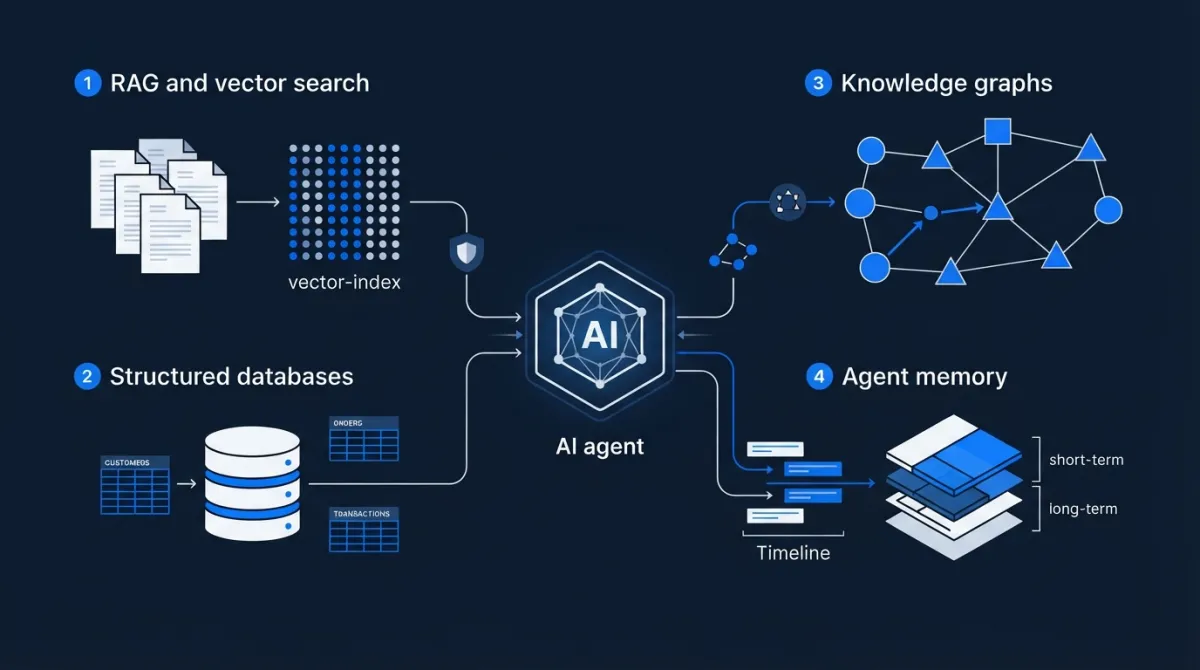
The Data Layer Behind AI Agents: RAG, Memory, Databases, and Knowledge Graphs
An AI agent can have a powerful language model, sophisticated reasoning capabilities, and access to dozens of tools. But if it cannot retrieve the right information at the right time, its capabilities are limited.
Consider an enterprise agent asked to answer this question:
"Which customers experienced delivery delays last month, what were the main causes, and which of them have unresolved support tickets?"
Answering this requires more than generating text.
The agent needs to retrieve customer records, access delivery information, search support tickets, understand relationships between records, compare dates, and combine evidence from different systems.
Some information belongs in relational databases. Some is stored in documents. Some relationships are easier to represent using knowledge graphs. Other information must be retained as conversational or task memory.
The architecture connecting these sources is the agent's data layer.
This layer determines what information the agent can access, how it retrieves that information, how it maintains context, and whether its responses can be grounded in reliable evidence.
This article explores the main components of an AI agent data architecture and explains when to use each one.
1. Why the data layer matters
Large language models contain knowledge acquired during training, but that knowledge has important limitations.
A model cannot automatically know:
- The latest status of a customer's order.
- The contents of an organization's private documents.
- A newly updated company policy.
- The current inventory of a warehouse.
- The history of a user's previous interactions with an application.
- Relationships between records in an internal database.
Even when a model has learned general information about a subject, it cannot be assumed to know the current state of a particular business.
This is why production agents need access to external data.
A typical agent data architecture has several responsibilities:
- Knowledge retrieval: Find relevant information from documents and knowledge bases.
- Structured data access: Query databases and business systems.
- Relationship discovery: Understand connections between entities and records.
- Memory management: Retain useful information from previous interactions or tasks.
- Context construction: Provide the model with the right information for its current decision.
- Data governance: Enforce permissions, freshness, privacy, and retention requirements.
These responsibilities are related, but they are not identical.
A vector database does not replace a relational database. A conversation history does not automatically provide reliable long-term memory. A knowledge graph is not simply another name for a document store.
The architecture should assign each data problem to an appropriate storage and retrieval mechanism.
2. Understanding the main components of an agent data layer
Before looking at individual technologies, it helps to understand the different kinds of information an agent works with.
| Data component | What it contains | Typical technology |
|---|---|---|
| Documents | PDFs, manuals, reports, policies | Object storage and document repositories |
| Structured records | Customers, orders, inventory, transactions | Relational databases |
| Search indexes | Searchable text and embeddings | Search engines and vector databases |
| Relationships | Connections between entities | Knowledge graphs |
| Working context | Current task and conversation state | Application state or session storage |
| Long-term memory | Relevant facts and previous experiences | Relational, document, vector, or graph storage |
These components may be implemented using separate services or combined technologies.
For example, PostgreSQL can store structured business records and support vector search through the pgvector extension. A dedicated search platform may handle document retrieval, while a graph database represents complex relationships.
The correct architecture depends on the access patterns and requirements of the application.
3. Retrieval-Augmented Generation: connecting agents to external knowledge
Retrieval-Augmented Generation (RAG) is one of the most widely used approaches for giving language models access to external information.
The principle is straightforward:
Instead of asking the model to answer entirely from its pretrained knowledge, the application first retrieves relevant information from an external data source and includes it in the model's context.
The model then generates an answer using that retrieved information.
How RAG works
A basic RAG system follows three main stages:
1. Retrieve
The application searches an index or data source for information relevant to the user's question.
2. Augment
The retrieved information is added to the model's input alongside the original question and instructions.
3. Generate
The model produces a response using the supplied context.
The simplified architecture looks like this:
             User Question
                   |
                   v
              Query Search
                   |
                   v
            Retrieval System
                   |
                   v
          Relevant Documents
                   |
                   v
          Context Construction
                   |
                   v
              Language Model
                   |
                   v
              Final Answer
Microsoft's documentation describes RAG as a combination of retrieval and generation that allows responses to be grounded in private or frequently changing information.
Source: Microsoft Foundry — Retrieval-Augmented Generation and Indexes.
Why not simply put all documents in the prompt?
Language models have context limits. Even when large context windows are available, sending an entire document collection with every request is usually inefficient.
It can also introduce:
- Higher inference costs.
- Increased latency.
- Irrelevant information.
- Conflicting evidence.
- Difficulty identifying the most useful passages.
RAG addresses this by retrieving a smaller set of relevant information for each request.
The objective is not to give the model access to every document simultaneously. It is to give it access to the information needed for the current task.
4. The RAG ingestion pipeline: preparing data for retrieval
A RAG system needs an ingestion pipeline before it can retrieve useful information.
Ingestion transforms raw data into a format suitable for indexing and search.
Consider an organization with thousands of PDF documents containing technical manuals, product specifications, and internal policies.
A typical ingestion pipeline includes the following steps.
Step 1: Extract the content
Documents must first be converted into machine-readable content.
Depending on the source, extraction may involve:
- PDF text extraction.
- OCR for scanned documents.
- HTML parsing.
- Word document processing.
- Spreadsheet extraction.
- Structured data connectors.
This step is important because poor extraction produces poor retrieval results.
For example, a scanned table may contain product specifications that become meaningless if its columns and values are extracted incorrectly.
Step 2: Clean and normalize
Raw documents often contain:
- Repeated headers and footers.
- Navigation elements.
- Duplicate paragraphs.
- Broken formatting.
- Unnecessary whitespace.
- Irrelevant metadata.
The ingestion pipeline should remove noise while preserving information that affects meaning.
Step 3: Split documents into chunks
A large document is generally divided into smaller sections called chunks.
Why?
Because retrieval systems need to identify relevant portions of a document rather than returning entire collections of unrelated content.
For example, a 100-page technical manual could be divided into sections covering installation, maintenance, troubleshooting, and specifications.
The retrieval system can then return the relevant section rather than the entire manual.
There are several chunking strategies:
| Strategy | Description | Suitable use |
|---|---|---|
| Fixed-size chunking | Splits text based on a defined size | Simple documents |
| Overlapping chunking | Includes some repeated text between adjacent chunks | Preserving context across boundaries |
| Recursive chunking | Splits using structural separators such as paragraphs and headings | General document collections |
| Semantic chunking | Uses content meaning to determine boundaries | Documents with complex topic transitions |
| Structure-aware chunking | Preserves sections, tables, and document hierarchy | Technical documentation |
There is no universally optimal chunk size.
A chunk that is too small may lose important context. A chunk that is too large may contain several unrelated subjects.
The right choice should be evaluated against actual retrieval performance.
Step 4: Generate embeddings
Once the content is prepared, an embedding model converts each chunk into a numerical vector.
An embedding represents semantic information in a mathematical space.
For example, the following two sentences use different words:
- "How do I reset my password?"
- "What should I do if I forget my login credentials?"
A semantic embedding model may represent these sentences as vectors that are relatively close to each other because their meanings are similar.
This makes it possible to search by meaning rather than relying exclusively on exact keyword matches.
An important distinction:
An embedding is not a database record or a summary of the document. It is a numerical representation used for similarity-based retrieval.
Step 5: Store the vectors and metadata
The generated embeddings are stored in a vector index or a database that supports vector search.
However, storing vectors alone is insufficient.
Each chunk should also have useful metadata, such as:
- Document identifier.
- Document title.
- Source URL or file location.
- Section name.
- Creation date.
- Last modified date.
- Document version.
- Access-control information.
- Relevant business category.
Metadata helps the application filter results, preserve provenance, and enforce access restrictions.
Complete ingestion flow
Documents and Data Sources
          |
          v
     Content Extraction
          |
          v
      Data Cleaning
          |
          v
       Chunking
          |
          v
   Embedding Generation
          |
          v
   Vector Index + Metadata
          |
          v
      Search Ready
The quality of this pipeline directly affects the quality of the information retrieved by the agent.
5. Vector databases: what they actually do
A vector database stores and searches numerical representations of data.
Its main purpose in a RAG architecture is to identify vectors that are similar to a query vector.
For example, a user asks:
"How can I reduce server response time?"
The application converts the question into an embedding and searches for documents whose embeddings are semantically similar.
The retrieval system may return documentation about caching, database optimization, and API performance.
How vector similarity works
A vector is a list of numerical values.
For illustration:
Document A:
[0.12, 0.45, 0.81, 0.32]

Document B:
[0.10, 0.43, 0.78, 0.30]

Query:
[0.11, 0.44, 0.80, 0.31]
These are simplified vectors, not actual production embeddings.
A similarity function measures how close two vectors are.
Common approaches include:
- Cosine similarity.
- Dot product.
- Euclidean distance.
The appropriate metric depends on the embedding model and the vector index configuration.
Approximate nearest-neighbor search
When a vector database contains millions of vectors, comparing a query against every stored vector can be expensive.
Vector databases therefore use indexing algorithms to find nearby vectors efficiently.
One commonly used family is Approximate Nearest Neighbor (ANN) search.
ANN methods trade some degree of exactness for faster retrieval at scale.
The engineering challenge is balancing:
- Search latency.
- Recall.
- Index size.
- Memory consumption.
- Ingestion speed.
Vector database versus relational database
A vector database is not a universal replacement for traditional databases.
Consider these two questions:
- "Find documents discussing customer complaints about delayed delivery."
- "Find all orders belonging to customer 1042 that have not shipped."
The first is naturally suited to semantic search.
The second is a structured query.
A relational database is usually better suited to the second operation because it can apply explicit conditions, relationships, and transactional guarantees.
Common vector database options
| Technology | General role |
|---|---|
| Pinecone | Managed vector database |
| Weaviate | Vector database with search and data-modeling capabilities |
| Qdrant | Vector search engine with metadata filtering |
| Milvus | Open-source vector database designed for large-scale vector workloads |
| Chroma | Developer-oriented embedding database |
| pgvector | Vector similarity search extension for PostgreSQL |
These technologies differ in deployment models, filtering capabilities, indexing approaches, scalability, and operational requirements.
The best option is not necessarily the one with the largest feature list. It is the one that fits the application's data volume, latency requirements, infrastructure, and operational capabilities.
6. Why vector search alone is often insufficient
Semantic search is powerful, but it does not solve every retrieval problem.
Consider the following query:
"Find the technical document for product XJ-204, revision 7, published in March 2026."
The user is searching for:
- An exact product identifier.
- A specific revision.
- A publication period.
Pure semantic similarity may retrieve documents discussing similar products while missing the exact record.
This is where other retrieval methods become important.
Keyword search
Keyword search is useful when the query contains exact terms, identifiers, codes, or names.
Examples:
- Product SKU.
- Customer number.
- Contract reference.
- Error code.
- Document identifier.
Semantic search
Semantic search is useful when the user expresses a concept without using the exact terminology found in the documents.
Example:
"Why does the application become slow when many users connect?"
A semantic search can identify documents discussing concurrency, connection pooling, and resource saturation.
Hybrid search
Hybrid search combines keyword retrieval with vector-based semantic retrieval.
This is useful because the two methods complement each other.
A practical retrieval pipeline might look like:
                User Query
                    |
                    v
              Query Processing
                    |
             +------+------+
             |             |
             v             v
        Keyword Search  Vector Search
             |             |
             v             v
        Keyword Results  Semantic Results
             |             |
             +------+------+
                    |
                    v
              Result Fusion
                    |
                    v
                 Reranker
                    |
                    v
             Selected Context
                    |
                    v
               Language Model
A reranker evaluates the retrieved candidates and prioritizes the most relevant passages.
This can improve retrieval quality, particularly when the initial search returns many potentially relevant results.
Microsoft Foundry supports keyword, semantic, vector, and hybrid retrieval patterns. Its documentation also describes semantic ranking as a way to prioritize relevant results.
Source: Microsoft Foundry — Retrieval-Augmented Generation and Indexes.
7. Reranking: improving the quality of retrieved information
Retrieval and reranking are separate operations.
The initial retrieval stage attempts to find a sufficiently broad set of relevant candidates.
The reranking stage evaluates those candidates more carefully and orders them according to their relevance to the original query.
For example, suppose a query returns 20 document chunks.
The initial search may identify relevant material about:
- Database indexing.
- Query optimization.
- Caching.
- API latency.
- Server monitoring.
A reranker can prioritize the passages that directly address the question.
This is particularly useful when the vector index retrieves semantically similar but contextually irrelevant content.
Why reranking matters
Imagine that an agent searches an internal company knowledge base for:
"What is the process for approving a software purchase above $10,000?"
The initial retrieval might return:
- General purchasing policies.
- Software procurement documentation.
- Expense reimbursement rules.
- Approval procedures for hardware purchases.
A reranker can prioritize the documents that directly concern software purchases and the relevant approval threshold.
The model then receives more focused context.
Reranking adds processing time and potentially additional inference cost, so it should be used when the improvement in retrieval quality justifies the overhead.
8. Structured databases: when the agent needs facts, not document similarity
A large part of enterprise information is structured.
Examples include:
- Customer records.
- Orders.
- Inventory.
- Invoices.
- Payments.
- Employee records.
- Product catalogs.
- Financial transactions.
These records usually have explicit fields and relationships.
A relational database is designed to manage this kind of information.
Example: querying an order database
Suppose an agent needs to answer:
"Which orders from customer 1042 are still awaiting shipment?"
A database might contain the following tables:
customers
---------
id
name
email

orders
------
id
customer_id
order_date
status
total_amount

shipments
---------
id
order_id
shipment_date
tracking_number
The application can use SQL to retrieve the relevant records:
SELECT
    o.id,
    o.order_date,
    o.status,
    o.total_amount
FROM orders o
WHERE o.customer_id = 1042
AND o.status = 'awaiting_shipment';
This query has explicit conditions and returns structured results.
A language model should not be expected to infer these records from document similarity.
Why structured databases matter for agents
They provide capabilities such as:
- Exact filtering.
- Joins between related records.
- Transactions.
- Constraints.
- Consistent data updates.
- Access control.
- Predictable query results.
For business-critical operations, the application should retain control over SQL execution, validation, and permissions.
An agent may generate or propose a query, but the application must validate it before execution.
In particular, unrestricted database access through model-generated SQL is dangerous.
A production design should consider:
- Read-only credentials where appropriate.
- Approved database views.
- Query validation.
- Row-level authorization.
- Query timeouts.
- Resource limits.
- Restrictions on destructive statements.
Natural-language-to-SQL
Some agent systems translate user requests into SQL.
For example:
"Show me the five products with the highest sales this quarter."
The model may generate a SQL query using the available schema.
However, the reliability of this approach depends on:
- Accurate schema information.
- Clear business definitions.
- Correct date interpretation.
- Proper handling of relationships.
- Query validation.
- Database permissions.
For financial or operational reporting, the definition of metrics should be controlled by the application rather than improvised by the model.
9. Knowledge graphs: understanding relationships between information
Relational databases represent relationships through tables, primary keys, and foreign keys.
Knowledge graphs represent information through entities and their relationships.
This distinction becomes useful when an application must reason across complex networks of connected information.
What is a knowledge graph?
A knowledge graph represents information using three basic elements:
- Nodes: entities.
- Edges: relationships.
- Properties: attributes describing nodes or relationships.
For example:
          Customer A
               |
           PLACED
               |
               v
            Order 101
               |
           CONTAINS
               |
               v
            Product X
               |
           SUPPLIED BY
               |
               v
           Supplier B
This structure represents connected facts:
- Customer A placed Order 101.
- Order 101 contains Product X.
- Supplier B supplies Product X.
The graph can be extended with additional relationships involving invoices, delivery events, support tickets, and other entities.
Why use a graph instead of only vector search?
Vector search identifies semantically similar information.
It does not automatically provide reliable relationship traversal.
Consider:
"Which suppliers are connected to customers with unresolved delivery complaints involving Product X?"
This question requires multiple relationships:
- Identify Product X.
- Find orders containing Product X.
- Find associated customers.
- Identify their delivery complaints.
- Determine which complaints remain unresolved.
- Find the suppliers associated with those orders or products.
A knowledge graph can represent these connections explicitly.
Graph databases and query languages
Examples of technologies used for graph workloads include:
- Neo4j.
- Amazon Neptune.
- ArangoDB.
- Graph capabilities in cloud database platforms.
Graph systems may use different data models and query languages.
For example, Neo4j uses Cypher for querying graph structures.
A simplified query could look like:
MATCH
  (c:Customer)-[:PLACED]->(o:Order)
  -[:CONTAINS]->(p:Product)
WHERE p.sku = 'XJ-204'
RETURN c, o, p;
This example retrieves customers and orders associated with a specific product.
The actual graph schema and query would need to account for the business rules and relationships being modeled.
GraphRAG: combining graphs and retrieval
GraphRAG combines knowledge graph structures with retrieval and language generation.
Instead of relying exclusively on similarity search, the system can use relationships between entities to retrieve context.
This can be useful for:
- Multi-hop questions.
- Enterprise relationship analysis.
- Complex technical documentation.
- Research across interconnected sources.
- Questions requiring an overview of a connected domain.
However, GraphRAG introduces additional requirements:
- Entity extraction.
- Relationship extraction.
- Entity resolution.
- Graph construction.
- Graph maintenance.
- Query planning.
- Provenance and source validation.
A graph is only as useful as the accuracy of its entities and relationships.
For many applications, conventional RAG with structured metadata is sufficient. A graph should be introduced when relationship-based retrieval provides measurable value.
Google Cloud publishes a dedicated GraphRAG reference architecture using Spanner Graph and Agent Platform.
Source: Google Cloud — GraphRAG Infrastructure Using Agent Platform and Spanner Graph.
10. Agent memory: what should an agent remember?
RAG and memory are often discussed together, but they solve different problems.
RAG retrieves external knowledge relevant to a request.
Memory allows an agent application to retain useful information from previous interactions, tasks, or experiences.
Consider an assistant used by a software engineering team.
It may need to remember:
- The user's preferred programming language.
- The architecture of an ongoing project.
- A previous debugging attempt that failed.
- Instructions for a recurring task.
- The current state of an unfinished workflow.
These are not all the same type of memory.
A useful conceptual classification distinguishes semantic, episodic, and procedural memory.
Semantic memory: remembering facts
Semantic memory stores facts and knowledge.
Examples:
- The project uses Laravel.
- The application uses PostgreSQL.
- The customer prefers email notifications.
- The production environment runs on Kubernetes.
These facts can remain useful across multiple conversations.
Episodic memory: remembering experiences
Episodic memory stores information about previous events and interactions.
Examples:
- A deployment failed after a specific configuration change.
- A previous API integration returned an unexpected response.
- A user approved a particular implementation.
- A debugging procedure was already attempted.
This information helps the agent understand what has happened before.
Procedural memory: remembering instructions
Procedural memory contains information about how to perform a task.
Examples:
- The team's code review process.
- Instructions for generating release notes.
- A standard deployment procedure.
- Rules for formatting technical reports.
These instructions should be managed carefully because outdated procedures can cause incorrect behavior.
Short-term versus long-term memory
Another useful distinction is based on how long information must remain available.
| Memory type | Scope | Example |
|---|---|---|
| Working memory | Current execution | Active task and latest tool result |
| Short-term conversational memory | Current session | Recent conversation messages |
| Long-term semantic memory | Across sessions | Stable facts and preferences |
| Episodic memory | Across sessions | Previous actions and outcomes |
| Procedural memory | Across tasks | Reusable instructions |
These categories are conceptual rather than mandatory storage products. One application may implement several memory types using the same database, while another may use separate services.
LangGraph's memory documentation uses semantic, episodic, and procedural categories and distinguishes thread-scoped short-term memory from long-term memory stored in namespaces.
Source: LangGraph — Memory Overview.
11. Designing a memory architecture
A production agent should not simply store every conversation and inject the entire history into every future request.
That approach creates several problems:
- Context grows continuously.
- Inference costs increase.
- Irrelevant information accumulates.
- Old information may conflict with newer information.
- Sensitive information may be retained unnecessarily.
- Retrieval quality can deteriorate.
Instead, memory should be selective.
A practical memory pipeline
A simplified memory architecture could work like this:
            User Interaction
                   |
                   v
            Memory Extraction
                   |
                   v
          Relevance and Validation
                   |
                   v
          Memory Classification
                   |
          +--------+--------+
          |        |        |
          v        v        v
       Semantic Episodic Procedural
        Facts   Events   Instructions
          |        |        |
          +--------+--------+
                   |
                   v
             Persistent Store
                   |
                   v
             Memory Retrieval
                   |
                   v
             Relevant Context
                   |
                   v
                Agent
The system should decide what is worth remembering.
For example, if a user says:
"Use Python for the data-processing scripts in this project."
The application may store a project-specific preference.
But if the user says:
"Show me how to write a Python loop."
That request does not necessarily imply a persistent preference.
Memory should have scope
Memory records should be associated with an appropriate owner and scope.
Possible scopes include:
- User.
- Organization.
- Project.
- Conversation.
- Agent.
- Task.
A project-specific fact should not automatically become a global user preference.
Likewise, one customer's information must not become accessible to another customer's agent.
Memory should be updateable
Information changes.
A user may change preferences, a project may adopt a new database, and an old procedure may become obsolete.
A memory system should support:
- Updating existing facts.
- Recording when information was learned.
- Tracking source and confidence.
- Resolving conflicting information.
- Expiring temporary facts.
- Deleting information when required.
Memory is not just storage. It is an information-management problem.
12. Agentic RAG: when the agent decides what to retrieve
Traditional RAG usually follows a predefined retrieval pipeline.
The application receives a question, searches a selected index, assembles context, and sends it to the model.
Agentic RAG changes the retrieval process.
The agent treats retrieval as a tool and can decide:
- Whether it needs external information.
- Which data source to search.
- How to decompose a complex question.
- Whether the retrieved results are sufficient.
- Whether another search is required.
Example: a multi-source research task
A user asks:
"Compare the latest reliability performance of our European and North American services and identify the biggest differences."
A conventional RAG pipeline may search one index and return a few documents.
An agentic retrieval architecture may:
- Search the European service metrics.
- Search the North American service metrics.
- Retrieve relevant incident reports.
- Compare the results.
- Search for additional context where evidence is missing.
- Produce a comparison supported by retrieved sources.
This approach is useful when questions require dynamic source selection, multiple retrieval steps, or iterative refinement.
Traditional RAG versus Agentic RAG
| Dimension | Traditional RAG | Agentic RAG |
|---|---|---|
| Retrieval strategy | Predefined | Dynamically selected |
| Query decomposition | Usually fixed or external | Can be decided by the agent |
| Number of searches | Generally predefined | Can vary |
| Data sources | Often a selected index | Multiple sources can be selected |
| Execution complexity | Lower | Higher |
| Latency and cost | More predictable | Potentially higher |
| Best use case | Straightforward knowledge retrieval | Complex multi-source research |
Agentic RAG is not automatically better.
Microsoft's architecture guidance explicitly recommends standard RAG when a single search against a single index is sufficient. Additional agent reasoning introduces latency, token consumption, and complexity.
Source: Microsoft Azure Architecture Center — Develop an Agentic RAG Solution.
Put limits on retrieval loops
An agent that repeatedly searches for more information can consume significant resources without improving the answer.
A production implementation should define:
- Maximum retrieval iterations.
- Maximum tool calls.
- Token budgets.
- Execution deadlines.
- Minimum evidence requirements.
- Conditions for requesting human assistance.
The objective is sufficient evidence, not unlimited searching.
13. A practical architecture for an enterprise AI agent
Let's combine the components into one architecture.
Imagine an enterprise support agent that needs to answer customer questions, retrieve company policies, inspect orders, and remember ongoing support cases.
A suitable architecture might look like this:
                  User Request
                       |
                       v
                  Agent Runtime
                       |
                       v
               Retrieval and Planning
                       |
          +------------+------------+
          |            |            |
          v            v            v
       Document     Structured    Memory
       Search       Database      Retrieval
          |            |            |
          v            v            v
       Vector       PostgreSQL   Memory Store
       Index        / ERP Data
          |            |            |
          +------------+------------+
                       |
                       v
               Context Construction
                       |
                       v
                 Language Model
                       |
                       v
                 Response / Action
                       |
                       v
               Memory and State Update
For more complex relationship-based questions, a knowledge graph can be introduced as another retrieval source.
Responsibilities of each component
| Component | Responsibility |
|---|---|
| Agent runtime | Coordinates the task |
| Document repository | Stores original source documents |
| Ingestion pipeline | Extracts, cleans, chunks, and indexes content |
| Vector index | Retrieves semantically similar content |
| Keyword search | Finds exact identifiers and terms |
| Relational database | Provides authoritative structured records |
| Knowledge graph | Represents connected entities and relationships |
| Memory store | Retains selected facts and experiences |
| Context builder | Selects and formats relevant information |
| Authorization layer | Restricts access to permitted data |
| Observability | Records retrieval and execution behavior |
The most important design decision is to avoid treating every source as interchangeable.
A vector index should not become the authoritative source for order status. A conversational memory should not replace the transaction database. A knowledge graph should not be introduced merely because it sounds more advanced.
Each component needs a clearly defined responsibility.
14. Data governance: the part that makes enterprise retrieval safe
Connecting an agent to internal data creates a security and governance challenge.
An agent may retrieve information from multiple systems, but not every user should have access to every record.
Consider a company with separate departments:
- Human resources.
- Finance.
- Sales.
- Engineering.
- Customer support.
A support agent may need customer order information but should not automatically access employee salaries or confidential financial reports.
Enforce permissions during retrieval
A dangerous architecture retrieves documents first and checks access only after they have been sent to the model.
Unauthorized information may already have entered the model's context.
A safer approach applies access restrictions as part of the retrieval process.
For example, a document index may store metadata such as:
{
  "document_id": "policy_104",
  "department": "finance",
  "classification": "confidential",
  "allowed_roles": [
    "finance_manager",
    "finance_director"
  ]
}
The application should use authenticated identity and authorization rules to determine which records can be retrieved.
The model must not be allowed to grant itself access by requesting a different department or changing a filter.
Preserve data provenance
A production agent should be able to identify where retrieved information originated.
Useful provenance information includes:
- Source document.
- Source URL or record identifier.
- Document version.
- Retrieval timestamp.
- Relevant section or page.
- Data owner.
- Access classification.
This makes it easier to verify answers and investigate incorrect retrieval.
Keep information fresh
A document index can become outdated when source documents change.
For example, an agent might retrieve an old pricing policy even though a new policy has already been published.
A production ingestion pipeline should support:
- Change detection.
- Incremental indexing.
- Document versioning.
- Deletion propagation.
- Index refresh monitoring.
- Reprocessing when extraction or embedding logic changes.
The source of truth should remain identifiable.
The vector index is generally a retrieval representation, not the authoritative record.
Protect memory as carefully as business data
Persistent memory introduces additional privacy risks.
An agent may retain:
- Personal information.
- Confidential project details.
- Customer preferences.
- Internal business decisions.
- Sensitive conversation content.
Memory systems need appropriate access controls, retention policies, deletion mechanisms, and auditability.
The application should store only information that has a clear purpose.
15. How to evaluate the data layer
A functioning RAG pipeline does not necessarily retrieve the right information.
The agent may produce a convincing answer using irrelevant or incomplete context.
This is why retrieval quality needs its own evaluation process.
Retrieval metrics
Common metrics include:
Recall@K
Measures whether relevant documents appear within the first K retrieved results.
For example, if five documents are considered relevant and the retrieval system finds four within its top ten results:
[ Recall@10 = \frac{4}{5}=0.8 ]
Precision@K
Measures how many of the top K retrieved results are relevant.
If six of the top ten results are relevant:
[ Precision@10 = \frac{6}{10}=0.6 ]
Mean Reciprocal Rank (MRR)
Measures how highly the first relevant result appears.
Normalized Discounted Cumulative Gain (NDCG)
Measures ranking quality while considering the relevance of results and their positions.
These metrics evaluate different aspects of retrieval. None should be interpreted in isolation.
Evaluate the generated answer separately
Even when retrieval is successful, the model can misunderstand or misuse the retrieved information.
Additional evaluation dimensions include:
- Groundedness: Is the answer supported by retrieved evidence?
- Faithfulness: Does it accurately represent the source content?
- Citation accuracy: Do citations support the associated claims?
- Completeness: Does the response address the important parts of the question?
- Correct abstention: Does the system admit when sufficient evidence is unavailable?
Build a retrieval evaluation dataset
A useful dataset contains:
- Representative user questions.
- Relevant document identifiers.
- Expected answers or evidence.
- Important metadata filters.
- Difficult or ambiguous queries.
- Queries that should return no results.
Evaluate the data layer independently from the agent's final answer generation where possible.
This helps identify whether a failure originated from document extraction, chunking, indexing, retrieval, reranking, or generation.
16. Choosing the right architecture: a practical decision guide
The following decision guide helps prevent unnecessary infrastructure.
| Requirement | Recommended starting point |
|---|---|
| Search internal documents | RAG with keyword or hybrid search |
| Find information by meaning | Vector search |
| Find exact identifiers and codes | Keyword or structured search |
| Retrieve customer or transaction records | Relational database |
| Understand complex entity relationships | Knowledge graph |
| Remember information across conversations | Persistent memory store |
| Maintain current task progress | Workflow state storage |
| Answer complex questions across multiple sources | Agentic RAG |
| Combine semantic search and structured filters | Hybrid retrieval |
Start simple and expand when necessary
A practical progression could look like this:
Level 1: Basic retrieval
A document repository, an ingestion pipeline, and keyword or vector search.
Level 2: Better retrieval
Add metadata filters, hybrid search, reranking, and citation support.
Level 3: Structured data access
Connect relational databases and business APIs through controlled tools.
Level 4: Persistent memory
Introduce selective long-term memory and session-aware context.
Level 5: Relationship-aware retrieval
Add a knowledge graph when multi-hop relationships justify the additional complexity.
Level 6: Agentic retrieval
Allow the agent to select and combine retrieval sources dynamically when fixed retrieval pipelines are insufficient.
This progression avoids the common mistake of implementing an unnecessarily complex data platform before understanding the application's actual retrieval requirements.
Conclusion: better agents need better data architecture
An AI agent does not become intelligent simply because it is connected to more databases.
It becomes useful when it can retrieve the right information, understand its relationships, maintain relevant context, and operate within clear data-access boundaries.
RAG provides a way to ground model responses in external knowledge. Vector search helps retrieve semantically relevant content. Relational databases provide authoritative structured records. Knowledge graphs represent relationships. Memory systems preserve selected facts and experiences across tasks.
These components solve different problems and should be combined according to the application's requirements.
The most important architectural principle is simple:
Do not build one universal memory system for every kind of information. Design the data layer around how information is stored, retrieved, updated, governed, and used.
A production agent needs more than access to data. It needs access to the right data, through the right interface, with the right permissions, at the right moment.
That is what turns a language model connected to tools into a useful information-processing system.
Sources and further reading
RAG and retrieval architecture
- Microsoft Foundry — Retrieval-Augmented Generation and Indexes
- Microsoft Azure Architecture Center — Develop an Agentic RAG Solution
- AWS — The Essential Guide to Building a Data Foundation for Agentic AI
- AWS Prescriptive Guidance — Agent RAG
Memory and state
- LangGraph — Memory Overview
- Microsoft — Multi-Agent Reference Architecture: Memory
- Microsoft — Memory Architecture Patterns
Graph-based retrieval
Database and vector search technologies
- pgvector — Open-source Vector Similarity Search for PostgreSQL
- Qdrant Documentation
- Pinecone Documentation
- Neo4j Documentation
Technical note: The architecture patterns described here are vendor-neutral. Individual database and agent framework capabilities vary by product version and deployment model. Consult the official documentation before selecting an implementation.