

Databricks AI
Use Databricks AI as the anchor for a real shortlist.
Instead of returning to a broad directory, jump straight into the strongest adjacent matchups for pricing, workflow fit, and differentiation.
Overview
Overview
Databricks AI is a unified data intelligence platform designed for data teams, data scientists, and AI practitioners. It combines data engineering, analytics, machine learning, and governance into a single collaborative environment. Built on Apache Spark and Delta Lake, Databricks enables organizations to simplify their data pipelines, manage large-scale data lakes, and accelerate AI model development. The platform’s data-centric approach focuses on improving data quality and lineage to build more trustworthy AI systems.
Key Features
- Unified Platform: Combines data engineering, data warehousing, data science, and AI workloads in one environment.
- Delta Lake: Provides ACID transactions, scalable metadata handling, and unified data lake storage.
- Collaborative Notebooks: Supports multiple languages (Python, SQL, R, Scala) with real-time collaboration and versioning.
- Auto-scaling Clusters: Automatically adjusts compute resources based on workload demands to optimize cost and performance.
- MLflow Integration: Built-in support for MLflow to manage the machine learning lifecycle, including experiment tracking, model registry, and deployment.
- Unity Catalog: A fine-grained governance solution for data and AI assets, offering auditing, lineage, and access control.
- Serverless SQL Warehouses: Provides instant, auto-scaling SQL endpoints for business intelligence dashboards.
- AI and ML Libraries: Pre-configured with popular libraries like TensorFlow, PyTorch, and scikit-learn for rapid model development.
Use Cases
Enterprise Data Lakehouse
Organizations use Databricks to build a data lakehouse that combines the flexibility of a data lake with the reliability of a data warehouse. This enables BI reporting, ad-hoc analytics, and ML workloads on a single copy of data without siloing.
Machine Learning Pipelines
Data science teams leverage Databricks to develop, train, and deploy ML models at scale. With MLflow integration, they can track experiments, compare runs, and manage model versions in a centralized registry.
Real-Time Analytics
Companies processing streaming data from IoT devices, logs, or clickstreams use Databricks Structured Streaming to build real-time dashboards and alerts. The platform handles high-velocity data with low latency.
Data Engineering and ETL
Data engineers use Databricks to build reliable ETL pipelines using Delta Live Tables. It automates data ingestion, transformation, and quality checks, reducing manual code and maintenance.
Collaborative Data Science
Teams across marketing, finance, and operations collaborate on shared notebooks to explore data, generate insights, and build predictive models without moving data between tools.
Pricing & Plans
Databricks offers a Freemium pricing model with a free tier that includes limited usage of compute and storage. Paid plans (Standard, Premium, and Enterprise) provide increasing levels of support, security, and governance features. Pricing is based on consumption of compute units (DBUs) and storage. For detailed pricing, users should contact Databricks sales or check the official pricing page.
Integrations & Compatibility
Databricks integrates with major cloud providers (AWS, Azure, GCP) and supports connectors to popular data sources such as Apache Kafka, Amazon S3, Azure Blob Storage, Snowflake, Salesforce, and more. It also integrates with BI tools like Tableau, Power BI, and Looker. The platform supports a wide range of programming languages and libraries commonly used in data science.
Who Is It For?
Databricks is designed for data engineers, data scientists, data analysts, and machine learning engineers. It is also used by business analysts who need to run SQL queries and create dashboards. The platform caters to enterprises with large-scale data and AI needs, as well as mid-market companies looking to modernize their data architecture.
Limitations
- Learning Curve: Setting up and optimizing Databricks workflows requires familiarity with distributed computing concepts and Spark.
- Cost Management: Running clusters and storing large datasets can become expensive if not properly monitored and optimized.
- Dependency on Cloud: Databricks is tightly integrated with cloud infrastructure, so on-premises or hybrid deployments are not straightforward.
- Data Quality Sensitivity: Platform performance heavily relies on input data quality; garbage-in-garbage-out remains a challenge.
Final Verdict
Databricks AI is a leading data intelligence platform that effectively unifies data engineering, analytics, and AI. Its strong governance features, scalability, and integration ecosystem make it a solid choice for enterprises pursuing a data-centric AI strategy. However, organizations should be prepared for the associated costs and learning investment. Overall, Databricks earns a strong recommendation for serious data and AI teams.
Tool Facts
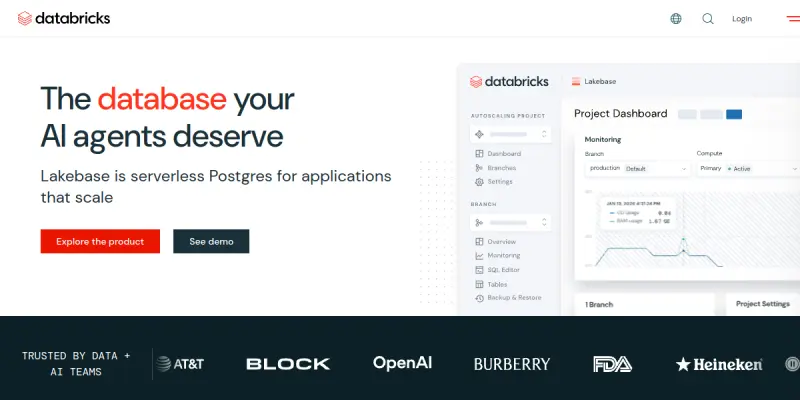
Screenshots & Interface
Pros
- ✓ Unified platform reduces the need to switch between separate data engineering, analytics, and ML tools.
- ✓ Delta Lake provides reliable, ACID-compliant data lake storage for enterprise workloads.
- ✓ MLflow integration streamlines model tracking, versioning, and deployment.
- ✓ Auto-scaling clusters help manage compute costs by adjusting resources based on demand.
- ✓ Unity Catalog offers comprehensive governance and data lineage across the entire data estate.
Cons
- × Advanced features and cluster optimizations require skilled personnel, increasing operational complexity.
- × Costs can escalate quickly without careful monitoring of compute usage and storage.
- × Tight cloud dependency limits deployment flexibility for on-premises or hybrid setups.
- × The extensive feature set can overwhelm new users, leading to a steep learning curve.
How to Use Databricks AI in Your Workflow
Integrating Databricks AI into your professional toolkit enhances efficiency by automating manual steps. By configuring it to suit your specific project requirements, you can optimize output quality and reduce project cycle times. Standard workflows involve testing the tool on simple tasks before scaling its use to complex operations.
Frequently Asked Questions
What is Databricks AI used for?
Databricks offers a unified data intelligence platform for data engineering, analytics, and AI. It helps data teams collaborate on ETL, data warehousing, and machine learning using a data-centric approach. The platform stands out with its integrated governance and scalability for enterprise workloads.
What is the pricing model for Databricks AI?
Databricks AI uses a Freemium pricing model.
What are the main advantages of Databricks AI?
The key benefits of Databricks AI include: Unified platform reduces the need to switch between separate data engineering, analytics, and ML tools., Delta Lake provides reliable, ACID-compliant data lake storage for enterprise workloads., MLflow integration streamlines model tracking, versioning, and deployment., Auto-scaling clusters help manage compute costs by adjusting resources based on demand., Unity Catalog offers comprehensive governance and data lineage across the entire data estate..
What are the main limitations of Databricks AI?
Some limitations or cons of Databricks AI are: Advanced features and cluster optimizations require skilled personnel, increasing operational complexity., Costs can escalate quickly without careful monitoring of compute usage and storage., Tight cloud dependency limits deployment flexibility for on-premises or hybrid setups., The extensive feature set can overwhelm new users, leading to a steep learning curve..
Alternative AI Tools

Domo AI
Domo AI is an enterprise platform for building, deploying, and governing AI agents using your business data. It features visual analytics and natural language query capabilities.
TradeBB
TradeBB is a All-in-One Trading Journal and analysis tool that helps traders seamlessly record each transaction, deeply analyze trading data, and review trading processes.

Trifacta
Trifacta (now Alteryx Designer Cloud) is a visual data preparation platform that cleans and transforms datasets for analysis. It targets data analysts who need to prepare data without writing code. The tool uses machine learning to suggest data transformations automatically.
Rating Details
Based on 0 ratings
Quick Comparisons
Related Tools
More AI tools from the same workflow, industry, or category.
NewsData.io
NewsData.io delivers structured global news data via a real-time API. It supports 100,000+ sources across 200+ countries with filtering by keyword and date. This tool helps developers integrate news intelligence into applications and dashboards.
Wisegrid
Wisegrid is a work management platform that combines spreadsheet functionality with application features like dashboards and automations. It allows teams to manage projects and data using rows and columns, including AI-driven formulas, with a flat pricing model.
TradeBB
TradeBB is a All-in-One Trading Journal and analysis tool that helps traders seamlessly record each transaction, deeply analyze trading data, and review trading processes.
Pinecone
Pinecone is a fully managed vector database for AI applications, enabling fast similarity search and retrieval-augmented generation (RAG). It targets developers and data scientists who need scalable vector storage without managing infrastructure.
Reviews
No reviews submitted yet. Be the first to share your experience.
Write a Review
Share Your Experience
Join the community to write reviews, submit ratings, and bookmark your favorite AI tools.