

Zoho Analytics AI
Use Zoho Analytics AI as the anchor for a real shortlist.
Instead of returning to a broad directory, jump straight into the strongest adjacent matchups for pricing, workflow fit, and differentiation.
Overview
Overview
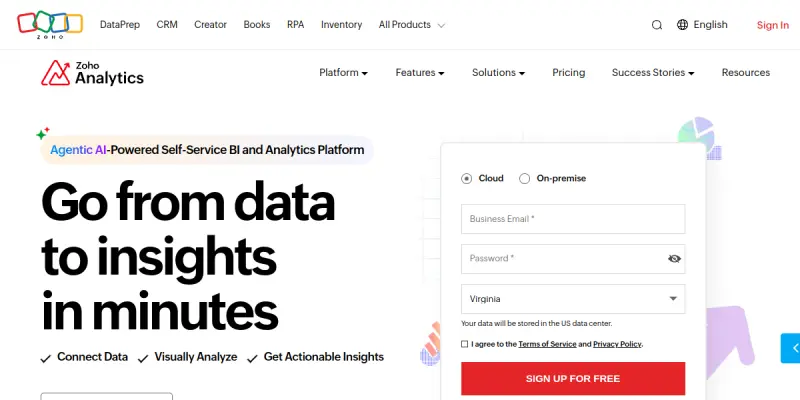
Zoho Analytics AI is an AI-powered business intelligence and data analytics platform that enables users to connect, prepare, and visualize data from over 500 applications and databases. It provides a unified environment for creating interactive dashboards, generating reports, and sharing insights across an organization. The platform’s AI capabilities, including Ask Zia (a natural-language query assistant) and automated insight generation, help users uncover trends, anomalies, and correlations without requiring deep technical expertise.
Key Features
- Ask Zia (AI Assistant): Ask natural-language questions to get instant chart, report, or KPI summaries from your data.
- Automated Insight Generation: The AI engine automatically surfaces trends, outliers, forecasts, and correlations in your datasets.
- 500+ Pre-built Connectors: Connect directly to cloud and on-premise apps, databases, and file sources like Google Analytics, Salesforce, SQL, and Excel.
- Drag-and-Drop Dashboard Builder: Create custom dashboards, reports, and visualizations with an intuitive, code-free interface.
- Interactive Visualizations: Use charts, pivot tables, summary views, and geo-maps to explore and present data.
- Data Preparation & Blending: Clean, merge, and transform data from multiple sources before analysis.
- Scheduled Reports & Alerts: Automate report delivery and set threshold alerts to monitor key metrics.
- Embedded Analytics: Embed dashboards and reports directly into your own applications or portals.
- Role-Based Access Control: Manage user permissions and data access with granular security settings.
- Mobile App: Access dashboards and reports on iOS and Android devices with full interactivity.
Use Cases
Sales & Revenue Analysis
Sales teams can connect CRM data (e.g., Salesforce, Zoho CRM) to track pipeline health, forecast revenue, and identify top-performing products or regions. Automated insights highlight changes in sales velocity and customer churn risk.
Marketing Campaign Performance
Marketers can aggregate data from Google Analytics, social media platforms, and email tools to measure ROI, conversion rates, and campaign attribution. Ask Zia enables natural-language queries like "Which campaign had the highest click-through rate last month?"
Financial Reporting & Budgeting
Finance departments can connect ERP systems and spreadsheets to create profit-and-loss statements, budget variance reports, and cash flow forecasts. Automated alerts notify stakeholders when spending exceeds thresholds.
Operations & Supply Chain Monitoring
Operations managers can blend data from inventory, order, and logistics systems to track stock levels, lead times, and supplier performance. Interactive dashboards provide real-time visibility into operational bottlenecks.
HR & Workforce Analytics
HR teams can link employee data from HRIS systems to analyze turnover rates, headcount trends, training effectiveness, and diversity metrics. Role-based dashboards ensure sensitive data is visible only to authorized users.
Pricing & Plans
Zoho Analytics offers a Freemium tier (lifetime free for up to 2 users, 100,000 rows, and 2 dashboards). Paid plans start at $30/month (billed annually) for the Basic plan (up to 5 users, 500k rows), scaling up to the Enterprise plan with unlimited users, row capacity, and advanced admin controls. A 30-day free trial is available for all paid plans.
Integrations & Compatibility
- Cloud & On-Premise Databases: MySQL, PostgreSQL, SQL Server, Oracle, IBM DB2, etc.
- Business Applications: Salesforce, Zoho CRM, Google Analytics, HubSpot, Mailchimp, QuickBooks, Shopify, etc.
- File Formats: CSV, Excel, JSON, XML, and Google Sheets.
- APIs & ETL Tools: Robust REST API for custom integrations; compatible with Zapier, Integromat, and other automation platforms.
- Platform Support: Web (all major browsers), iOS, and Android mobile apps.
Who Is It For?
Zoho Analytics is suitable for small-to-medium businesses (SMBs) and mid-market companies looking for an affordable, self-service BI solution without heavy IT involvement. It also serves departmental analysts and data-savvy managers who need to quickly derive insights from multiple data sources. Large enterprises may prefer Zoho Analytics for its embedded analytics capabilities and role-based access controls.
Limitations
- Row limits on lower tiers: Basic plans cap rows at 500k, which may be restrictive for high-volume datasets.
- Steep learning curve for advanced features: While basic dashboards are easy, advanced data blending and calculated fields require practice.
- Limited data source connectors compared to enterprise BI tools: Some niche or legacy databases may require custom API work.
- Performance with extremely large datasets: Heavy queries on large datasets can be slow compared to dedicated data warehouse solutions.
Final Verdict
Zoho Analytics AI delivers a compelling self-service analytics experience with strong AI-driven insights and a generous free tier. Its extensive connector library and mobile accessibility make it a practical choice for SMBs and teams needing a budget-friendly BI tool. However, teams with massive data volumes or complex enterprise requirements may need to evaluate its scalability and customization limits.
Tool Facts
Screenshots & Interface
Pros
- ✓ Processes and segments complex datasets rapidly.
- ✓ Visualizes trends and customer patterns automatically via the Ask Zia AI assistant.
- ✓ Offers a generous free tier for life, supporting up to 2 users and 100k rows.
- ✓ Provides 500+ pre-built connectors to apps and databases for easy data integration.
- ✓ Supports embedding dashboards into external applications for client-facing analytics.
Cons
- × Highly sensitive to input data quality (garbage in, garbage out).
- × Advanced reporting features such as data blending and calculated fields require practice to master.
- × Cannot fully replace human domain-expert analysis for nuanced interpretation.
- × Row limits on lower tiers (500k rows on Basic plan) may constrict large organizations.
How to Use Zoho Analytics AI in Your Workflow
Integrating Zoho Analytics AI into your professional toolkit enhances efficiency by automating manual steps. By configuring it to suit your specific project requirements, you can optimize output quality and reduce project cycle times. Standard workflows involve testing the tool on simple tasks before scaling its use to complex operations.
Frequently Asked Questions
What is Zoho Analytics AI used for?
Zoho Analytics AI is a business intelligence platform that connects 500+ apps to create interactive dashboards. It uses AI to surface trends and patterns for data-driven decision-making. The tool is designed for analysts and business users who need self-service analytics.
What is the pricing model for Zoho Analytics AI?
Zoho Analytics AI uses a Freemium pricing model.
What are the main advantages of Zoho Analytics AI?
The key benefits of Zoho Analytics AI include: Processes and segments complex datasets rapidly., Visualizes trends and customer patterns automatically via the Ask Zia AI assistant., Offers a generous free tier for life, supporting up to 2 users and 100k rows., Provides 500+ pre-built connectors to apps and databases for easy data integration., Supports embedding dashboards into external applications for client-facing analytics..
What are the main limitations of Zoho Analytics AI?
Some limitations or cons of Zoho Analytics AI are: Highly sensitive to input data quality (garbage in, garbage out)., Advanced reporting features such as data blending and calculated fields require practice to master., Cannot fully replace human domain-expert analysis for nuanced interpretation., Row limits on lower tiers (500k rows on Basic plan) may constrict large organizations..
Alternative AI Tools

Goalfinder
Goalfinder provides AI-driven audits for pre-launch, post-launch, and market analysis, helping early-stage startups identify growth blockers in under 60 seconds. It targets founders who need a quick, unbiased reality check on product-market fit and distribution challenges.
Datactics AI
Datactics AI is an augmented data quality platform that uses machine learning to automate data cleansing, matching, and enrichment. It helps data teams and analysts improve data accuracy, reduce manual data preparation, and support regulatory compliance. Its key differentiator is the combination of rule-based and AI-driven data quality controls.

Precisely AI
Precisely AI is a SaaS platform that automates data cleaning and segmentation to identify trends. It helps users analyze complex datasets without manual tabulation. The tool offers visual insights for customer behavior.
Rating Details
Based on 0 ratings
Related Tools
More AI tools from the same workflow, industry, or category.
NewsData.io
NewsData.io delivers structured global news data via a real-time API. It supports 100,000+ sources across 200+ countries with filtering by keyword and date. This tool helps developers integrate news intelligence into applications and dashboards.
Wisegrid
Wisegrid is a work management platform that combines spreadsheet functionality with application features like dashboards and automations. It allows teams to manage projects and data using rows and columns, including AI-driven formulas, with a flat pricing model.
TradeBB
TradeBB is a All-in-One Trading Journal and analysis tool that helps traders seamlessly record each transaction, deeply analyze trading data, and review trading processes.
Pinecone
Pinecone is a fully managed vector database for AI applications, enabling fast similarity search and retrieval-augmented generation (RAG). It targets developers and data scientists who need scalable vector storage without managing infrastructure.
Reviews
No reviews submitted yet. Be the first to share your experience.
Write a Review
Share Your Experience
Join the community to write reviews, submit ratings, and bookmark your favorite AI tools.