
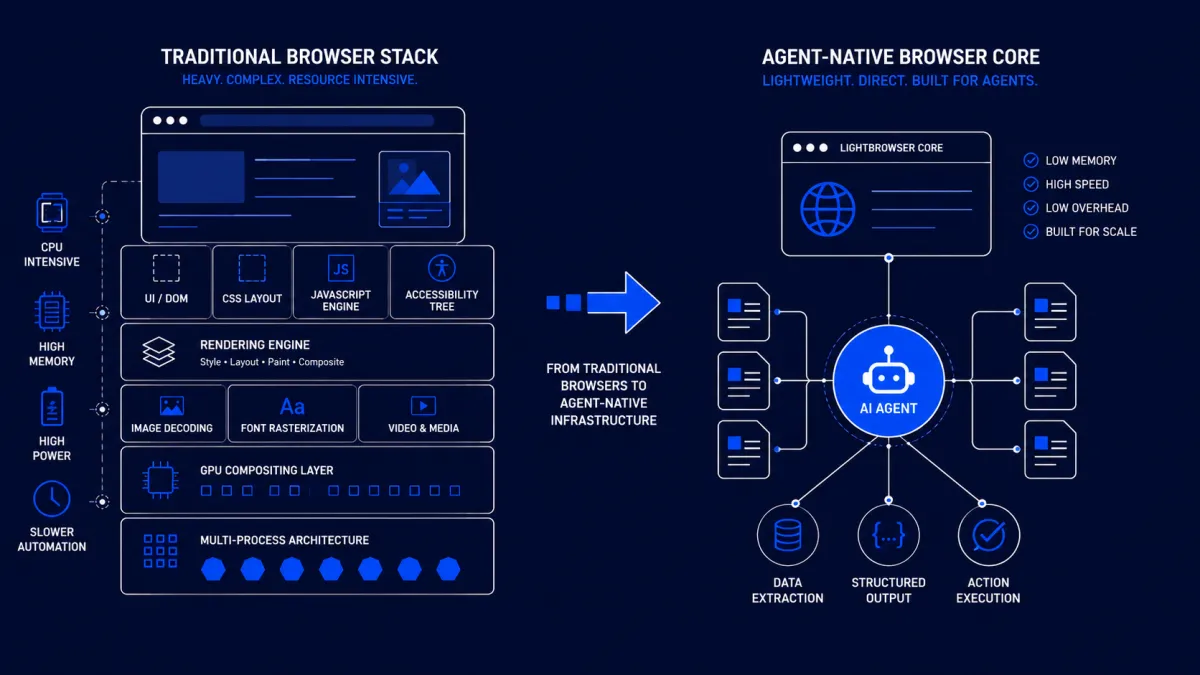
Every AI agent that interacts with the web today carries an invisible tax.
Whether it's an autonomous research assistant, a browser automation workflow, or an enterprise agent completing online tasks, chances are it's running inside Chromium. Even in headless mode, Chrome still loads much of the same architecture designed for humans: rendering engines, graphics pipelines, image decoding, font rasterization, accessibility trees, and UI components that an AI agent never actually sees.
Lightpanda challenges that assumption. Instead of optimizing Chrome for AI workloads, it asks a more fundamental question: What if browsers for AI agents were designed from scratch? If successful, this approach could reduce infrastructure costs, improve scalability, and reshape how web-native AI systems are built.
Chrome Is Optimized for Humans, Not Machines
Chrome is one of the most sophisticated software projects ever created.
Its mission is to render the modern web with pixel-perfect accuracy while supporting billions of users across every operating system and device. To accomplish that, Chromium includes an enormous amount of functionality:
- CSS layout engines
- GPU compositing
- Image decoding
- Font rendering
- Media playback
- Accessibility layers
- Animation pipelines
- Visual rendering
For a human browsing the web, these features are essential.
For an AI agent extracting information from a webpage or submitting an online form, they're mostly unnecessary.
The agent doesn't care whether a button has rounded corners or whether a page scrolls smoothly. It only needs access to the underlying document structure and JavaScript execution.
Yet every browser-based AI workflow pays the computational cost of features it never uses.
This architectural mismatch has become increasingly expensive as organizations move from running a handful of browser sessions to deploying thousands of autonomous agents simultaneously.
The Browser Has Become an Infrastructure Bottleneck
Most conversations around AI infrastructure focus on language models.
Teams debate GPT-5.5 versus Claude, optimize prompt engineering, or compare inference costs between providers.
Meanwhile, another major cost sits quietly underneath the stack.
Each browser instance consumes memory, CPU resources, and startup time before an agent performs its first action.
For small automation scripts, this overhead is negligible.
For enterprise-scale deployments, it becomes a significant infrastructure concern.
Running hundreds or thousands of concurrent browser sessions means:
- Higher memory consumption
- Increased cloud infrastructure costs
- Slower startup times
- Lower agent density per server
- Higher operational expenses
Improving browser efficiency doesn't make the language model smarter—but it can make the entire system dramatically more efficient.
As AI agents become long-running services rather than experimental prototypes, infrastructure optimization becomes just as important as model optimization.
Lightpanda Starts With a Different Assumption
Most browser automation frameworks build on Chromium because it's mature, widely compatible, and well understood.
Lightpanda takes the opposite approach.
Rather than inheriting decades of browser engineering intended for visual browsing, it focuses on the capabilities autonomous agents actually require.
That includes:
- HTML parsing
- JavaScript execution
- DOM interaction
- Network requests
- Cookie and session management
- Browser automation APIs
Everything else becomes optional.
According to Lightpanda's published benchmarks, this architectural simplification allows browser sessions to run up to nine times faster while using approximately sixteen times less memory than Chromium-based alternatives.
Those figures should be independently validated across different workloads, but they illustrate the project's core philosophy.
The real innovation isn't the benchmark numbers.
It's the idea that AI agents deserve infrastructure designed specifically for their needs instead of adapting tools built for humans.
Why This Matters Beyond Performance
Performance improvements are only one part of the story.
A lighter browser architecture changes the economics of AI agents.
Consider an enterprise running thousands of browser sessions for:
- Customer support automation
- Sales prospecting
- Market research
- Competitive monitoring
- Data extraction
- Quality assurance
- Internal workflow automation
Reducing the memory footprint of each session allows more agents to run on the same infrastructure.
Lower startup times also improve responsiveness, enabling agents to scale dynamically instead of maintaining expensive idle browser instances.
These gains compound over time.
Instead of thinking in terms of milliseconds saved, organizations begin thinking in terms of lower infrastructure costs, higher concurrency, and improved operational efficiency.
For AI companies operating at scale, those differences directly affect profitability.
The Rise of Agent-Native Infrastructure
Lightpanda reflects a broader trend within AI engineering.
Every layer of the software stack is being redesigned for autonomous systems.
Traditional infrastructure is increasingly giving way to components built specifically for AI workloads.
Examples include:
| Traditional Infrastructure | AI-Native Alternative |
|---|---|
| REST APIs | Model Context Protocol (MCP) |
| Manual QA | Continuous AI evaluation |
| Traditional monitoring | AI observability platforms |
| SQL search | Vector databases |
| Desktop browsers | Lightweight agent browsers |
The pattern is consistent.
Rather than adapting existing software, engineers are rebuilding core infrastructure around the unique characteristics of AI systems.
Browser engines are simply the latest component undergoing this transition.
Chrome Isn't Going Away
None of this means Chromium is obsolete.
Chrome remains the most mature and compatible browser engine available today.
Many enterprise applications depend on advanced rendering features, complex JavaScript behavior, multimedia support, and near-perfect compatibility with modern websites.
For those workloads, Chromium will continue to be the safest option.
Instead, the market is likely to split into two categories.
Full-featured browsers will prioritize compatibility and complete web standards support.
Agent-native browsers will prioritize efficiency, scalability, and automation performance.
The choice becomes an engineering decision based on workload requirements rather than a universal default.
What AI Engineers Should Evaluate
As browser infrastructure evolves, choosing a browser becomes part of designing an AI system.
Instead of evaluating only language models, engineering teams should also compare browser architectures using criteria such as:
- Memory footprint
- Startup latency
- JavaScript compatibility
- Automation APIs
- Reliability
- Resource consumption
- Scalability
- Operational cost
These characteristics directly influence the total cost of running browser agents in production.
For many organizations, optimizing browser infrastructure may deliver greater efficiency gains than switching to a slightly better language model.
Browser Infrastructure Could Become the Next Competitive Advantage
The first generation of AI products focused on larger models.
The second generation focused on better orchestration.
The next generation may focus on infrastructure efficiency.
As autonomous agents become a standard component of enterprise software, every unnecessary layer in the stack becomes an opportunity for optimization.
Lightpanda represents one of the earliest attempts to rethink browser architecture through that lens.
Whether it ultimately becomes the dominant solution is less important than the broader trend it represents.
The future of browser automation may not belong to the browser that renders webpages best—it may belong to the browser that understands AI agents best.
For engineers building large-scale web automation systems, that's a shift worth paying attention to.
Key Takeaways
- Chromium remains the default browser engine for most AI agents but carries significant rendering overhead.
- AI agents rarely require the full visual rendering pipeline built for human users.
- Lightpanda proposes an agent-first browser architecture focused on automation rather than presentation.
- Lower memory usage and faster startup times can significantly reduce infrastructure costs at scale.
- Browser infrastructure is emerging as an important optimization layer alongside models, orchestration, and evaluation.
- The future of AI infrastructure will likely include specialized components designed specifically for autonomous systems rather than repurposed human-centric software.